Apple is giving Screen Time and parental controls a long overdue upgrade in iOS 27


Apple briefly listed iPadOS 27 beta 1 restore images for two older iPad Pro models before removing them from its developer downloads page. Here are the details.
Expand Expanding Close

OmniGroup’s legendary outlining tool just got even more useful and accessible to users around the world, with expanded localization support across Mac, iPad, iPhone, and Apple Vision Pro. Here are the details.
Expand Expanding Close

I spent the last month trying out the Comulytic Note Pro, a credit card-sized AI recording transcriber, summarizer, and all-around assistant. Here are my takeaways.
Expand Expanding Close

When you’re using Apple hardware, you just want things to work – to feel native and seamless – and that’s exactly what MSI had in mind with the PRO MAX 271UPXW12G monitor. Boasting a pixel-dense 4K resolution on a 27-in screen with a QD-OLED display, this MSI monitor is designed for easy macOS integration and offers a wide variety of thoughtful features. It’s a productivity-focused monitor that might actually be good for gaming as well. Be sure to check out the video below for more details.
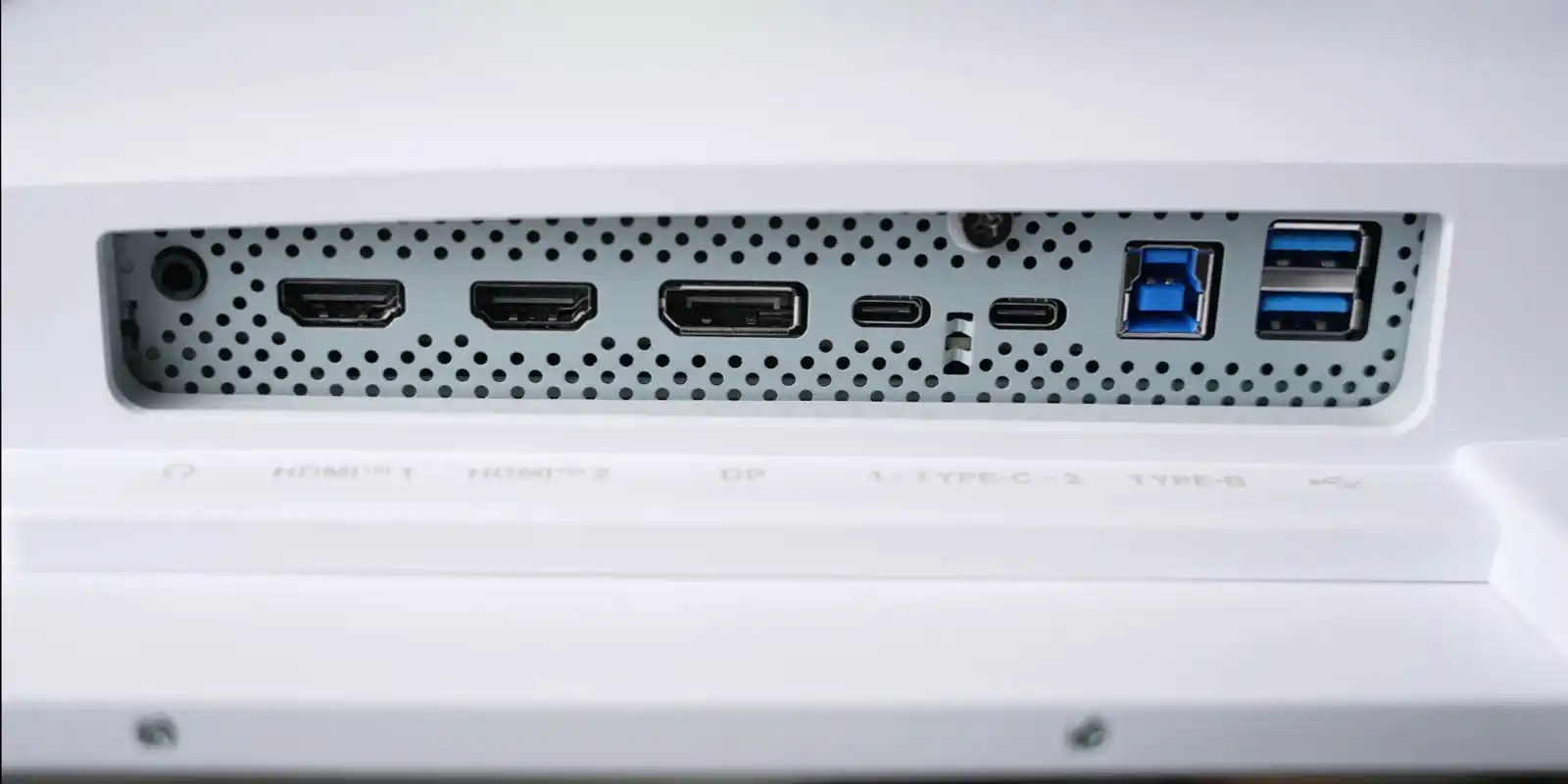
If you’re going to create a display designed to be used with MacBooks, it’s going to need to be stylish, and the MSI PRO MAX delivers. The back of the panel may be larger than other modern monitors, but that also houses the power brick, meaning there is only a simple IEC cable to plug in.
It has a thin bezel, and the light colorway has an air of modern elegance. There’s nothing extravagant or gaudy; everything on the PRO MAX fits right in with Apple aesthetics.
On the back, there is a host of connection ports, including dual HDMI, dual USB Type-C, and DisplayPort. The USB-C connection can provide up to 98W of power for a MacBook Pro, while a 2nd USB-C connection allows for 15W to charge an iPhone or iPad.
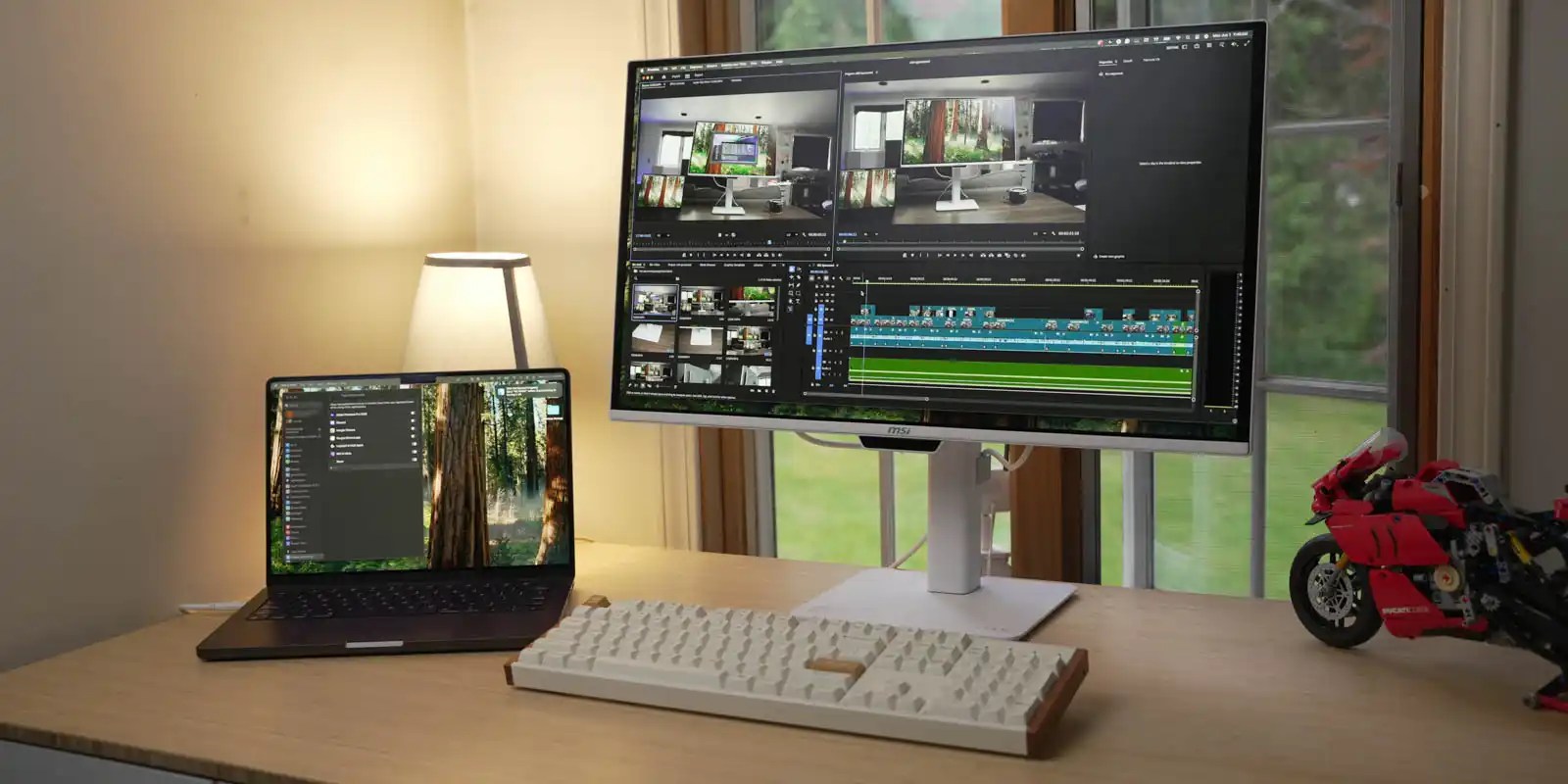
A simple stand makes the monitor sleek but also allows for plenty of adjustability. It can easily tilt, turn, twist, and raise to get in the right position. It will raise just enough to fit a 14-in MacBook Pro in front and under the display.
Adjusting the monitor can be accomplished with a single hand. Everything is well balanced – even moving the screen up or down. Whether it’s a main display or a vertical-oriented monitor on the side, the MSI PRO MAX has plenty of adjustability.
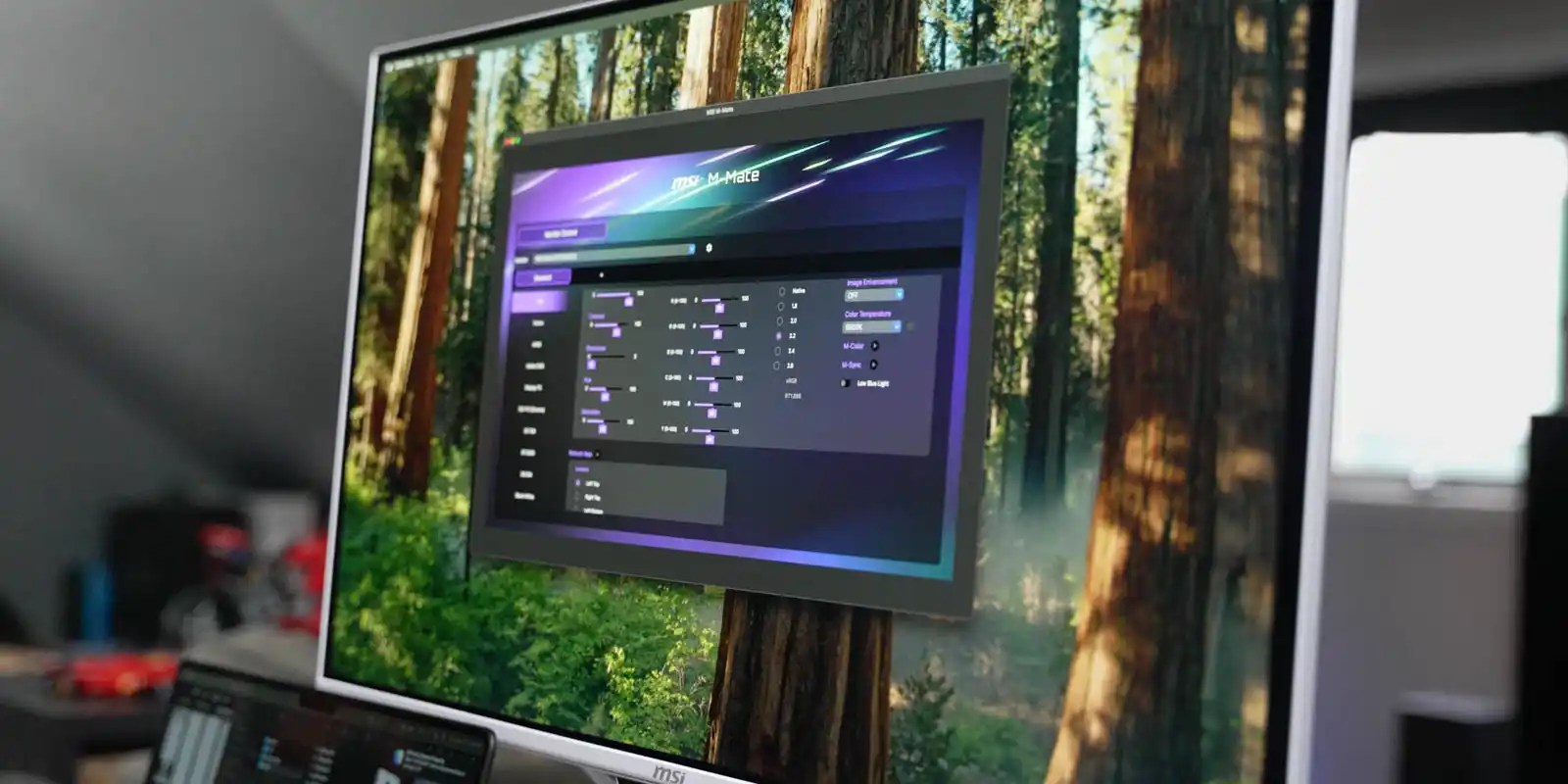
Of course, there is a standard menu control, but MSI also has an app for macOS that allows for easy customization of the monitor without fumbling with OSD buttons. If you’ve ever navigated a monitor menu without really knowing which button goes where, you’ll appreciate the ability to tweak settings with your mouse from an app, rather than maneuvering through an on-screen menu.
Two notable options in the MSI app (or OSD) are M-Color and M-Sync.
M-Color will sync the monitor’s color profile to match a connected MacBook’s display for consistent color. Creatives who are concerned about color accuracy will find this a great benefit to their workflow.
Additionally, M-Sync enables easy control of brightness and volume from your MacBook’s controls – another way the MSI PRO MAX makes Mac workflow feel seamless.
Another way MSI had creatives in mind with the PRO MAX by including composition guides built into the monitor’s OSD with options for the rule of thirds, golden ratio, diagonal lines, and more.
Despite being built specifically for Mac workflows, the variety of inputs is a perfect match for the 3-way KVM, which enables the use of the same keyboard and mouse across a Mac, iPad, and PC – great for multiplatform setups.
Besides easy-to-use controls and a clean design, the panel of the PRO MAX is also feature-packed for creatives.
A 4th Gen QD-OLED panel is more efficient than previous generations and delivers crisp 4K resolution in a 27-in package. That gives it a pixel density of 166 ppi – great for Mac-style text rendering.
It’s also treated with protective and anti-glare coatings that make it a perfect fit for bright working conditions. Even when I had my video lighting aimed at the PRO MAX, the monitor was usable – something that is nearly impossible on glossy screens in bright environments.
I was impressed with the viewing angles of this panel, as well. While moving around to take pictures and video of the monitor, the monitor looked great from every angle.
One of my complaints with productivity-focused monitors is that they often don’t have good high enough refresh rates for doubling as a suitable gaming monitor – that’s not the case with the MSI PRO MAX. With 4K resolution and up to 120Hz, it’s a great option for getting work done, but it will also make your games smooth.
So if you’re looking for a do-it-all monitor with the design and Mac-focused features that will enhance your Mac workstation, check out the MSI PRO MAX 271UPXW12G.


Listen to a recap of the top stories of the day from 9to5Mac. 9to5Mac Daily is available on iTunes and Apple’s Podcasts app, Stitcher, TuneIn, Google Play, or through our dedicated RSS feed for Overcast and other podcast players.
Sponsored by CardPointers: The best way to maximize your credit card rewards. 9to5Mac Daily listeners can exclusively save 30% and get a $200 Savings Card.

Apple and Jon Prosser’s attorney have asked the court to set aside the default entered against him last October, which may give him another chance to formally respond to the complaint. Here are the details.
Expand Expanding Close

During Monday’s WWDC keynote, Apple announced iOS 27 and iPadOS 27, and as usual, both updates include new wallpapers to mark the transition to the next major software cycle. You can download them below.
Expand Expanding Close

AirPods get new features just like every other Apple device, including big additions like Live Translation and Hearing Aid. And in iOS 27, the new Siri AI is set to make AirPods better than ever.
Expand Expanding Close

Earlier this year, Apple updated its iOS and iPadOS usage figures, showing adoption just a smidge behind iOS 18 and iOS 17 in the months after their releases. Here are the updated numbers.
Expand Expanding Close

Meta has announced that, starting November 30, 2026, WhatsApp will raise its minimum requirements for running on iPhones and iPads. Here are the details.
Expand Expanding Close

Starting with Xcode 27, developers will be able to natively use Google Gemini, in addition to Claude Code and OpenAI Codex, to plan, write, and review code. Here are the details.
Expand Expanding Close

iPhone 18 Pro is coming this fall, and three new features could be among the top upgrade motivators for Apple’s latest flagship model.
Expand Expanding Close

iOS 27 brings exciting new features to Messages, Apple Notes, Wallet, and more. But FaceTime is getting one of the biggest upgrades thanks to a powerful new Dual Camera feature for iPhone 17 and newer.
Expand Expanding Close

Since iOS 5 in 2011, the iPhone and iPad have included Notification Center, a central place to find alerts from various apps in chronological order. Starting with iOS 27, Apple is making a major change to how users open Notification Center on iPhone and iPad.
Expand Expanding Close

iOS 27 adds new features for CarPlay, the Messages app, and a lot more, including a handful of Apple Notes upgrades. Here’s what’s new for Apple Notes in iOS 27.
Expand Expanding Close

Pocket Casts for iOS has picked up a fresh visual overhaul this week. The latest version brings Apple’s Liquid Glass design language to one of the most popular podcast apps on the platform.
Expand Expanding Close

Today’s 9to5Toys Lunch Break is headlined by AirPods Pro 3 dropping even lower to the best price ever at $179 shipped (nearly 30% off) and all five AirPods Max 2 colors hitting the Amazon all-time low. We also have up to $300 off M5 Pro MacBook Pro models joined by Apple’s most affordable 15-inch M5 MacBook Air at $200 off, the most popular Apple Watch Series 11 models up to $130 off, and the upgraded 240W braided Beats USB-C cable down as low as $19. Head below for a closer look.
Expand Expanding Close

Apple is making a major push around child safety and parental controls with iOS 27, including a completely redesigned Screen Time experience, new limits for websites, expanded communication controls, and more flexible tools for managing when kids can use apps. The changes are part of Apple’s broader OS 27 updates across iPhone, iPad, Mac, Apple Watch, and Vision Pro.
Expand Expanding Close

Apple’s HomePod products were largely absent from the company’s WWDC announcements this week, but there are two improvements coming in iOS 27—with more set to be unveiled this fall.
Expand Expanding Close

iOS 27 adds new features across many system apps, like Wallet, Calendar, Music, and Maps. Here’s what’s new for the Messages app in iOS 27.
Expand Expanding Close

While the Apple Watch is gaining a handful of helpful features with watchOS 27, it’s also losing one that some users might miss.
Expand Expanding Close

AT&T has announced a new ‘Unlimited Day Pass’ plan launching today that allows iPad users to activate cellular coverage on a convenient, per-need basis. Here are the details.
Expand Expanding Close

One controversy to mar the launch of Siri AI was the news that it will not as yet be available within EU countries.
The EU told Apple that it would have to allow third-party AI providers to offer similar functionality on iPhones, and the company has responded by withholding an EU launch for now. We’re now learning that Meta’s WhatsApp is being faced with a similar demand …
Expand Expanding Close

While at Apple Park this week for WWDC, I had the opportunity to sit down with two Swift Student Challenge Distinguished Winners to talk about their apps and what it’s like giving a surprise demo to Tim Cook and John Ternus.
Expand Expanding Close