<br />
<b>Deprecated</b>:  The each() function is deprecated. This message will be suppressed on further calls in <b>/home/zhenxiangba/zhenxiangba.com/public_html/phproxy-improved-master/index.php</b> on line <b>456</b><br />
<?xml version="1.0" encoding="utf-8"?>
<rss version="2.0" xmlns:dc="http://purl.org/dc/elements/1.1/" xmlns:content="http://purl.org/rss/1.0/modules/content/">
    <channel>
        <title>Toggl Engineering Blog</title>
        <link>https://engineering.toggl.com/blog/</link>
        <description>Toggl Engineering Blog</description>
        <lastBuildDate>Tue, 15 Oct 2024 00:00:00 GMT</lastBuildDate>
        <docs>https://validator.w3.org/feed/docs/rss2.html</docs>
        <generator>https://github.com/jpmonette/feed</generator>
        <language>en</language>
        <item>
            <title><![CDATA[A journey into PostgreSQL logical replication - the next chapter]]></title>
            <link>https://engineering.toggl.com/blog/journey-into-postgresql-logical-replication-the-next-chapter/</link>
            <guid>https://engineering.toggl.com/blog/journey-into-postgresql-logical-replication-the-next-chapter/</guid>
            <pubDate>Tue, 15 Oct 2024 00:00:00 GMT</pubDate>
            <description><![CDATA[Last year, we embarked on a journey to leverage PostgreSQL logical replication to build a data change CDC pipeline fundamental to help us transform our transactional data in analytical data models tuned to serve specific analytic use-cases.]]></description>
            <content:encoded><![CDATA[<p>Last year, we embarked on a <a href="https://engineering.toggl.com/blog/journey-into-postgresql-logical-replication" target="_blank" rel="noopener noreferrer">journey to leverage PostgreSQL logical replication</a> to build a data change CDC pipeline fundamental to help us transform our transactional data in analytical data models tuned to serve specific analytic use-cases.</p>
<p>As the developed system matured we found new challenges in our push toward an event-driven architecture and OLAP powered features. We want to talk about these challenges, specifically the ones that we overcome by using PostgreSQL to - not only serve the OLAP data - but also to do the required transformations of the sourced data, in near real-time.</p>
<h2 class="anchor anchorWithStickyNavbar_LWe7" id="the-next-chapter">The next chapter<a href="https://engineering.toggl.com/blog/journey-into-postgresql-logical-replication-the-next-chapter/#the-next-chapter" class="hash-link" aria-label="Direct link to The next chapter" title="Direct link to The next chapter">​</a></h2>
<p>After we sorted our troubles managing PostgreSQL logical replication slot consumption state, our CDC of postgres events started to work reliably. We even used it a few times to debug data issues in situations where the transactional data was overwritten.
And we found no data inconsistency since, and it was time to focus on what came next.</p>
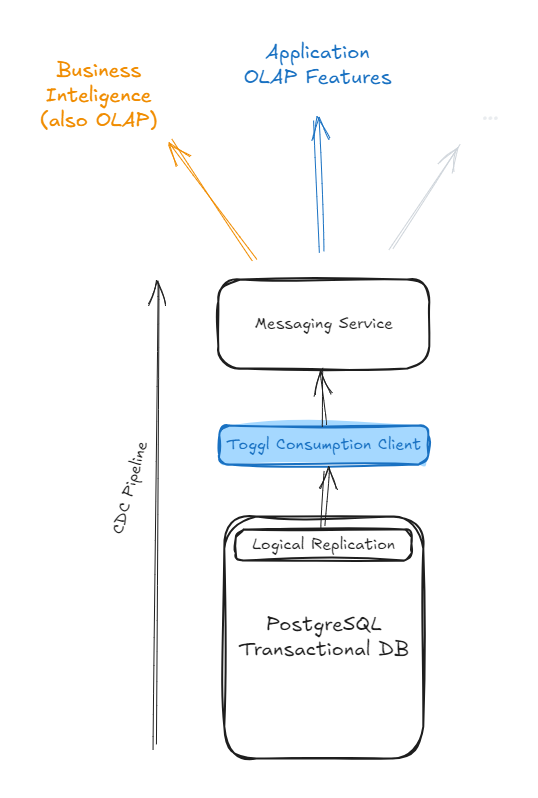
<p>Today almost all our transactional databases have our logical replication client attached to them and are streaming data to our data-event layer, our CDC.
The data sourced from our transactional databases is then used for the most varied ends. This data source segregation also proved useful to ensure system reliability.</p>
<p><img decoding="async" loading="lazy" alt="Alt text" src="https://engineering.toggl.com/assets/images/olap_applications-52cef8dc901d400aa130944db10b46fc.png" width="538" height="798" class="img_ev3q"></p>
<p>And we started to develop analytic features on top of it. These go from generalist data aggregations - where we sum up time - to more complex reporting, evolving heavier data transformations. The ability to spin off new databases - OLAP or not - and keep them up-to-date with transactional data brought speed and independence to teams across our engineering department.</p>
<p>We also have been extending its applications for other purposes such as decreasing the lag of business intelligence tooling, for instance.</p>
<h2 class="anchor anchorWithStickyNavbar_LWe7" id="data-pipelines">Data pipelines<a href="https://engineering.toggl.com/blog/journey-into-postgresql-logical-replication-the-next-chapter/#data-pipelines" class="hash-link" aria-label="Direct link to Data pipelines" title="Direct link to Data pipelines">​</a></h2>
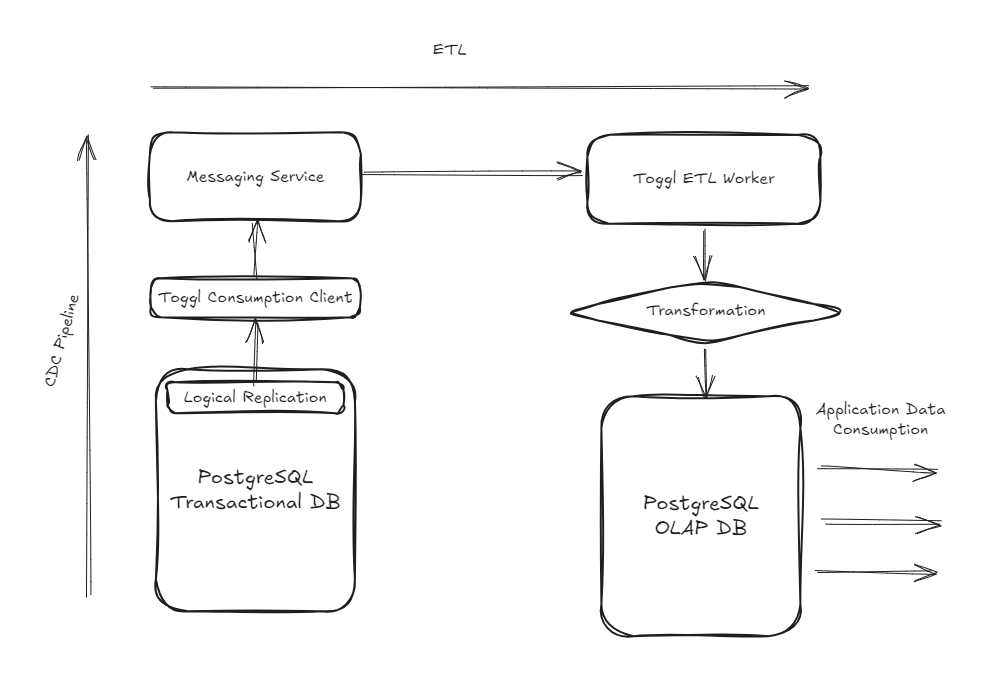
<p>In practice, we create subscriptions in our messaging service behind the CDC pipeline, and with each new subscription, the service attached to it can keep the respective database in sync with our transactional databases, creating independent ETL pipelines.
This allows us to advance the development of non-core parts of the system independently. But, of course, also brings challenges when things on our transactional database change.</p>
<p>When we started to develop our transformations, we wanted to move data from our monolith transaction database, but in parallel to that other efforts have been made to decouple domains from our main service. Such as subscriptions or <a href="https://engineering.toggl.com/blog/delivering-toggl-shared-authentication" target="_blank" rel="noopener noreferrer">authentication</a>. And… a new authorization layer.</p>
<p><img decoding="async" loading="lazy" alt="Alt text" src="https://engineering.toggl.com/assets/images/etl-pipeline-0c032a76d2ab2dcfeb634eb5d1731c33.png" width="986" height="676" class="img_ev3q"></p>
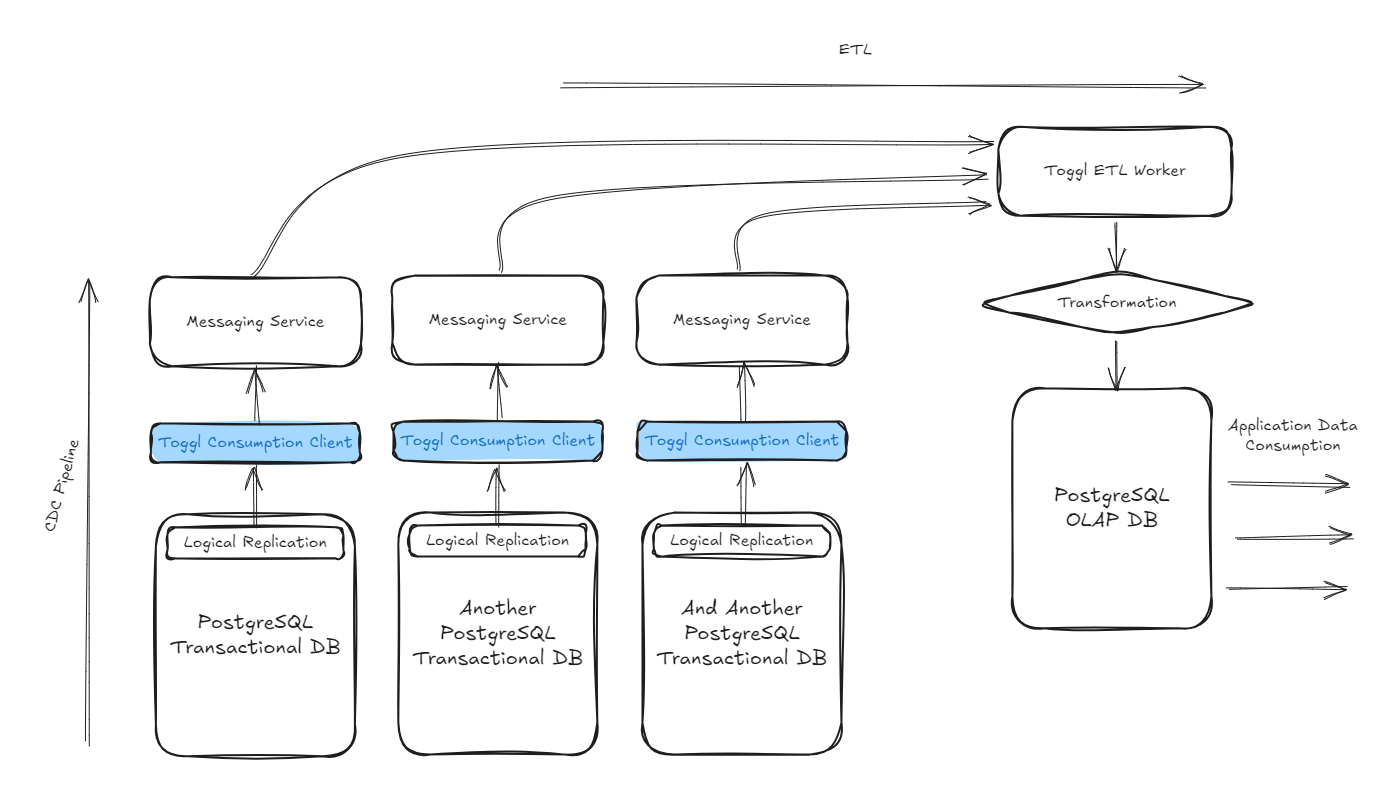
<p>As a result, some new projects needed to tap into data sourced from different transactional databases. From different sources of truth. That drove the need to source data from the different databases into our CDC and resulting ETL pipelines. All data ends up traveling in the same data backbone and can be accessed, and managed by mostly reusing the same go package.</p>
<p><img decoding="async" loading="lazy" alt="Alt text" src="https://engineering.toggl.com/assets/images/pg-worker-eaf8976a45dde9ed763b1d720bf13a48.png" width="1398" height="796" class="img_ev3q"></p>
<p>PostgreSQL logical replication was just the very beginning of the journey, each blue box represents a different deployment of our replication consumption client, listening to a different replication stream, from a different database, and making that data generally available in the CDC pipeline.</p>
<h2 class="anchor anchorWithStickyNavbar_LWe7" id="authorization-system">Authorization system<a href="https://engineering.toggl.com/blog/journey-into-postgresql-logical-replication-the-next-chapter/#authorization-system" class="hash-link" aria-label="Direct link to Authorization system" title="Direct link to Authorization system">​</a></h2>
<p>Our new authorization layer is a project using the CDC. That stands out unexpectedly but has more to it.</p>
<p>Toggl Track had a limited and hard-coded system of roles. It's more than that, but we can sum it up to whether you are an admin or not. Replacing the entire authorization layer was a major project, as most of these rules are enforced at the database layer. On top of that, we have been decoupling domains from our main service, which means that data to assess authorization rules was now coming from different sources of truth, such as the old monolithic database where entity settings are stored, our new subscription service, and the new authorization database where we were planning to store roles, permissions and their relations to users.</p>
<p>However, in addition to providing more role flexibility, we set out to deal with performance bottlenecks while resolving authorization rules for large organizations with tens of thousands of projects and users. Authorization alone was taking a considerable amount of response time for reporting features, for instance.</p>
<p>The solution that we came up with was computing a data object with all the needed information to solve authorization. But, as we didn't want to increase sign-in time, we needed to generate that object pre-session. While looking for ways to achieve this, our newly developed CDC pipeline couldn't have come at a better time.</p>
<p>This means that while projects are added to a workspace, the user sessions belonging to that workspace are being precomputed on our authorization OLAP database through the ETL process that is sourcing data available on the CDC from the different transactional databases.</p>
<p>Of course, you don't want to wait forever for your newly created project to be usable! These sessions have to be updated fast, near real-time.
Doing these transformations fast, over a large and constant stream of data highlighted some... light DB tips.</p>
<h2 class="anchor anchorWithStickyNavbar_LWe7" id="tips--tricks">Tips &amp; Tricks<a href="https://engineering.toggl.com/blog/journey-into-postgresql-logical-replication-the-next-chapter/#tips--tricks" class="hash-link" aria-label="Direct link to Tips &amp; Tricks" title="Direct link to Tips &amp; Tricks">​</a></h2>
<h3 class="anchor anchorWithStickyNavbar_LWe7" id="handling-duplication">Handling duplication<a href="https://engineering.toggl.com/blog/journey-into-postgresql-logical-replication-the-next-chapter/#handling-duplication" class="hash-link" aria-label="Direct link to Handling duplication" title="Direct link to Handling duplication">​</a></h3>
<p>While properly managing the state of our logical replication slot fully prevents data loss, there is still the possibility of data duplication, on plug-off events, for instance.</p>
<p>We embraced the duplication possibilities from the get-go, which turned out to be an advantage. Our CDC carries the LSN from the logical replication event that generated a given data event, and we use it as an identifier for simpler data aggregations, while for more complex ones we make use of updated timestamps to filter out unnecessary data changes, which prevents duplicated operations.</p>
<p>The <code>updated_at</code> is required in all our transactional tables, and its update is enforced through triggers.</p>
<p>Overall, the operations on our OLAP transformation end up atomic. Different data events resulting from the same transaction will become atomic in our data stream. And we strive for idempotence, either using the data identifier or the updated timestamps, processing the same event multiple times will need to generate the same result. Ideally processing events out of order should also produce the same result.</p>
<h3 class="anchor anchorWithStickyNavbar_LWe7" id="bulk-first">Bulk first<a href="https://engineering.toggl.com/blog/journey-into-postgresql-logical-replication-the-next-chapter/#bulk-first" class="hash-link" aria-label="Direct link to Bulk first" title="Direct link to Bulk first">​</a></h3>
<p>Large transactions can easily generate thousands of data events. Processing these events individually in OLAP would be challenging. Bulking their ingestion and processing was a key factor in dealing with large volumes of data in near real-time.</p>
<div class="language-sql codeBlockContainer_Ckt0 theme-code-block" style="--prism-color:#bfc7d5;--prism-background-color:#292d3e"><div class="codeBlockContent_QJqH"><pre tabindex="0" class="prism-code language-sql codeBlock_bY9V thin-scrollbar" style="color:#bfc7d5;background-color:#292d3e"><code class="codeBlockLines_e6Vv"><span class="token-line" style="color:#bfc7d5"><span class="token keyword" style="font-style:italic">INSERT</span><span class="token plain"> </span><span class="token keyword" style="font-style:italic">INTO</span><span class="token plain"> transformation </span><span class="token punctuation" style="color:rgb(199, 146, 234)">(</span><span class="token plain"></span><br></span><span class="token-line" style="color:#bfc7d5"><span class="token plain">  user_id</span><span class="token punctuation" style="color:rgb(199, 146, 234)">,</span><span class="token plain"></span><br></span><span class="token-line" style="color:#bfc7d5"><span class="token plain">  total_time</span><span class="token punctuation" style="color:rgb(199, 146, 234)">,</span><span class="token plain"></span><br></span><span class="token-line" style="color:#bfc7d5"><span class="token plain">  updated_at</span><br></span><span class="token-line" style="color:#bfc7d5"><span class="token plain"></span><span class="token punctuation" style="color:rgb(199, 146, 234)">)</span><span class="token plain"></span><br></span><span class="token-line" style="color:#bfc7d5"><span class="token plain"></span><span class="token keyword" style="font-style:italic">SELECT</span><span class="token plain"></span><br></span><span class="token-line" style="color:#bfc7d5"><span class="token plain">  </span><span class="token punctuation" style="color:rgb(199, 146, 234)">(</span><span class="token plain">d</span><span class="token operator" style="color:rgb(137, 221, 255)">-</span><span class="token operator" style="color:rgb(137, 221, 255)">&gt;&gt;</span><span class="token string" style="color:rgb(195, 232, 141)">'user_id'</span><span class="token punctuation" style="color:rgb(199, 146, 234)">)</span><span class="token plain">::</span><span class="token keyword" style="font-style:italic">int</span><span class="token plain"> </span><span class="token keyword" style="font-style:italic">AS</span><span class="token plain"> user_id</span><span class="token punctuation" style="color:rgb(199, 146, 234)">,</span><span class="token plain"></span><br></span><span class="token-line" style="color:#bfc7d5"><span class="token plain">  </span><span class="token punctuation" style="color:rgb(199, 146, 234)">(</span><span class="token plain">d</span><span class="token operator" style="color:rgb(137, 221, 255)">-</span><span class="token operator" style="color:rgb(137, 221, 255)">&gt;&gt;</span><span class="token string" style="color:rgb(195, 232, 141)">'total_time'</span><span class="token punctuation" style="color:rgb(199, 146, 234)">)</span><span class="token plain">::</span><span class="token keyword" style="font-style:italic">int</span><span class="token plain"> </span><span class="token keyword" style="font-style:italic">AS</span><span class="token plain"> total_time</span><span class="token punctuation" style="color:rgb(199, 146, 234)">,</span><span class="token plain"></span><br></span><span class="token-line" style="color:#bfc7d5"><span class="token plain">  </span><span class="token punctuation" style="color:rgb(199, 146, 234)">(</span><span class="token plain">d</span><span class="token operator" style="color:rgb(137, 221, 255)">-</span><span class="token operator" style="color:rgb(137, 221, 255)">&gt;&gt;</span><span class="token string" style="color:rgb(195, 232, 141)">'updated_at'</span><span class="token punctuation" style="color:rgb(199, 146, 234)">)</span><span class="token plain">::</span><span class="token keyword" style="font-style:italic">timestamp</span><span class="token plain"> without </span><span class="token keyword" style="font-style:italic">time</span><span class="token plain"> zone </span><span class="token keyword" style="font-style:italic">AS</span><span class="token plain"> updated_at</span><br></span><span class="token-line" style="color:#bfc7d5"><span class="token plain"></span><span class="token keyword" style="font-style:italic">FROM</span><span class="token plain"> JSON_ARRAY_ELEMENTS</span><span class="token punctuation" style="color:rgb(199, 146, 234)">(</span><span class="token plain">$</span><span class="token number" style="color:rgb(247, 140, 108)">1</span><span class="token plain">::jsonb</span><span class="token punctuation" style="color:rgb(199, 146, 234)">)</span><span class="token plain"> d</span><br></span><span class="token-line" style="color:#bfc7d5"><span class="token plain"></span><span class="token keyword" style="font-style:italic">ON</span><span class="token plain"> CONFLICT </span><span class="token keyword" style="font-style:italic">ON</span><span class="token plain"> </span><span class="token keyword" style="font-style:italic">CONSTRAINT</span><span class="token plain"> transformation_pkey</span><br></span><span class="token-line" style="color:#bfc7d5"><span class="token plain"></span><span class="token keyword" style="font-style:italic">DO</span><span class="token plain"> </span><span class="token keyword" style="font-style:italic">UPDATE</span><span class="token plain"> </span><span class="token keyword" style="font-style:italic">SET</span><span class="token plain"></span><br></span><span class="token-line" style="color:#bfc7d5"><span class="token plain">  total_time </span><span class="token operator" style="color:rgb(137, 221, 255)">=</span><span class="token plain"> excluded</span><span class="token punctuation" style="color:rgb(199, 146, 234)">.</span><span class="token plain">total_time</span><span class="token punctuation" style="color:rgb(199, 146, 234)">,</span><span class="token plain"></span><br></span><span class="token-line" style="color:#bfc7d5"><span class="token plain">  updated_at </span><span class="token operator" style="color:rgb(137, 221, 255)">=</span><span class="token plain"> excluded</span><span class="token punctuation" style="color:rgb(199, 146, 234)">.</span><span class="token plain">updated_at</span><br></span><span class="token-line" style="color:#bfc7d5"><span class="token plain"></span><span class="token keyword" style="font-style:italic">WHERE</span><span class="token plain"></span><br></span><span class="token-line" style="color:#bfc7d5"><span class="token plain">  transformation</span><span class="token punctuation" style="color:rgb(199, 146, 234)">.</span><span class="token plain">updated_at </span><span class="token operator" style="color:rgb(137, 221, 255)">&lt;</span><span class="token plain"></span><br></span><span class="token-line" style="color:#bfc7d5"><span class="token plain">    excluded</span><span class="token punctuation" style="color:rgb(199, 146, 234)">.</span><span class="token plain">updated_at</span><span class="token punctuation" style="color:rgb(199, 146, 234)">;</span><br></span></code></pre></div></div>
<p>Data ingestion will vary from transformation to transformation, but if we were to draw a baseline, it would look like this.
We feed to postgres a single parameter, which is a json array string. We then use json array functions from postgres to turn that data into table records, and we always try to insert them first. Then, we make use of conflict constraints to decide if we should update the existing data or skip it.
The where clause in the query above is an application example of the <code>updated_at</code> fields that we talked about above.</p>
<h3 class="anchor anchorWithStickyNavbar_LWe7" id="dealing-with-low-level-data-models">Dealing with low-level data models<a href="https://engineering.toggl.com/blog/journey-into-postgresql-logical-replication-the-next-chapter/#dealing-with-low-level-data-models" class="hash-link" aria-label="Direct link to Dealing with low-level data models" title="Direct link to Dealing with low-level data models">​</a></h3>
<p>Our data events on the CDC pipeline contain only the information of the affected table row. The data event schema matches the table definition at the time that it was generated.</p>
<p>This low-level data structure is most of the time incomplete for what we need to do. Sometimes we need data from other tables, or relation keys that only exist in the parent entity, this is normal as our source is normalized transactional data.</p>
<p>We found that the optimal way to deal with missing data on individual data events is to keep a small version of the entities, that we need to relate to our OLAP database. It's something like a cache, updated by the ETL process itself. And through triggers, we use these updates to populate our final OLAP model.</p>
<h4 class="anchor anchorWithStickyNavbar_LWe7" id="statement-triggers">Statement triggers<a href="https://engineering.toggl.com/blog/journey-into-postgresql-logical-replication-the-next-chapter/#statement-triggers" class="hash-link" aria-label="Direct link to Statement triggers" title="Direct link to Statement triggers">​</a></h4>
<p>Similarly to defaulting to bulking, we should be aware of what kind of triggers we define. If we define row-level triggers, the transformation query will run once for each row changed by our data update, while if we use statement triggers, we execute it only once.</p>
<p>Of course, this will also imply supporting it in the trigger function.</p>
<div class="language-sql codeBlockContainer_Ckt0 theme-code-block" style="--prism-color:#bfc7d5;--prism-background-color:#292d3e"><div class="codeBlockContent_QJqH"><pre tabindex="0" class="prism-code language-sql codeBlock_bY9V thin-scrollbar" style="color:#bfc7d5;background-color:#292d3e"><code class="codeBlockLines_e6Vv"><span class="token-line" style="color:#bfc7d5"><span class="token keyword" style="font-style:italic">CREATE</span><span class="token plain"> </span><span class="token keyword" style="font-style:italic">TRIGGER</span><span class="token plain"> after_update </span><span class="token keyword" style="font-style:italic">AFTER</span><span class="token plain"> </span><span class="token keyword" style="font-style:italic">UPDATE</span><span class="token plain"> </span><span class="token keyword" style="font-style:italic">ON</span><span class="token plain"> transformation</span><br></span><span class="token-line" style="color:#bfc7d5"><span class="token plain">  REFERENCING NEW </span><span class="token keyword" style="font-style:italic">TABLE</span><span class="token plain"> </span><span class="token keyword" style="font-style:italic">AS</span><span class="token plain"> new_table OLD </span><span class="token keyword" style="font-style:italic">TABLE</span><span class="token plain"> </span><span class="token keyword" style="font-style:italic">AS</span><span class="token plain"> old_table</span><br></span><span class="token-line" style="color:#bfc7d5"><span class="token plain">  </span><span class="token keyword" style="font-style:italic">FOR</span><span class="token plain"> EACH STATEMENT </span><span class="token keyword" style="font-style:italic">EXECUTE</span><span class="token plain"> </span><span class="token keyword" style="font-style:italic">FUNCTION</span><span class="token plain"> olap</span><span class="token punctuation" style="color:rgb(199, 146, 234)">.</span><span class="token plain">update_team_goals</span><span class="token punctuation" style="color:rgb(199, 146, 234)">(</span><span class="token punctuation" style="color:rgb(199, 146, 234)">)</span><span class="token punctuation" style="color:rgb(199, 146, 234)">;</span><span class="token plain"></span><br></span><span class="token-line" style="color:#bfc7d5"><span class="token plain" style="display:inline-block"></span><br></span><span class="token-line" style="color:#bfc7d5"><span class="token plain"></span><span class="token keyword" style="font-style:italic">CREATE</span><span class="token plain"> </span><span class="token operator" style="color:rgb(137, 221, 255)">OR</span><span class="token plain"> </span><span class="token keyword" style="font-style:italic">REPLACE</span><span class="token plain"> </span><span class="token keyword" style="font-style:italic">FUNCTION</span><span class="token plain"> olap</span><span class="token punctuation" style="color:rgb(199, 146, 234)">.</span><span class="token plain">update_team_goals</span><span class="token punctuation" style="color:rgb(199, 146, 234)">(</span><span class="token punctuation" style="color:rgb(199, 146, 234)">)</span><span class="token plain"> </span><span class="token keyword" style="font-style:italic">RETURNS</span><span class="token plain"> </span><span class="token keyword" style="font-style:italic">trigger</span><span class="token plain"> </span><span class="token keyword" style="font-style:italic">LANGUAGE</span><span class="token plain"> plpgsql </span><span class="token keyword" style="font-style:italic">AS</span><span class="token plain"> $$</span><br></span><span class="token-line" style="color:#bfc7d5"><span class="token plain">  </span><span class="token keyword" style="font-style:italic">BEGIN</span><span class="token plain"></span><br></span><span class="token-line" style="color:#bfc7d5"><span class="token plain">    </span><span class="token keyword" style="font-style:italic">WITH</span><span class="token plain"> changes </span><span class="token keyword" style="font-style:italic">AS</span><span class="token plain"> </span><span class="token punctuation" style="color:rgb(199, 146, 234)">(</span><span class="token plain"></span><br></span><span class="token-line" style="color:#bfc7d5"><span class="token plain"> </span><span class="token keyword" style="font-style:italic">SELECT</span><span class="token plain"> t</span><span class="token punctuation" style="color:rgb(199, 146, 234)">.</span><span class="token plain">team_id</span><span class="token punctuation" style="color:rgb(199, 146, 234)">,</span><span class="token plain"> </span><span class="token function" style="color:rgb(130, 170, 255)">SUM</span><span class="token punctuation" style="color:rgb(199, 146, 234)">(</span><span class="token plain">new_table</span><span class="token punctuation" style="color:rgb(199, 146, 234)">.</span><span class="token plain">total_time </span><span class="token operator" style="color:rgb(137, 221, 255)">-</span><span class="token plain"> </span><span class="token keyword" style="font-style:italic">COALESCE</span><span class="token punctuation" style="color:rgb(199, 146, 234)">(</span><span class="token plain">old_table</span><span class="token punctuation" style="color:rgb(199, 146, 234)">.</span><span class="token plain">total_time</span><span class="token punctuation" style="color:rgb(199, 146, 234)">,</span><span class="token plain"> </span><span class="token number" style="color:rgb(247, 140, 108)">0</span><span class="token punctuation" style="color:rgb(199, 146, 234)">)</span><span class="token punctuation" style="color:rgb(199, 146, 234)">)</span><span class="token plain"> </span><span class="token keyword" style="font-style:italic">AS</span><span class="token plain"> total_time</span><br></span><span class="token-line" style="color:#bfc7d5"><span class="token plain"> </span><span class="token keyword" style="font-style:italic">FROM</span><span class="token plain"> relations</span><span class="token punctuation" style="color:rgb(199, 146, 234)">.</span><span class="token plain">user_teams t</span><br></span><span class="token-line" style="color:#bfc7d5"><span class="token plain"> </span><span class="token keyword" style="font-style:italic">JOIN</span><span class="token plain"> new_table </span><span class="token keyword" style="font-style:italic">ON</span><span class="token plain"> t</span><span class="token punctuation" style="color:rgb(199, 146, 234)">.</span><span class="token plain">user_id </span><span class="token operator" style="color:rgb(137, 221, 255)">=</span><span class="token plain"> new_table</span><span class="token punctuation" style="color:rgb(199, 146, 234)">.</span><span class="token plain">user_id</span><br></span><span class="token-line" style="color:#bfc7d5"><span class="token plain"> </span><span class="token keyword" style="font-style:italic">LEFT</span><span class="token plain"> </span><span class="token keyword" style="font-style:italic">JOIN</span><span class="token plain"> old_table </span><span class="token keyword" style="font-style:italic">ON</span><span class="token plain"> new_table</span><span class="token punctuation" style="color:rgb(199, 146, 234)">.</span><span class="token plain">user_id </span><span class="token operator" style="color:rgb(137, 221, 255)">=</span><span class="token plain"> old_table</span><span class="token punctuation" style="color:rgb(199, 146, 234)">.</span><span class="token plain">user_id</span><br></span><span class="token-line" style="color:#bfc7d5"><span class="token plain"> </span><span class="token keyword" style="font-style:italic">GROUP</span><span class="token plain"> </span><span class="token keyword" style="font-style:italic">BY</span><span class="token plain"> t</span><span class="token punctuation" style="color:rgb(199, 146, 234)">.</span><span class="token plain">team_id</span><br></span><span class="token-line" style="color:#bfc7d5"><span class="token plain">    </span><span class="token punctuation" style="color:rgb(199, 146, 234)">)</span><span class="token plain"></span><br></span><span class="token-line" style="color:#bfc7d5"><span class="token plain">    </span><span class="token keyword" style="font-style:italic">UPDATE</span><span class="token plain"> olap</span><span class="token punctuation" style="color:rgb(199, 146, 234)">.</span><span class="token plain">team_goals tg </span><span class="token keyword" style="font-style:italic">SET</span><span class="token plain"> total_time </span><span class="token operator" style="color:rgb(137, 221, 255)">=</span><span class="token plain"> total_time </span><span class="token operator" style="color:rgb(137, 221, 255)">+</span><span class="token plain"> changes</span><span class="token punctuation" style="color:rgb(199, 146, 234)">.</span><span class="token plain">total_time</span><br></span><span class="token-line" style="color:#bfc7d5"><span class="token plain">    </span><span class="token keyword" style="font-style:italic">FROM</span><span class="token plain"> changes </span><span class="token keyword" style="font-style:italic">WHERE</span><span class="token plain"> tg</span><span class="token punctuation" style="color:rgb(199, 146, 234)">.</span><span class="token plain">team_id </span><span class="token operator" style="color:rgb(137, 221, 255)">=</span><span class="token plain"> changes</span><span class="token punctuation" style="color:rgb(199, 146, 234)">.</span><span class="token plain">team_id</span><span class="token punctuation" style="color:rgb(199, 146, 234)">;</span><span class="token plain"></span><br></span><span class="token-line" style="color:#bfc7d5"><span class="token plain" style="display:inline-block"></span><br></span><span class="token-line" style="color:#bfc7d5"><span class="token plain" style="display:inline-block"></span><br></span><span class="token-line" style="color:#bfc7d5"><span class="token plain">    </span><span class="token keyword" style="font-style:italic">RETURN</span><span class="token plain"> </span><span class="token boolean" style="color:rgb(255, 88, 116)">NULL</span><span class="token punctuation" style="color:rgb(199, 146, 234)">;</span><span class="token plain"></span><br></span><span class="token-line" style="color:#bfc7d5"><span class="token plain">  </span><span class="token keyword" style="font-style:italic">END</span><span class="token punctuation" style="color:rgb(199, 146, 234)">;</span><span class="token plain"></span><br></span><span class="token-line" style="color:#bfc7d5"><span class="token plain">$$</span><span class="token punctuation" style="color:rgb(199, 146, 234)">;</span><br></span></code></pre></div></div>
<p>In the code above you can find a practical example of the process. We define a trigger over a <code>transformation</code> table, calling the <code>olap.update_team_goals</code> function, referencing new and old data tables. This call is for <code>EACH STATEMENT</code>.</p>
<p>If we look at the function, these reference tables have only the <code>user_id</code> and <code>total_time</code>, however, as the function name states, we want to update the team goals. As so, we must find out the <code>team_id</code> for the teams to which each user belongs, and that's done in the CTE by cross-checking the new data table with the <code>relations.user_teams</code> existing on our OLAP database and kept up to date by the ETL pipeline.
We join it with the new and old tables - as we want to find the time difference added by the new change - and we use the results to update our final transformation in the update query below.</p>
<h4 class="anchor anchorWithStickyNavbar_LWe7" id="inclusive-indexes">Inclusive Indexes<a href="https://engineering.toggl.com/blog/journey-into-postgresql-logical-replication-the-next-chapter/#inclusive-indexes" class="hash-link" aria-label="Direct link to Inclusive Indexes" title="Direct link to Inclusive Indexes">​</a></h4>
<p>In this way, we end up using smaller versions of the transactional entity on our OLAP database, and because of that many of our table searches are for a limited amount of data. By making use of <strong>inclusive indexes</strong>, we can save a trip to the table, at run time, to retrieve the bit of information that we are looking for because it will be part of the index.</p>
<p>This can cut execution time in half very easily.</p>
<div class="language-sql codeBlockContainer_Ckt0 theme-code-block" style="--prism-color:#bfc7d5;--prism-background-color:#292d3e"><div class="codeBlockContent_QJqH"><pre tabindex="0" class="prism-code language-sql codeBlock_bY9V thin-scrollbar" style="color:#bfc7d5;background-color:#292d3e"><code class="codeBlockLines_e6Vv"><span class="token-line" style="color:#bfc7d5"><span class="token keyword" style="font-style:italic">CREATE</span><span class="token plain"> </span><span class="token keyword" style="font-style:italic">SCHEMA</span><span class="token plain"> relations</span><span class="token punctuation" style="color:rgb(199, 146, 234)">;</span><span class="token plain"></span><br></span><span class="token-line" style="color:#bfc7d5"><span class="token plain"></span><span class="token keyword" style="font-style:italic">CREATE</span><span class="token plain"> </span><span class="token keyword" style="font-style:italic">TABLE</span><span class="token plain"> relations</span><span class="token punctuation" style="color:rgb(199, 146, 234)">.</span><span class="token plain">user_teams </span><span class="token punctuation" style="color:rgb(199, 146, 234)">(</span><span class="token plain"></span><br></span><span class="token-line" style="color:#bfc7d5"><span class="token plain">  user_id </span><span class="token keyword" style="font-style:italic">integer</span><span class="token plain"> </span><span class="token operator" style="color:rgb(137, 221, 255)">NOT</span><span class="token plain"> </span><span class="token boolean" style="color:rgb(255, 88, 116)">NULL</span><span class="token punctuation" style="color:rgb(199, 146, 234)">,</span><span class="token plain"></span><br></span><span class="token-line" style="color:#bfc7d5"><span class="token plain"> team_id </span><span class="token keyword" style="font-style:italic">integer</span><span class="token plain"> </span><span class="token operator" style="color:rgb(137, 221, 255)">NOT</span><span class="token plain"> </span><span class="token boolean" style="color:rgb(255, 88, 116)">NULL</span><span class="token punctuation" style="color:rgb(199, 146, 234)">,</span><span class="token plain"></span><br></span><span class="token-line" style="color:#bfc7d5"><span class="token plain">  </span><span class="token keyword" style="font-style:italic">CONSTRAINT</span><span class="token plain"> user_teams_pkey </span><span class="token keyword" style="font-style:italic">PRIMARY</span><span class="token plain"> </span><span class="token keyword" style="font-style:italic">KEY</span><span class="token plain"> </span><span class="token punctuation" style="color:rgb(199, 146, 234)">(</span><span class="token plain">user_id</span><span class="token punctuation" style="color:rgb(199, 146, 234)">,</span><span class="token plain"> team_id</span><span class="token punctuation" style="color:rgb(199, 146, 234)">)</span><span class="token plain"></span><br></span><span class="token-line" style="color:#bfc7d5"><span class="token plain"></span><span class="token punctuation" style="color:rgb(199, 146, 234)">)</span><span class="token punctuation" style="color:rgb(199, 146, 234)">;</span><span class="token plain"></span><br></span><span class="token-line" style="color:#bfc7d5"><span class="token plain" style="display:inline-block"></span><br></span><span class="token-line" style="color:#bfc7d5"><span class="token plain"></span><span class="token keyword" style="font-style:italic">INSERT</span><span class="token plain"> </span><span class="token keyword" style="font-style:italic">INTO</span><span class="token plain"> relations</span><span class="token punctuation" style="color:rgb(199, 146, 234)">.</span><span class="token plain">user_teams </span><span class="token punctuation" style="color:rgb(199, 146, 234)">(</span><span class="token plain">user_id</span><span class="token punctuation" style="color:rgb(199, 146, 234)">,</span><span class="token plain"> team_id</span><span class="token punctuation" style="color:rgb(199, 146, 234)">)</span><span class="token plain"></span><br></span><span class="token-line" style="color:#bfc7d5"><span class="token plain"></span><span class="token keyword" style="font-style:italic">SELECT</span><span class="token plain"> </span><span class="token punctuation" style="color:rgb(199, 146, 234)">(</span><span class="token plain">random</span><span class="token punctuation" style="color:rgb(199, 146, 234)">(</span><span class="token punctuation" style="color:rgb(199, 146, 234)">)</span><span class="token plain"> </span><span class="token operator" style="color:rgb(137, 221, 255)">*</span><span class="token plain"> </span><span class="token number" style="color:rgb(247, 140, 108)">10000</span><span class="token punctuation" style="color:rgb(199, 146, 234)">)</span><span class="token plain">::</span><span class="token keyword" style="font-style:italic">int</span><span class="token plain"> </span><span class="token keyword" style="font-style:italic">AS</span><span class="token plain"> user_id</span><span class="token punctuation" style="color:rgb(199, 146, 234)">,</span><span class="token plain"> </span><span class="token punctuation" style="color:rgb(199, 146, 234)">(</span><span class="token plain">random</span><span class="token punctuation" style="color:rgb(199, 146, 234)">(</span><span class="token punctuation" style="color:rgb(199, 146, 234)">)</span><span class="token plain"> </span><span class="token operator" style="color:rgb(137, 221, 255)">*</span><span class="token plain"> </span><span class="token number" style="color:rgb(247, 140, 108)">1000</span><span class="token punctuation" style="color:rgb(199, 146, 234)">)</span><span class="token plain">::</span><span class="token keyword" style="font-style:italic">int</span><span class="token plain"> </span><span class="token keyword" style="font-style:italic">AS</span><span class="token plain"> team_id</span><br></span><span class="token-line" style="color:#bfc7d5"><span class="token plain"></span><span class="token keyword" style="font-style:italic">FROM</span><span class="token plain"> generate_series</span><span class="token punctuation" style="color:rgb(199, 146, 234)">(</span><span class="token number" style="color:rgb(247, 140, 108)">1</span><span class="token punctuation" style="color:rgb(199, 146, 234)">,</span><span class="token plain"> </span><span class="token number" style="color:rgb(247, 140, 108)">1000000</span><span class="token punctuation" style="color:rgb(199, 146, 234)">)</span><span class="token plain"></span><br></span><span class="token-line" style="color:#bfc7d5"><span class="token plain"></span><span class="token keyword" style="font-style:italic">GROUP</span><span class="token plain"> </span><span class="token keyword" style="font-style:italic">BY</span><span class="token plain"> </span><span class="token number" style="color:rgb(247, 140, 108)">1</span><span class="token punctuation" style="color:rgb(199, 146, 234)">,</span><span class="token plain"> </span><span class="token number" style="color:rgb(247, 140, 108)">2</span><span class="token punctuation" style="color:rgb(199, 146, 234)">;</span><span class="token plain"></span><br></span><span class="token-line" style="color:#bfc7d5"><span class="token plain" style="display:inline-block"></span><br></span><span class="token-line" style="color:#bfc7d5"><span class="token plain"></span><span class="token keyword" style="font-style:italic">SELECT</span><span class="token plain"> user_id</span><span class="token punctuation" style="color:rgb(199, 146, 234)">,</span><span class="token plain"> </span><span class="token function" style="color:rgb(130, 170, 255)">COUNT</span><span class="token punctuation" style="color:rgb(199, 146, 234)">(</span><span class="token number" style="color:rgb(247, 140, 108)">1</span><span class="token punctuation" style="color:rgb(199, 146, 234)">)</span><span class="token plain"> </span><span class="token keyword" style="font-style:italic">FROM</span><span class="token plain"> relations</span><span class="token punctuation" style="color:rgb(199, 146, 234)">.</span><span class="token plain">user_teams </span><span class="token keyword" style="font-style:italic">GROUP</span><span class="token plain"> </span><span class="token keyword" style="font-style:italic">BY</span><span class="token plain"> user_id </span><span class="token keyword" style="font-style:italic">ORDER</span><span class="token plain"> </span><span class="token keyword" style="font-style:italic">BY</span><span class="token plain"> </span><span class="token number" style="color:rgb(247, 140, 108)">2</span><span class="token plain"> </span><span class="token keyword" style="font-style:italic">DESC</span><span class="token plain"> </span><span class="token keyword" style="font-style:italic">LIMIT</span><span class="token plain"> </span><span class="token number" style="color:rgb(247, 140, 108)">1</span><span class="token punctuation" style="color:rgb(199, 146, 234)">;</span><span class="token plain"></span><br></span><span class="token-line" style="color:#bfc7d5"><span class="token plain" style="display:inline-block"></span><br></span><span class="token-line" style="color:#bfc7d5"><span class="token plain"></span><span class="token keyword" style="font-style:italic">CREATE</span><span class="token plain"> </span><span class="token keyword" style="font-style:italic">INDEX</span><span class="token plain"> simple_user_index </span><span class="token keyword" style="font-style:italic">ON</span><span class="token plain"> relations</span><span class="token punctuation" style="color:rgb(199, 146, 234)">.</span><span class="token plain">user_teams </span><span class="token punctuation" style="color:rgb(199, 146, 234)">(</span><span class="token plain">user_id</span><span class="token punctuation" style="color:rgb(199, 146, 234)">)</span><span class="token punctuation" style="color:rgb(199, 146, 234)">;</span><span class="token plain"></span><br></span><span class="token-line" style="color:#bfc7d5"><span class="token plain"></span><span class="token keyword" style="font-style:italic">EXPLAIN</span><span class="token plain"> </span><span class="token punctuation" style="color:rgb(199, 146, 234)">(</span><span class="token plain">ANALYSE</span><span class="token punctuation" style="color:rgb(199, 146, 234)">,</span><span class="token plain"> VERBOSE</span><span class="token punctuation" style="color:rgb(199, 146, 234)">)</span><span class="token plain"> </span><span class="token keyword" style="font-style:italic">SELECT</span><span class="token plain"> team_id </span><span class="token keyword" style="font-style:italic">FROM</span><span class="token plain"> relations</span><span class="token punctuation" style="color:rgb(199, 146, 234)">.</span><span class="token plain">user_teams </span><span class="token keyword" style="font-style:italic">WHERE</span><span class="token plain"> user_id </span><span class="token operator" style="color:rgb(137, 221, 255)">=</span><span class="token plain"> </span><span class="token number" style="color:rgb(247, 140, 108)">1560</span><span class="token punctuation" style="color:rgb(199, 146, 234)">;</span><span class="token plain"></span><br></span><span class="token-line" style="color:#bfc7d5"><span class="token plain" style="display:inline-block"></span><br></span><span class="token-line" style="color:#bfc7d5"><span class="token plain"></span><span class="token keyword" style="font-style:italic">CREATE</span><span class="token plain"> </span><span class="token keyword" style="font-style:italic">INDEX</span><span class="token plain"> inclusive_user_index </span><span class="token keyword" style="font-style:italic">ON</span><span class="token plain"> relations</span><span class="token punctuation" style="color:rgb(199, 146, 234)">.</span><span class="token plain">user_teams </span><span class="token punctuation" style="color:rgb(199, 146, 234)">(</span><span class="token plain">user_id</span><span class="token punctuation" style="color:rgb(199, 146, 234)">)</span><span class="token plain"> INCLUDE </span><span class="token punctuation" style="color:rgb(199, 146, 234)">(</span><span class="token plain">team_id</span><span class="token punctuation" style="color:rgb(199, 146, 234)">)</span><span class="token punctuation" style="color:rgb(199, 146, 234)">;</span><span class="token plain"></span><br></span><span class="token-line" style="color:#bfc7d5"><span class="token plain"></span><span class="token keyword" style="font-style:italic">EXPLAIN</span><span class="token plain"> </span><span class="token punctuation" style="color:rgb(199, 146, 234)">(</span><span class="token plain">ANALYSE</span><span class="token punctuation" style="color:rgb(199, 146, 234)">,</span><span class="token plain"> VERBOSE</span><span class="token punctuation" style="color:rgb(199, 146, 234)">)</span><span class="token plain"> </span><span class="token keyword" style="font-style:italic">SELECT</span><span class="token plain"> team_id </span><span class="token keyword" style="font-style:italic">FROM</span><span class="token plain"> relations</span><span class="token punctuation" style="color:rgb(199, 146, 234)">.</span><span class="token plain">user_teams </span><span class="token keyword" style="font-style:italic">WHERE</span><span class="token plain"> user_id </span><span class="token operator" style="color:rgb(137, 221, 255)">=</span><span class="token plain"> </span><span class="token number" style="color:rgb(247, 140, 108)">1560</span><span class="token punctuation" style="color:rgb(199, 146, 234)">;</span><br></span></code></pre></div></div>
<p>In the runnable sample above we create our acquainted <code>relations.user_teams</code> table, with a <code>user_id</code> and a <code>team_id</code> columns, making them our composite primary key. We then generate some sample data, and we search for the user with the most teams - to get the most meaningful results.
We create a simple index over our <code>user_id</code>, our search condition. Run an explain, and create an inclusive index, where we include the <code>team_id</code>. Note that <code>team_id</code> is not searchable and will not be used as an index condition, but it's usable as part of the index search.</p>
<p>Looking at the results:</p>
<div class="language-sql codeBlockContainer_Ckt0 theme-code-block" style="--prism-color:#bfc7d5;--prism-background-color:#292d3e"><div class="codeBlockContent_QJqH"><pre tabindex="0" class="prism-code language-sql codeBlock_bY9V thin-scrollbar" style="color:#bfc7d5;background-color:#292d3e"><code class="codeBlockLines_e6Vv"><span class="token-line" style="color:#bfc7d5"><span class="token keyword" style="font-style:italic">Index</span><span class="token plain"> Scan </span><span class="token keyword" style="font-style:italic">using</span><span class="token plain"> simple_user_index </span><span class="token keyword" style="font-style:italic">on</span><span class="token plain"> relations</span><span class="token punctuation" style="color:rgb(199, 146, 234)">.</span><span class="token plain">user_teams  </span><span class="token punctuation" style="color:rgb(199, 146, 234)">(</span><span class="token plain">cost</span><span class="token operator" style="color:rgb(137, 221, 255)">=</span><span class="token number" style="color:rgb(247, 140, 108)">0.42</span><span class="token punctuation" style="color:rgb(199, 146, 234)">.</span><span class="token number" style="color:rgb(247, 140, 108)">.4</span><span class="token number" style="color:rgb(247, 140, 108)">.29</span><span class="token plain"> </span><span class="token keyword" style="font-style:italic">rows</span><span class="token operator" style="color:rgb(137, 221, 255)">=</span><span class="token number" style="color:rgb(247, 140, 108)">95</span><span class="token plain"> width</span><span class="token operator" style="color:rgb(137, 221, 255)">=</span><span class="token number" style="color:rgb(247, 140, 108)">4</span><span class="token punctuation" style="color:rgb(199, 146, 234)">)</span><span class="token plain"> </span><span class="token punctuation" style="color:rgb(199, 146, 234)">(</span><span class="token plain">actual </span><span class="token keyword" style="font-style:italic">time</span><span class="token operator" style="color:rgb(137, 221, 255)">=</span><span class="token number" style="color:rgb(247, 140, 108)">12.193</span><span class="token punctuation" style="color:rgb(199, 146, 234)">.</span><span class="token number" style="color:rgb(247, 140, 108)">.12</span><span class="token number" style="color:rgb(247, 140, 108)">.220</span><span class="token plain"> </span><span class="token keyword" style="font-style:italic">rows</span><span class="token operator" style="color:rgb(137, 221, 255)">=</span><span class="token number" style="color:rgb(247, 140, 108)">128</span><span class="token plain"> loops</span><span class="token operator" style="color:rgb(137, 221, 255)">=</span><span class="token number" style="color:rgb(247, 140, 108)">1</span><span class="token punctuation" style="color:rgb(199, 146, 234)">)</span><span class="token plain"></span><br></span><span class="token-line" style="color:#bfc7d5"><span class="token plain">  Output: team_id</span><br></span><span class="token-line" style="color:#bfc7d5"><span class="token plain">  </span><span class="token keyword" style="font-style:italic">Index</span><span class="token plain"> Cond: </span><span class="token punctuation" style="color:rgb(199, 146, 234)">(</span><span class="token plain">user_teams</span><span class="token punctuation" style="color:rgb(199, 146, 234)">.</span><span class="token plain">user_id </span><span class="token operator" style="color:rgb(137, 221, 255)">=</span><span class="token plain"> </span><span class="token number" style="color:rgb(247, 140, 108)">1560</span><span class="token punctuation" style="color:rgb(199, 146, 234)">)</span><span class="token plain"></span><br></span><span class="token-line" style="color:#bfc7d5"><span class="token plain">Planning </span><span class="token keyword" style="font-style:italic">Time</span><span class="token plain">: </span><span class="token number" style="color:rgb(247, 140, 108)">0.116</span><span class="token plain"> ms</span><br></span><span class="token-line" style="color:#bfc7d5"><span class="token plain">Execution </span><span class="token keyword" style="font-style:italic">Time</span><span class="token plain">: </span><span class="token number" style="color:rgb(247, 140, 108)">12.253</span><span class="token plain"> ms</span><br></span></code></pre></div></div>
<p>In the first explain, we see our simple index being applied. However, in the second:</p>
<div class="language-sql codeBlockContainer_Ckt0 theme-code-block" style="--prism-color:#bfc7d5;--prism-background-color:#292d3e"><div class="codeBlockContent_QJqH"><pre tabindex="0" class="prism-code language-sql codeBlock_bY9V thin-scrollbar" style="color:#bfc7d5;background-color:#292d3e"><code class="codeBlockLines_e6Vv"><span class="token-line" style="color:#bfc7d5"><span class="token keyword" style="font-style:italic">Index</span><span class="token plain"> Only Scan </span><span class="token keyword" style="font-style:italic">using</span><span class="token plain"> inclusive_user_index </span><span class="token keyword" style="font-style:italic">on</span><span class="token plain"> relations</span><span class="token punctuation" style="color:rgb(199, 146, 234)">.</span><span class="token plain">user_teams  </span><span class="token punctuation" style="color:rgb(199, 146, 234)">(</span><span class="token plain">cost</span><span class="token operator" style="color:rgb(137, 221, 255)">=</span><span class="token number" style="color:rgb(247, 140, 108)">0.42</span><span class="token punctuation" style="color:rgb(199, 146, 234)">.</span><span class="token number" style="color:rgb(247, 140, 108)">.3</span><span class="token number" style="color:rgb(247, 140, 108)">.19</span><span class="token plain"> </span><span class="token keyword" style="font-style:italic">rows</span><span class="token operator" style="color:rgb(137, 221, 255)">=</span><span class="token number" style="color:rgb(247, 140, 108)">95</span><span class="token plain"> width</span><span class="token operator" style="color:rgb(137, 221, 255)">=</span><span class="token number" style="color:rgb(247, 140, 108)">4</span><span class="token punctuation" style="color:rgb(199, 146, 234)">)</span><span class="token plain"> </span><span class="token punctuation" style="color:rgb(199, 146, 234)">(</span><span class="token plain">actual </span><span class="token keyword" style="font-style:italic">time</span><span class="token operator" style="color:rgb(137, 221, 255)">=</span><span class="token number" style="color:rgb(247, 140, 108)">0.077</span><span class="token punctuation" style="color:rgb(199, 146, 234)">.</span><span class="token number" style="color:rgb(247, 140, 108)">.0</span><span class="token number" style="color:rgb(247, 140, 108)">.089</span><span class="token plain"> </span><span class="token keyword" style="font-style:italic">rows</span><span class="token operator" style="color:rgb(137, 221, 255)">=</span><span class="token number" style="color:rgb(247, 140, 108)">128</span><span class="token plain"> loops</span><span class="token operator" style="color:rgb(137, 221, 255)">=</span><span class="token number" style="color:rgb(247, 140, 108)">1</span><span class="token punctuation" style="color:rgb(199, 146, 234)">)</span><span class="token plain"></span><br></span><span class="token-line" style="color:#bfc7d5"><span class="token plain">  Output: team_id</span><br></span><span class="token-line" style="color:#bfc7d5"><span class="token plain">  </span><span class="token keyword" style="font-style:italic">Index</span><span class="token plain"> Cond: </span><span class="token punctuation" style="color:rgb(199, 146, 234)">(</span><span class="token plain">user_teams</span><span class="token punctuation" style="color:rgb(199, 146, 234)">.</span><span class="token plain">user_id </span><span class="token operator" style="color:rgb(137, 221, 255)">=</span><span class="token plain"> </span><span class="token number" style="color:rgb(247, 140, 108)">1560</span><span class="token punctuation" style="color:rgb(199, 146, 234)">)</span><span class="token plain"></span><br></span><span class="token-line" style="color:#bfc7d5"><span class="token plain">  Heap Fetches: </span><span class="token number" style="color:rgb(247, 140, 108)">0</span><span class="token plain"></span><br></span><span class="token-line" style="color:#bfc7d5"><span class="token plain">Planning </span><span class="token keyword" style="font-style:italic">Time</span><span class="token plain">: </span><span class="token number" style="color:rgb(247, 140, 108)">0.129</span><span class="token plain"> ms</span><br></span><span class="token-line" style="color:#bfc7d5"><span class="token plain">Execution </span><span class="token keyword" style="font-style:italic">Time</span><span class="token plain">: </span><span class="token number" style="color:rgb(247, 140, 108)">0.112</span><span class="token plain"> ms</span><br></span></code></pre></div></div>
<p>We end up with an execution time of about 1/10th of the original time. We have "Heap Fetches: 0", which means, we never used the table data to fetch results from.</p>
<h3 class="anchor anchorWithStickyNavbar_LWe7" id="generated-columns">Generated columns<a href="https://engineering.toggl.com/blog/journey-into-postgresql-logical-replication-the-next-chapter/#generated-columns" class="hash-link" aria-label="Direct link to Generated columns" title="Direct link to Generated columns">​</a></h3>
<p>Another trick has to do with unstructured data on source transactional databases. We can find ourselves in need of retrieving data from a JSON structure to build our transformation on. That data may be easily accessible through the application layer, but in OLAP may be challenging to access due to the atomicity of the sourced data events.</p>
<p>If we create generated columns from such data, sure, it will take a little longer to write operations, but we can index it. This is especially important if we are not searching for a specific value within the JSON field where GIN indexes are useful.</p>
<div class="language-sql codeBlockContainer_Ckt0 theme-code-block" style="--prism-color:#bfc7d5;--prism-background-color:#292d3e"><div class="codeBlockContent_QJqH"><pre tabindex="0" class="prism-code language-sql codeBlock_bY9V thin-scrollbar" style="color:#bfc7d5;background-color:#292d3e"><code class="codeBlockLines_e6Vv"><span class="token-line" style="color:#bfc7d5"><span class="token keyword" style="font-style:italic">CREATE</span><span class="token plain"> </span><span class="token keyword" style="font-style:italic">SCHEMA</span><span class="token plain"> olap</span><span class="token punctuation" style="color:rgb(199, 146, 234)">;</span><span class="token plain"></span><br></span><span class="token-line" style="color:#bfc7d5"><span class="token plain"></span><span class="token keyword" style="font-style:italic">CREATE</span><span class="token plain"> </span><span class="token keyword" style="font-style:italic">TABLE</span><span class="token plain"> olap</span><span class="token punctuation" style="color:rgb(199, 146, 234)">.</span><span class="token plain">unstructured </span><span class="token punctuation" style="color:rgb(199, 146, 234)">(</span><span class="token plain"></span><br></span><span class="token-line" style="color:#bfc7d5"><span class="token plain"> </span><span class="token keyword" style="font-style:italic">dump</span><span class="token plain"> jsonb </span><span class="token operator" style="color:rgb(137, 221, 255)">NOT</span><span class="token plain"> </span><span class="token boolean" style="color:rgb(255, 88, 116)">NULL</span><span class="token plain"></span><br></span><span class="token-line" style="color:#bfc7d5"><span class="token plain"></span><span class="token punctuation" style="color:rgb(199, 146, 234)">)</span><span class="token punctuation" style="color:rgb(199, 146, 234)">;</span><span class="token plain"></span><br></span><span class="token-line" style="color:#bfc7d5"><span class="token plain" style="display:inline-block"></span><br></span><span class="token-line" style="color:#bfc7d5"><span class="token plain"></span><span class="token keyword" style="font-style:italic">INSERT</span><span class="token plain"> </span><span class="token keyword" style="font-style:italic">INTO</span><span class="token plain"> olap</span><span class="token punctuation" style="color:rgb(199, 146, 234)">.</span><span class="token plain">unstructured </span><span class="token punctuation" style="color:rgb(199, 146, 234)">(</span><span class="token keyword" style="font-style:italic">dump</span><span class="token punctuation" style="color:rgb(199, 146, 234)">)</span><span class="token plain"></span><br></span><span class="token-line" style="color:#bfc7d5"><span class="token plain"></span><span class="token keyword" style="font-style:italic">SELECT</span><span class="token plain"> JSONB_BUILD_OBJECT</span><span class="token punctuation" style="color:rgb(199, 146, 234)">(</span><span class="token string" style="color:rgb(195, 232, 141)">'user_id'</span><span class="token punctuation" style="color:rgb(199, 146, 234)">,</span><span class="token plain"> </span><span class="token punctuation" style="color:rgb(199, 146, 234)">(</span><span class="token plain">random</span><span class="token punctuation" style="color:rgb(199, 146, 234)">(</span><span class="token punctuation" style="color:rgb(199, 146, 234)">)</span><span class="token plain"> </span><span class="token operator" style="color:rgb(137, 221, 255)">*</span><span class="token plain"> </span><span class="token number" style="color:rgb(247, 140, 108)">10000</span><span class="token punctuation" style="color:rgb(199, 146, 234)">)</span><span class="token plain">::</span><span class="token keyword" style="font-style:italic">int</span><span class="token punctuation" style="color:rgb(199, 146, 234)">,</span><span class="token plain"> </span><span class="token string" style="color:rgb(195, 232, 141)">'total_time'</span><span class="token punctuation" style="color:rgb(199, 146, 234)">,</span><span class="token plain"> </span><span class="token punctuation" style="color:rgb(199, 146, 234)">(</span><span class="token plain">random</span><span class="token punctuation" style="color:rgb(199, 146, 234)">(</span><span class="token punctuation" style="color:rgb(199, 146, 234)">)</span><span class="token plain"> </span><span class="token operator" style="color:rgb(137, 221, 255)">*</span><span class="token plain"> </span><span class="token number" style="color:rgb(247, 140, 108)">1000</span><span class="token punctuation" style="color:rgb(199, 146, 234)">)</span><span class="token plain">::</span><span class="token keyword" style="font-style:italic">int</span><span class="token punctuation" style="color:rgb(199, 146, 234)">,</span><span class="token plain"> </span><span class="token string" style="color:rgb(195, 232, 141)">'goal'</span><span class="token punctuation" style="color:rgb(199, 146, 234)">,</span><span class="token plain"> </span><span class="token punctuation" style="color:rgb(199, 146, 234)">(</span><span class="token plain">random</span><span class="token punctuation" style="color:rgb(199, 146, 234)">(</span><span class="token punctuation" style="color:rgb(199, 146, 234)">)</span><span class="token plain"> </span><span class="token operator" style="color:rgb(137, 221, 255)">*</span><span class="token plain"> </span><span class="token number" style="color:rgb(247, 140, 108)">1000</span><span class="token punctuation" style="color:rgb(199, 146, 234)">)</span><span class="token plain">::</span><span class="token keyword" style="font-style:italic">int</span><span class="token plain"> </span><span class="token operator" style="color:rgb(137, 221, 255)">+</span><span class="token plain"> </span><span class="token number" style="color:rgb(247, 140, 108)">1</span><span class="token punctuation" style="color:rgb(199, 146, 234)">)</span><span class="token plain"> </span><span class="token keyword" style="font-style:italic">FROM</span><span class="token plain"> generate_series</span><span class="token punctuation" style="color:rgb(199, 146, 234)">(</span><span class="token number" style="color:rgb(247, 140, 108)">1</span><span class="token punctuation" style="color:rgb(199, 146, 234)">,</span><span class="token plain"> </span><span class="token number" style="color:rgb(247, 140, 108)">100000000</span><span class="token punctuation" style="color:rgb(199, 146, 234)">)</span><span class="token punctuation" style="color:rgb(199, 146, 234)">;</span><span class="token plain"></span><br></span><span class="token-line" style="color:#bfc7d5"><span class="token plain" style="display:inline-block"></span><br></span><span class="token-line" style="color:#bfc7d5"><span class="token plain"></span><span class="token keyword" style="font-style:italic">CREATE</span><span class="token plain"> </span><span class="token keyword" style="font-style:italic">INDEX</span><span class="token plain"> unstructured_gin_index </span><span class="token keyword" style="font-style:italic">ON</span><span class="token plain"> olap</span><span class="token punctuation" style="color:rgb(199, 146, 234)">.</span><span class="token plain">unstructured </span><span class="token keyword" style="font-style:italic">USING</span><span class="token plain"> GIN </span><span class="token punctuation" style="color:rgb(199, 146, 234)">(</span><span class="token keyword" style="font-style:italic">dump</span><span class="token punctuation" style="color:rgb(199, 146, 234)">)</span><span class="token punctuation" style="color:rgb(199, 146, 234)">;</span><span class="token plain"></span><br></span><span class="token-line" style="color:#bfc7d5"><span class="token plain" style="display:inline-block"></span><br></span><span class="token-line" style="color:#bfc7d5"><span class="token plain"></span><span class="token keyword" style="font-style:italic">EXPLAIN</span><span class="token plain"> </span><span class="token punctuation" style="color:rgb(199, 146, 234)">(</span><span class="token plain">ANALYSE</span><span class="token punctuation" style="color:rgb(199, 146, 234)">,</span><span class="token plain"> VERBOSE</span><span class="token punctuation" style="color:rgb(199, 146, 234)">)</span><span class="token plain"> </span><span class="token keyword" style="font-style:italic">SELECT</span><span class="token plain"> </span><span class="token function" style="color:rgb(130, 170, 255)">COUNT</span><span class="token punctuation" style="color:rgb(199, 146, 234)">(</span><span class="token number" style="color:rgb(247, 140, 108)">1</span><span class="token punctuation" style="color:rgb(199, 146, 234)">)</span><span class="token plain"> </span><span class="token keyword" style="font-style:italic">FROM</span><span class="token plain"> olap</span><span class="token punctuation" style="color:rgb(199, 146, 234)">.</span><span class="token plain">unstructured</span><br></span><span class="token-line" style="color:#bfc7d5"><span class="token plain"></span><span class="token keyword" style="font-style:italic">WHERE</span><span class="token plain"> </span><span class="token punctuation" style="color:rgb(199, 146, 234)">(</span><span class="token keyword" style="font-style:italic">dump</span><span class="token operator" style="color:rgb(137, 221, 255)">-</span><span class="token operator" style="color:rgb(137, 221, 255)">&gt;&gt;</span><span class="token string" style="color:rgb(195, 232, 141)">'total_time'</span><span class="token punctuation" style="color:rgb(199, 146, 234)">)</span><span class="token plain">::</span><span class="token keyword" style="font-style:italic">int</span><span class="token plain"> </span><span class="token operator" style="color:rgb(137, 221, 255)">&gt;=</span><span class="token plain"> </span><span class="token punctuation" style="color:rgb(199, 146, 234)">(</span><span class="token keyword" style="font-style:italic">dump</span><span class="token operator" style="color:rgb(137, 221, 255)">-</span><span class="token operator" style="color:rgb(137, 221, 255)">&gt;&gt;</span><span class="token string" style="color:rgb(195, 232, 141)">'goal'</span><span class="token punctuation" style="color:rgb(199, 146, 234)">)</span><span class="token plain">::</span><span class="token keyword" style="font-style:italic">int</span><span class="token punctuation" style="color:rgb(199, 146, 234)">;</span><span class="token plain"></span><br></span><span class="token-line" style="color:#bfc7d5"><span class="token plain" style="display:inline-block"></span><br></span><span class="token-line" style="color:#bfc7d5"><span class="token plain"></span><span class="token keyword" style="font-style:italic">ALTER</span><span class="token plain"> </span><span class="token keyword" style="font-style:italic">TABLE</span><span class="token plain"> olap</span><span class="token punctuation" style="color:rgb(199, 146, 234)">.</span><span class="token plain">unstructured </span><span class="token keyword" style="font-style:italic">ADD</span><span class="token plain"> </span><span class="token keyword" style="font-style:italic">COLUMN</span><span class="token plain"> goal_completed </span><span class="token keyword" style="font-style:italic">boolean</span><span class="token plain"></span><br></span><span class="token-line" style="color:#bfc7d5"><span class="token plain">GENERATED ALWAYS </span><span class="token keyword" style="font-style:italic">AS</span><span class="token plain"> </span><span class="token punctuation" style="color:rgb(199, 146, 234)">(</span><span class="token punctuation" style="color:rgb(199, 146, 234)">(</span><span class="token keyword" style="font-style:italic">dump</span><span class="token operator" style="color:rgb(137, 221, 255)">-</span><span class="token operator" style="color:rgb(137, 221, 255)">&gt;&gt;</span><span class="token string" style="color:rgb(195, 232, 141)">'total_time'</span><span class="token punctuation" style="color:rgb(199, 146, 234)">)</span><span class="token plain">::</span><span class="token keyword" style="font-style:italic">int</span><span class="token plain"> </span><span class="token operator" style="color:rgb(137, 221, 255)">&gt;=</span><span class="token plain"> </span><span class="token punctuation" style="color:rgb(199, 146, 234)">(</span><span class="token keyword" style="font-style:italic">dump</span><span class="token operator" style="color:rgb(137, 221, 255)">-</span><span class="token operator" style="color:rgb(137, 221, 255)">&gt;&gt;</span><span class="token string" style="color:rgb(195, 232, 141)">'goal'</span><span class="token punctuation" style="color:rgb(199, 146, 234)">)</span><span class="token plain">::</span><span class="token keyword" style="font-style:italic">int</span><span class="token punctuation" style="color:rgb(199, 146, 234)">)</span><span class="token plain"> STORED</span><span class="token punctuation" style="color:rgb(199, 146, 234)">;</span><span class="token plain"></span><br></span><span class="token-line" style="color:#bfc7d5"><span class="token plain"></span><span class="token keyword" style="font-style:italic">CREATE</span><span class="token plain"> </span><span class="token keyword" style="font-style:italic">INDEX</span><span class="token plain"> goal_completed_index </span><span class="token keyword" style="font-style:italic">ON</span><span class="token plain"> olap</span><span class="token punctuation" style="color:rgb(199, 146, 234)">.</span><span class="token plain">unstructured </span><span class="token punctuation" style="color:rgb(199, 146, 234)">(</span><span class="token plain">goal_completed</span><span class="token punctuation" style="color:rgb(199, 146, 234)">)</span><span class="token punctuation" style="color:rgb(199, 146, 234)">;</span><span class="token plain"></span><br></span><span class="token-line" style="color:#bfc7d5"><span class="token plain" style="display:inline-block"></span><br></span><span class="token-line" style="color:#bfc7d5"><span class="token plain"></span><span class="token keyword" style="font-style:italic">EXPLAIN</span><span class="token plain"> </span><span class="token punctuation" style="color:rgb(199, 146, 234)">(</span><span class="token plain">ANALYSE</span><span class="token punctuation" style="color:rgb(199, 146, 234)">,</span><span class="token plain"> VERBOSE</span><span class="token punctuation" style="color:rgb(199, 146, 234)">)</span><span class="token plain"> </span><span class="token keyword" style="font-style:italic">SELECT</span><span class="token plain"> </span><span class="token function" style="color:rgb(130, 170, 255)">COUNT</span><span class="token punctuation" style="color:rgb(199, 146, 234)">(</span><span class="token number" style="color:rgb(247, 140, 108)">1</span><span class="token punctuation" style="color:rgb(199, 146, 234)">)</span><span class="token plain"> </span><span class="token keyword" style="font-style:italic">FROM</span><span class="token plain"> olap</span><span class="token punctuation" style="color:rgb(199, 146, 234)">.</span><span class="token plain">unstructured </span><span class="token keyword" style="font-style:italic">WHERE</span><span class="token plain"> goal_completed</span><span class="token punctuation" style="color:rgb(199, 146, 234)">;</span><br></span></code></pre></div></div>
<p>This time we create an <code>olap.unstructured</code> table with a single JSON field (don't do this in real life). We then generate some sample data, basically JSON objects with 3 fields: random user IDs, total times, and goals.
We create a GIN index, which we will see that it's useless for our case, and then run an explain on a query that is counting the number of users that fulfilled their goal. After that, we create a generated column with that same condition and index it.</p>
<div class="language-sql codeBlockContainer_Ckt0 theme-code-block" style="--prism-color:#bfc7d5;--prism-background-color:#292d3e"><div class="codeBlockContent_QJqH"><pre tabindex="0" class="prism-code language-sql codeBlock_bY9V thin-scrollbar" style="color:#bfc7d5;background-color:#292d3e"><code class="codeBlockLines_e6Vv"><span class="token-line" style="color:#bfc7d5"><span class="token keyword" style="font-style:italic">EXPLAIN</span><span class="token plain"> </span><span class="token punctuation" style="color:rgb(199, 146, 234)">(</span><span class="token plain">ANALYSE</span><span class="token punctuation" style="color:rgb(199, 146, 234)">,</span><span class="token plain"> VERBOSE</span><span class="token punctuation" style="color:rgb(199, 146, 234)">)</span><span class="token plain"> </span><span class="token keyword" style="font-style:italic">SELECT</span><span class="token plain"> </span><span class="token function" style="color:rgb(130, 170, 255)">COUNT</span><span class="token punctuation" style="color:rgb(199, 146, 234)">(</span><span class="token number" style="color:rgb(247, 140, 108)">1</span><span class="token punctuation" style="color:rgb(199, 146, 234)">)</span><span class="token plain"> </span><span class="token keyword" style="font-style:italic">FROM</span><span class="token plain"> olap</span><span class="token punctuation" style="color:rgb(199, 146, 234)">.</span><span class="token plain">unstructured</span><br></span><span class="token-line" style="color:#bfc7d5"><span class="token plain"></span><span class="token keyword" style="font-style:italic">WHERE</span><span class="token plain"> </span><span class="token punctuation" style="color:rgb(199, 146, 234)">(</span><span class="token keyword" style="font-style:italic">dump</span><span class="token operator" style="color:rgb(137, 221, 255)">-</span><span class="token operator" style="color:rgb(137, 221, 255)">&gt;&gt;</span><span class="token string" style="color:rgb(195, 232, 141)">'total_time'</span><span class="token punctuation" style="color:rgb(199, 146, 234)">)</span><span class="token plain">::</span><span class="token keyword" style="font-style:italic">int</span><span class="token plain"> </span><span class="token operator" style="color:rgb(137, 221, 255)">&gt;=</span><span class="token plain"> </span><span class="token punctuation" style="color:rgb(199, 146, 234)">(</span><span class="token keyword" style="font-style:italic">dump</span><span class="token operator" style="color:rgb(137, 221, 255)">-</span><span class="token operator" style="color:rgb(137, 221, 255)">&gt;&gt;</span><span class="token string" style="color:rgb(195, 232, 141)">'goal'</span><span class="token punctuation" style="color:rgb(199, 146, 234)">)</span><span class="token plain">::</span><span class="token keyword" style="font-style:italic">int</span><span class="token punctuation" style="color:rgb(199, 146, 234)">;</span><span class="token plain"></span><br></span><span class="token-line" style="color:#bfc7d5"><span class="token plain">—</span><span class="token comment" style="color:rgb(105, 112, 152);font-style:italic">--------------------------------------------------------------------------------------------------</span><span class="token plain"></span><br></span><span class="token-line" style="color:#bfc7d5"><span class="token plain">Finalize Aggregate  </span><span class="token punctuation" style="color:rgb(199, 146, 234)">(</span><span class="token plain">cost</span><span class="token operator" style="color:rgb(137, 221, 255)">=</span><span class="token number" style="color:rgb(247, 140, 108)">2292731.42</span><span class="token punctuation" style="color:rgb(199, 146, 234)">.</span><span class="token number" style="color:rgb(247, 140, 108)">.2292731</span><span class="token number" style="color:rgb(247, 140, 108)">.43</span><span class="token plain"> </span><span class="token keyword" style="font-style:italic">rows</span><span class="token operator" style="color:rgb(137, 221, 255)">=</span><span class="token number" style="color:rgb(247, 140, 108)">1</span><span class="token plain"> width</span><span class="token operator" style="color:rgb(137, 221, 255)">=</span><span class="token number" style="color:rgb(247, 140, 108)">8</span><span class="token punctuation" style="color:rgb(199, 146, 234)">)</span><span class="token plain"> </span><span class="token punctuation" style="color:rgb(199, 146, 234)">(</span><span class="token plain">actual </span><span class="token keyword" style="font-style:italic">time</span><span class="token operator" style="color:rgb(137, 221, 255)">=</span><span class="token number" style="color:rgb(247, 140, 108)">74036.280</span><span class="token punctuation" style="color:rgb(199, 146, 234)">.</span><span class="token number" style="color:rgb(247, 140, 108)">.74047</span><span class="token number" style="color:rgb(247, 140, 108)">.599</span><span class="token plain"> </span><span class="token keyword" style="font-style:italic">rows</span><span class="token operator" style="color:rgb(137, 221, 255)">=</span><span class="token number" style="color:rgb(247, 140, 108)">1</span><span class="token plain"> loops</span><span class="token operator" style="color:rgb(137, 221, 255)">=</span><span class="token number" style="color:rgb(247, 140, 108)">1</span><span class="token punctuation" style="color:rgb(199, 146, 234)">)</span><span class="token plain"></span><br></span><span class="token-line" style="color:#bfc7d5"><span class="token plain">  Output: </span><span class="token function" style="color:rgb(130, 170, 255)">count</span><span class="token punctuation" style="color:rgb(199, 146, 234)">(</span><span class="token number" style="color:rgb(247, 140, 108)">1</span><span class="token punctuation" style="color:rgb(199, 146, 234)">)</span><span class="token plain"></span><br></span><span class="token-line" style="color:#bfc7d5"><span class="token plain">  </span><span class="token operator" style="color:rgb(137, 221, 255)">-</span><span class="token operator" style="color:rgb(137, 221, 255)">&gt;</span><span class="token plain">  Gather  </span><span class="token punctuation" style="color:rgb(199, 146, 234)">(</span><span class="token plain">cost</span><span class="token operator" style="color:rgb(137, 221, 255)">=</span><span class="token number" style="color:rgb(247, 140, 108)">2292731.00</span><span class="token punctuation" style="color:rgb(199, 146, 234)">.</span><span class="token number" style="color:rgb(247, 140, 108)">.2292731</span><span class="token number" style="color:rgb(247, 140, 108)">.41</span><span class="token plain"> </span><span class="token keyword" style="font-style:italic">rows</span><span class="token operator" style="color:rgb(137, 221, 255)">=</span><span class="token number" style="color:rgb(247, 140, 108)">4</span><span class="token plain"> width</span><span class="token operator" style="color:rgb(137, 221, 255)">=</span><span class="token number" style="color:rgb(247, 140, 108)">8</span><span class="token punctuation" style="color:rgb(199, 146, 234)">)</span><span class="token plain"> </span><span class="token punctuation" style="color:rgb(199, 146, 234)">(</span><span class="token plain">actual </span><span class="token keyword" style="font-style:italic">time</span><span class="token operator" style="color:rgb(137, 221, 255)">=</span><span class="token number" style="color:rgb(247, 140, 108)">74036.072</span><span class="token punctuation" style="color:rgb(199, 146, 234)">.</span><span class="token number" style="color:rgb(247, 140, 108)">.74047</span><span class="token number" style="color:rgb(247, 140, 108)">.584</span><span class="token plain"> </span><span class="token keyword" style="font-style:italic">rows</span><span class="token operator" style="color:rgb(137, 221, 255)">=</span><span class="token number" style="color:rgb(247, 140, 108)">5</span><span class="token plain"> loops</span><span class="token operator" style="color:rgb(137, 221, 255)">=</span><span class="token number" style="color:rgb(247, 140, 108)">1</span><span class="token punctuation" style="color:rgb(199, 146, 234)">)</span><span class="token plain"></span><br></span><span class="token-line" style="color:#bfc7d5"><span class="token plain">        Output: </span><span class="token punctuation" style="color:rgb(199, 146, 234)">(</span><span class="token keyword" style="font-style:italic">PARTIAL</span><span class="token plain"> </span><span class="token function" style="color:rgb(130, 170, 255)">count</span><span class="token punctuation" style="color:rgb(199, 146, 234)">(</span><span class="token number" style="color:rgb(247, 140, 108)">1</span><span class="token punctuation" style="color:rgb(199, 146, 234)">)</span><span class="token punctuation" style="color:rgb(199, 146, 234)">)</span><span class="token punctuation" style="color:rgb(199, 146, 234)">.</span><span class="token punctuation" style="color:rgb(199, 146, 234)">.</span><span class="token punctuation" style="color:rgb(199, 146, 234)">.</span><span class="token plain"></span><br></span><span class="token-line" style="color:#bfc7d5"><span class="token plain">        </span><span class="token operator" style="color:rgb(137, 221, 255)">-</span><span class="token operator" style="color:rgb(137, 221, 255)">&gt;</span><span class="token plain">  </span><span class="token keyword" style="font-style:italic">Partial</span><span class="token plain"> Aggregate  </span><span class="token punctuation" style="color:rgb(199, 146, 234)">(</span><span class="token plain">cost</span><span class="token operator" style="color:rgb(137, 221, 255)">=</span><span class="token number" style="color:rgb(247, 140, 108)">2291731.00</span><span class="token punctuation" style="color:rgb(199, 146, 234)">.</span><span class="token number" style="color:rgb(247, 140, 108)">.2291731</span><span class="token number" style="color:rgb(247, 140, 108)">.01</span><span class="token plain"> </span><span class="token keyword" style="font-style:italic">rows</span><span class="token operator" style="color:rgb(137, 221, 255)">=</span><span class="token number" style="color:rgb(247, 140, 108)">1</span><span class="token plain"> width</span><span class="token operator" style="color:rgb(137, 221, 255)">=</span><span class="token number" style="color:rgb(247, 140, 108)">8</span><span class="token punctuation" style="color:rgb(199, 146, 234)">)</span><span class="token plain"> </span><span class="token punctuation" style="color:rgb(199, 146, 234)">(</span><span class="token plain">actual </span><span class="token keyword" style="font-style:italic">time</span><span class="token operator" style="color:rgb(137, 221, 255)">=</span><span class="token number" style="color:rgb(247, 140, 108)">74029.976</span><span class="token punctuation" style="color:rgb(199, 146, 234)">.</span><span class="token number" style="color:rgb(247, 140, 108)">.74029</span><span class="token number" style="color:rgb(247, 140, 108)">.977</span><span class="token plain"> </span><span class="token keyword" style="font-style:italic">rows</span><span class="token operator" style="color:rgb(137, 221, 255)">=</span><span class="token number" style="color:rgb(247, 140, 108)">1</span><span class="token plain"> loops</span><span class="token operator" style="color:rgb(137, 221, 255)">=</span><span class="token number" style="color:rgb(247, 140, 108)">5</span><span class="token punctuation" style="color:rgb(199, 146, 234)">)</span><span class="token plain"></span><br></span><span class="token-line" style="color:#bfc7d5"><span class="token plain">              Output: </span><span class="token keyword" style="font-style:italic">PARTIAL</span><span class="token plain"> </span><span class="token function" style="color:rgb(130, 170, 255)">count</span><span class="token punctuation" style="color:rgb(199, 146, 234)">(</span><span class="token number" style="color:rgb(247, 140, 108)">1</span><span class="token punctuation" style="color:rgb(199, 146, 234)">)</span><span class="token punctuation" style="color:rgb(199, 146, 234)">.</span><span class="token punctuation" style="color:rgb(199, 146, 234)">.</span><span class="token punctuation" style="color:rgb(199, 146, 234)">.</span><span class="token plain"></span><br></span><span class="token-line" style="color:#bfc7d5"><span class="token plain">              </span><span class="token operator" style="color:rgb(137, 221, 255)">-</span><span class="token operator" style="color:rgb(137, 221, 255)">&gt;</span><span class="token plain">  Parallel Seq Scan </span><span class="token keyword" style="font-style:italic">on</span><span class="token plain"> olap</span><span class="token punctuation" style="color:rgb(199, 146, 234)">.</span><span class="token plain">unstructured  </span><span class="token punctuation" style="color:rgb(199, 146, 234)">(</span><span class="token plain">cost</span><span class="token operator" style="color:rgb(137, 221, 255)">=</span><span class="token number" style="color:rgb(247, 140, 108)">0.00</span><span class="token punctuation" style="color:rgb(199, 146, 234)">.</span><span class="token number" style="color:rgb(247, 140, 108)">.2270481</span><span class="token number" style="color:rgb(247, 140, 108)">.00</span><span class="token plain"> </span><span class="token keyword" style="font-style:italic">rows</span><span class="token operator" style="color:rgb(137, 221, 255)">=</span><span class="token number" style="color:rgb(247, 140, 108)">8500000</span><span class="token plain"> width</span><span class="token operator" style="color:rgb(137, 221, 255)">=</span><span class="token number" style="color:rgb(247, 140, 108)">0</span><span class="token punctuation" style="color:rgb(199, 146, 234)">)</span><span class="token plain"> </span><span class="token punctuation" style="color:rgb(199, 146, 234)">(</span><span class="token plain">actual </span><span class="token keyword" style="font-style:italic">time</span><span class="token operator" style="color:rgb(137, 221, 255)">=</span><span class="token number" style="color:rgb(247, 140, 108)">0.477</span><span class="token punctuation" style="color:rgb(199, 146, 234)">.</span><span class="token number" style="color:rgb(247, 140, 108)">.73068</span><span class="token number" style="color:rgb(247, 140, 108)">.822</span><span class="token plain"> </span><span class="token keyword" style="font-style:italic">rows</span><span class="token operator" style="color:rgb(137, 221, 255)">=</span><span class="token number" style="color:rgb(247, 140, 108)">10190650</span><span class="token plain"> loops</span><span class="token operator" style="color:rgb(137, 221, 255)">=</span><span class="token number" style="color:rgb(247, 140, 108)">5</span><span class="token punctuation" style="color:rgb(199, 146, 234)">)</span><span class="token plain"></span><br></span><span class="token-line" style="color:#bfc7d5"><span class="token plain">                    Filter: </span><span class="token punctuation" style="color:rgb(199, 146, 234)">(</span><span class="token punctuation" style="color:rgb(199, 146, 234)">(</span><span class="token punctuation" style="color:rgb(199, 146, 234)">(</span><span class="token plain">unstructured</span><span class="token punctuation" style="color:rgb(199, 146, 234)">.</span><span class="token keyword" style="font-style:italic">dump</span><span class="token plain"> </span><span class="token operator" style="color:rgb(137, 221, 255)">-</span><span class="token operator" style="color:rgb(137, 221, 255)">&gt;&gt;</span><span class="token plain"> </span><span class="token string" style="color:rgb(195, 232, 141)">'total_time'</span><span class="token plain">::</span><span class="token keyword" style="font-style:italic">text</span><span class="token punctuation" style="color:rgb(199, 146, 234)">)</span><span class="token punctuation" style="color:rgb(199, 146, 234)">)</span><span class="token plain">::</span><span class="token keyword" style="font-style:italic">integer</span><span class="token plain"> </span><span class="token operator" style="color:rgb(137, 221, 255)">&gt;=</span><span class="token plain"> </span><span class="token punctuation" style="color:rgb(199, 146, 234)">(</span><span class="token punctuation" style="color:rgb(199, 146, 234)">(</span><span class="token plain">unstructured</span><span class="token punctuation" style="color:rgb(199, 146, 234)">.</span><span class="token keyword" style="font-style:italic">dump</span><span class="token plain"> </span><span class="token operator" style="color:rgb(137, 221, 255)">-</span><span class="token operator" style="color:rgb(137, 221, 255)">&gt;&gt;</span><span class="token plain"> </span><span class="token string" style="color:rgb(195, 232, 141)">'goal'</span><span class="token plain">::</span><span class="token keyword" style="font-style:italic">text</span><span class="token punctuation" style="color:rgb(199, 146, 234)">)</span><span class="token punctuation" style="color:rgb(199, 146, 234)">)</span><span class="token plain">::</span><span class="token keyword" style="font-style:italic">integer</span><span class="token punctuation" style="color:rgb(199, 146, 234)">)</span><span class="token plain"></span><br></span><span class="token-line" style="color:#bfc7d5"><span class="token plain">                    </span><span class="token keyword" style="font-style:italic">Rows</span><span class="token plain"> Removed </span><span class="token keyword" style="font-style:italic">by</span><span class="token plain"> Filter: </span><span class="token number" style="color:rgb(247, 140, 108)">10209350.</span><span class="token punctuation" style="color:rgb(199, 146, 234)">.</span><span class="token punctuation" style="color:rgb(199, 146, 234)">.</span><span class="token plain"></span><br></span><span class="token-line" style="color:#bfc7d5"><span class="token plain">Planning </span><span class="token keyword" style="font-style:italic">Time</span><span class="token plain">: </span><span class="token number" style="color:rgb(247, 140, 108)">10.810</span><span class="token plain"> ms</span><br></span><span class="token-line" style="color:#bfc7d5"><span class="token plain">Execution </span><span class="token keyword" style="font-style:italic">Time</span><span class="token plain">: </span><span class="token number" style="color:rgb(247, 140, 108)">74048.038</span><span class="token plain"> ms</span><br></span></code></pre></div></div>
<p>Looking at the query plan for the first query we see that we actually end up with a sequential scan, and quite a bit of execution time. This happens because in this case, we are not searching for a specific value within the json object, where GIN indexes would help. Instead, that index is not used here because we are comparing properties within the json object itself.</p>
<div class="language-sql codeBlockContainer_Ckt0 theme-code-block" style="--prism-color:#bfc7d5;--prism-background-color:#292d3e"><div class="codeBlockContent_QJqH"><pre tabindex="0" class="prism-code language-sql codeBlock_bY9V thin-scrollbar" style="color:#bfc7d5;background-color:#292d3e"><code class="codeBlockLines_e6Vv"><span class="token-line" style="color:#bfc7d5"><span class="token keyword" style="font-style:italic">EXPLAIN</span><span class="token plain"> </span><span class="token punctuation" style="color:rgb(199, 146, 234)">(</span><span class="token plain">ANALYSE</span><span class="token punctuation" style="color:rgb(199, 146, 234)">,</span><span class="token plain"> VERBOSE</span><span class="token punctuation" style="color:rgb(199, 146, 234)">)</span><span class="token plain"> </span><span class="token keyword" style="font-style:italic">SELECT</span><span class="token plain"> </span><span class="token function" style="color:rgb(130, 170, 255)">COUNT</span><span class="token punctuation" style="color:rgb(199, 146, 234)">(</span><span class="token number" style="color:rgb(247, 140, 108)">1</span><span class="token punctuation" style="color:rgb(199, 146, 234)">)</span><span class="token plain"> </span><span class="token keyword" style="font-style:italic">FROM</span><span class="token plain"> olap</span><span class="token punctuation" style="color:rgb(199, 146, 234)">.</span><span class="token plain">unstructured </span><span class="token keyword" style="font-style:italic">WHERE</span><span class="token plain"> goal_completed</span><span class="token punctuation" style="color:rgb(199, 146, 234)">;</span><span class="token plain"></span><br></span><span class="token-line" style="color:#bfc7d5"><span class="token plain">—</span><span class="token comment" style="color:rgb(105, 112, 152);font-style:italic">--------------------------------------------------------------------------------------------------</span><span class="token plain"></span><br></span><span class="token-line" style="color:#bfc7d5"><span class="token plain">Finalize Aggregate  </span><span class="token punctuation" style="color:rgb(199, 146, 234)">(</span><span class="token plain">cost</span><span class="token operator" style="color:rgb(137, 221, 255)">=</span><span class="token number" style="color:rgb(247, 140, 108)">692971.65</span><span class="token punctuation" style="color:rgb(199, 146, 234)">.</span><span class="token number" style="color:rgb(247, 140, 108)">.692971</span><span class="token number" style="color:rgb(247, 140, 108)">.66</span><span class="token plain"> </span><span class="token keyword" style="font-style:italic">rows</span><span class="token operator" style="color:rgb(137, 221, 255)">=</span><span class="token number" style="color:rgb(247, 140, 108)">1</span><span class="token plain"> width</span><span class="token operator" style="color:rgb(137, 221, 255)">=</span><span class="token number" style="color:rgb(247, 140, 108)">8</span><span class="token punctuation" style="color:rgb(199, 146, 234)">)</span><span class="token plain"> </span><span class="token punctuation" style="color:rgb(199, 146, 234)">(</span><span class="token plain">actual </span><span class="token keyword" style="font-style:italic">time</span><span class="token operator" style="color:rgb(137, 221, 255)">=</span><span class="token number" style="color:rgb(247, 140, 108)">3173.567</span><span class="token punctuation" style="color:rgb(199, 146, 234)">.</span><span class="token number" style="color:rgb(247, 140, 108)">.3195</span><span class="token number" style="color:rgb(247, 140, 108)">.634</span><span class="token plain"> </span><span class="token keyword" style="font-style:italic">rows</span><span class="token operator" style="color:rgb(137, 221, 255)">=</span><span class="token number" style="color:rgb(247, 140, 108)">1</span><span class="token plain"> loops</span><span class="token operator" style="color:rgb(137, 221, 255)">=</span><span class="token number" style="color:rgb(247, 140, 108)">1</span><span class="token punctuation" style="color:rgb(199, 146, 234)">)</span><span class="token plain"></span><br></span><span class="token-line" style="color:#bfc7d5"><span class="token plain">  Output: </span><span class="token function" style="color:rgb(130, 170, 255)">count</span><span class="token punctuation" style="color:rgb(199, 146, 234)">(</span><span class="token number" style="color:rgb(247, 140, 108)">1</span><span class="token punctuation" style="color:rgb(199, 146, 234)">)</span><span class="token plain"></span><br></span><span class="token-line" style="color:#bfc7d5"><span class="token plain">  </span><span class="token operator" style="color:rgb(137, 221, 255)">-</span><span class="token operator" style="color:rgb(137, 221, 255)">&gt;</span><span class="token plain">  Gather  </span><span class="token punctuation" style="color:rgb(199, 146, 234)">(</span><span class="token plain">cost</span><span class="token operator" style="color:rgb(137, 221, 255)">=</span><span class="token number" style="color:rgb(247, 140, 108)">692971.23</span><span class="token punctuation" style="color:rgb(199, 146, 234)">.</span><span class="token number" style="color:rgb(247, 140, 108)">.692971</span><span class="token number" style="color:rgb(247, 140, 108)">.64</span><span class="token plain"> </span><span class="token keyword" style="font-style:italic">rows</span><span class="token operator" style="color:rgb(137, 221, 255)">=</span><span class="token number" style="color:rgb(247, 140, 108)">4</span><span class="token plain"> width</span><span class="token operator" style="color:rgb(137, 221, 255)">=</span><span class="token number" style="color:rgb(247, 140, 108)">8</span><span class="token punctuation" style="color:rgb(199, 146, 234)">)</span><span class="token plain"> </span><span class="token punctuation" style="color:rgb(199, 146, 234)">(</span><span class="token plain">actual </span><span class="token keyword" style="font-style:italic">time</span><span class="token operator" style="color:rgb(137, 221, 255)">=</span><span class="token number" style="color:rgb(247, 140, 108)">3173.488</span><span class="token punctuation" style="color:rgb(199, 146, 234)">.</span><span class="token number" style="color:rgb(247, 140, 108)">.3195</span><span class="token number" style="color:rgb(247, 140, 108)">.625</span><span class="token plain"> </span><span class="token keyword" style="font-style:italic">rows</span><span class="token operator" style="color:rgb(137, 221, 255)">=</span><span class="token number" style="color:rgb(247, 140, 108)">5</span><span class="token plain"> loops</span><span class="token operator" style="color:rgb(137, 221, 255)">=</span><span class="token number" style="color:rgb(247, 140, 108)">1</span><span class="token punctuation" style="color:rgb(199, 146, 234)">)</span><span class="token plain"></span><br></span><span class="token-line" style="color:#bfc7d5"><span class="token plain">        Output: </span><span class="token punctuation" style="color:rgb(199, 146, 234)">(</span><span class="token keyword" style="font-style:italic">PARTIAL</span><span class="token plain"> </span><span class="token function" style="color:rgb(130, 170, 255)">count</span><span class="token punctuation" style="color:rgb(199, 146, 234)">(</span><span class="token number" style="color:rgb(247, 140, 108)">1</span><span class="token punctuation" style="color:rgb(199, 146, 234)">)</span><span class="token punctuation" style="color:rgb(199, 146, 234)">)</span><span class="token punctuation" style="color:rgb(199, 146, 234)">.</span><span class="token punctuation" style="color:rgb(199, 146, 234)">.</span><span class="token punctuation" style="color:rgb(199, 146, 234)">.</span><span class="token plain"></span><br></span><span class="token-line" style="color:#bfc7d5"><span class="token plain">        </span><span class="token operator" style="color:rgb(137, 221, 255)">-</span><span class="token operator" style="color:rgb(137, 221, 255)">&gt;</span><span class="token plain">  </span><span class="token keyword" style="font-style:italic">Partial</span><span class="token plain"> Aggregate  </span><span class="token punctuation" style="color:rgb(199, 146, 234)">(</span><span class="token plain">cost</span><span class="token operator" style="color:rgb(137, 221, 255)">=</span><span class="token number" style="color:rgb(247, 140, 108)">691971.23</span><span class="token punctuation" style="color:rgb(199, 146, 234)">.</span><span class="token number" style="color:rgb(247, 140, 108)">.691971</span><span class="token number" style="color:rgb(247, 140, 108)">.24</span><span class="token plain"> </span><span class="token keyword" style="font-style:italic">rows</span><span class="token operator" style="color:rgb(137, 221, 255)">=</span><span class="token number" style="color:rgb(247, 140, 108)">1</span><span class="token plain"> width</span><span class="token operator" style="color:rgb(137, 221, 255)">=</span><span class="token number" style="color:rgb(247, 140, 108)">8</span><span class="token punctuation" style="color:rgb(199, 146, 234)">)</span><span class="token plain"> </span><span class="token punctuation" style="color:rgb(199, 146, 234)">(</span><span class="token plain">actual </span><span class="token keyword" style="font-style:italic">time</span><span class="token operator" style="color:rgb(137, 221, 255)">=</span><span class="token number" style="color:rgb(247, 140, 108)">3165.396</span><span class="token punctuation" style="color:rgb(199, 146, 234)">.</span><span class="token number" style="color:rgb(247, 140, 108)">.3165</span><span class="token number" style="color:rgb(247, 140, 108)">.397</span><span class="token plain"> </span><span class="token keyword" style="font-style:italic">rows</span><span class="token operator" style="color:rgb(137, 221, 255)">=</span><span class="token number" style="color:rgb(247, 140, 108)">1</span><span class="token plain"> loops</span><span class="token operator" style="color:rgb(137, 221, 255)">=</span><span class="token number" style="color:rgb(247, 140, 108)">5</span><span class="token punctuation" style="color:rgb(199, 146, 234)">)</span><span class="token plain"></span><br></span><span class="token-line" style="color:#bfc7d5"><span class="token plain">              Output: </span><span class="token keyword" style="font-style:italic">PARTIAL</span><span class="token plain"> </span><span class="token function" style="color:rgb(130, 170, 255)">count</span><span class="token punctuation" style="color:rgb(199, 146, 234)">(</span><span class="token number" style="color:rgb(247, 140, 108)">1</span><span class="token punctuation" style="color:rgb(199, 146, 234)">)</span><span class="token punctuation" style="color:rgb(199, 146, 234)">.</span><span class="token punctuation" style="color:rgb(199, 146, 234)">.</span><span class="token punctuation" style="color:rgb(199, 146, 234)">.</span><span class="token plain"></span><br></span><span class="token-line" style="color:#bfc7d5"><span class="token plain">              </span><span class="token operator" style="color:rgb(137, 221, 255)">-</span><span class="token operator" style="color:rgb(137, 221, 255)">&gt;</span><span class="token plain">  Parallel </span><span class="token keyword" style="font-style:italic">Index</span><span class="token plain"> Only Scan </span><span class="token keyword" style="font-style:italic">using</span><span class="token plain"> goal_completed_index </span><span class="token keyword" style="font-style:italic">on</span><span class="token plain"> olap</span><span class="token punctuation" style="color:rgb(199, 146, 234)">.</span><span class="token plain">unstructured  </span><span class="token punctuation" style="color:rgb(199, 146, 234)">(</span><span class="token plain">cost</span><span class="token operator" style="color:rgb(137, 221, 255)">=</span><span class="token number" style="color:rgb(247, 140, 108)">0.57</span><span class="token punctuation" style="color:rgb(199, 146, 234)">.</span><span class="token number" style="color:rgb(247, 140, 108)">.660276</span><span class="token number" style="color:rgb(247, 140, 108)">.85</span><span class="token plain"> </span><span class="token keyword" style="font-style:italic">rows</span><span class="token operator" style="color:rgb(137, 221, 255)">=</span><span class="token number" style="color:rgb(247, 140, 108)">12677752</span><span class="token plain"> width</span><span class="token operator" style="color:rgb(137, 221, 255)">=</span><span class="token number" style="color:rgb(247, 140, 108)">0</span><span class="token punctuation" style="color:rgb(199, 146, 234)">)</span><span class="token plain"> </span><span class="token punctuation" style="color:rgb(199, 146, 234)">(</span><span class="token plain">actual </span><span class="token keyword" style="font-style:italic">time</span><span class="token operator" style="color:rgb(137, 221, 255)">=</span><span class="token number" style="color:rgb(247, 140, 108)">0.161</span><span class="token punctuation" style="color:rgb(199, 146, 234)">.</span><span class="token number" style="color:rgb(247, 140, 108)">.2484</span><span class="token number" style="color:rgb(247, 140, 108)">.704</span><span class="token plain"> </span><span class="token keyword" style="font-style:italic">rows</span><span class="token operator" style="color:rgb(137, 221, 255)">=</span><span class="token number" style="color:rgb(247, 140, 108)">10190650</span><span class="token plain"> loops</span><span class="token operator" style="color:rgb(137, 221, 255)">=</span><span class="token number" style="color:rgb(247, 140, 108)">5</span><span class="token punctuation" style="color:rgb(199, 146, 234)">)</span><span class="token plain"></span><br></span><span class="token-line" style="color:#bfc7d5"><span class="token plain">                    Output: goal_completed</span><br></span><span class="token-line" style="color:#bfc7d5"><span class="token plain">                    </span><span class="token keyword" style="font-style:italic">Index</span><span class="token plain"> Cond: </span><span class="token punctuation" style="color:rgb(199, 146, 234)">(</span><span class="token plain">unstructured</span><span class="token punctuation" style="color:rgb(199, 146, 234)">.</span><span class="token plain">goal_completed </span><span class="token operator" style="color:rgb(137, 221, 255)">=</span><span class="token plain"> </span><span class="token boolean" style="color:rgb(255, 88, 116)">true</span><span class="token punctuation" style="color:rgb(199, 146, 234)">)</span><span class="token plain"></span><br></span><span class="token-line" style="color:#bfc7d5"><span class="token plain">                    Heap Fetches: </span><span class="token number" style="color:rgb(247, 140, 108)">0.</span><span class="token punctuation" style="color:rgb(199, 146, 234)">.</span><span class="token punctuation" style="color:rgb(199, 146, 234)">.</span><span class="token plain"></span><br></span><span class="token-line" style="color:#bfc7d5"><span class="token plain">Planning </span><span class="token keyword" style="font-style:italic">Time</span><span class="token plain">: </span><span class="token number" style="color:rgb(247, 140, 108)">0.234</span><span class="token plain"> ms</span><br></span><span class="token-line" style="color:#bfc7d5"><span class="token plain">Execution </span><span class="token keyword" style="font-style:italic">Time</span><span class="token plain">: </span><span class="token number" style="color:rgb(247, 140, 108)">3195.690</span><span class="token plain"> ms</span><br></span></code></pre></div></div>
<p>Our second query shows a considerable improvement in execution time because it makes use of the index, created over the generated field.
<strong>Bonus: Note that there are 0 heap fetches. We are using <code>COUNT(1)</code>, and because our operation doesn't need any more data, it can use the index alone. If we were to push execution to go back to the table, such as by using <code>COUNT(*)</code> that wouldn't be the case; that would degrade response time.</strong></p>
<h3 class="anchor anchorWithStickyNavbar_LWe7" id="jsonb">JSONB<a href="https://engineering.toggl.com/blog/journey-into-postgresql-logical-replication-the-next-chapter/#jsonb" class="hash-link" aria-label="Direct link to JSONB" title="Direct link to JSONB">​</a></h3>
<p>On our authorization transformation, we were looking to generate a session object in JSON. That meant that more than transversing the data model, this ETL transformation was about aggregating data, in particular, aggregating data hierarchically in JSON format.</p>
<p>We have large organizations with tens of thousands of projects, for our transformation that means generating and aggregating tens of thousands of small JSON objects. Aware of the advantages of using JSONB for storage, we didn't think twice about executing our smaller operations using JSONB functions, which meant many small parsing operations on every iteration degrading session update response time.</p>
<p>If, instead, we cast the result, we convert it only once, resulting in a sweat performance improvement.</p>
<div class="language-sql codeBlockContainer_Ckt0 theme-code-block" style="--prism-color:#bfc7d5;--prism-background-color:#292d3e"><div class="codeBlockContent_QJqH"><pre tabindex="0" class="prism-code language-sql codeBlock_bY9V thin-scrollbar" style="color:#bfc7d5;background-color:#292d3e"><code class="codeBlockLines_e6Vv"><span class="token-line" style="color:#bfc7d5"><span class="token keyword" style="font-style:italic">EXPLAIN</span><span class="token plain"> </span><span class="token punctuation" style="color:rgb(199, 146, 234)">(</span><span class="token plain">ANALYSE</span><span class="token punctuation" style="color:rgb(199, 146, 234)">,</span><span class="token plain"> VERBOSE</span><span class="token punctuation" style="color:rgb(199, 146, 234)">)</span><span class="token plain"> </span><span class="token keyword" style="font-style:italic">SELECT</span><span class="token plain"> JSONB_BUILD_OBJECT</span><span class="token punctuation" style="color:rgb(199, 146, 234)">(</span><span class="token string" style="color:rgb(195, 232, 141)">'obj'</span><span class="token punctuation" style="color:rgb(199, 146, 234)">,</span><span class="token plain"> obj</span><span class="token punctuation" style="color:rgb(199, 146, 234)">)</span><span class="token plain"> </span><span class="token keyword" style="font-style:italic">FROM</span><span class="token plain"> </span><span class="token punctuation" style="color:rgb(199, 146, 234)">(</span><span class="token plain"></span><br></span><span class="token-line" style="color:#bfc7d5"><span class="token plain"> </span><span class="token keyword" style="font-style:italic">SELECT</span><span class="token plain"> JSONB_OBJECT_AGG</span><span class="token punctuation" style="color:rgb(199, 146, 234)">(</span><span class="token plain">user_id</span><span class="token punctuation" style="color:rgb(199, 146, 234)">,</span><span class="token plain"> tracked_obj</span><span class="token punctuation" style="color:rgb(199, 146, 234)">)</span><span class="token plain"> </span><span class="token keyword" style="font-style:italic">AS</span><span class="token plain"> obj </span><span class="token keyword" style="font-style:italic">FROM</span><span class="token plain"> </span><span class="token punctuation" style="color:rgb(199, 146, 234)">(</span><span class="token plain"></span><br></span><span class="token-line" style="color:#bfc7d5"><span class="token plain">  </span><span class="token keyword" style="font-style:italic">SELECT</span><span class="token plain"> user_id</span><span class="token punctuation" style="color:rgb(199, 146, 234)">,</span><span class="token plain"> JSONB_OBJECT_AGG</span><span class="token punctuation" style="color:rgb(199, 146, 234)">(</span><span class="token plain">team_id</span><span class="token punctuation" style="color:rgb(199, 146, 234)">,</span><span class="token plain">  JSONB_BUILD_OBJECT</span><span class="token punctuation" style="color:rgb(199, 146, 234)">(</span><span class="token string" style="color:rgb(195, 232, 141)">'total_time'</span><span class="token punctuation" style="color:rgb(199, 146, 234)">,</span><span class="token plain"> </span><span class="token punctuation" style="color:rgb(199, 146, 234)">(</span><span class="token plain">random</span><span class="token punctuation" style="color:rgb(199, 146, 234)">(</span><span class="token punctuation" style="color:rgb(199, 146, 234)">)</span><span class="token plain"> </span><span class="token operator" style="color:rgb(137, 221, 255)">*</span><span class="token plain"> </span><span class="token number" style="color:rgb(247, 140, 108)">1000</span><span class="token punctuation" style="color:rgb(199, 146, 234)">)</span><span class="token plain">::</span><span class="token keyword" style="font-style:italic">int</span><span class="token punctuation" style="color:rgb(199, 146, 234)">)</span><span class="token punctuation" style="color:rgb(199, 146, 234)">)</span><span class="token plain"> </span><span class="token keyword" style="font-style:italic">AS</span><span class="token plain"> tracked_obj </span><span class="token keyword" style="font-style:italic">FROM</span><span class="token plain"> </span><span class="token punctuation" style="color:rgb(199, 146, 234)">(</span><span class="token plain"></span><br></span><span class="token-line" style="color:#bfc7d5"><span class="token plain">   </span><span class="token keyword" style="font-style:italic">SELECT</span><span class="token plain"> </span><span class="token punctuation" style="color:rgb(199, 146, 234)">(</span><span class="token plain">random</span><span class="token punctuation" style="color:rgb(199, 146, 234)">(</span><span class="token punctuation" style="color:rgb(199, 146, 234)">)</span><span class="token plain"> </span><span class="token operator" style="color:rgb(137, 221, 255)">*</span><span class="token plain"> </span><span class="token number" style="color:rgb(247, 140, 108)">10000</span><span class="token punctuation" style="color:rgb(199, 146, 234)">)</span><span class="token plain">::</span><span class="token keyword" style="font-style:italic">int</span><span class="token plain"> </span><span class="token keyword" style="font-style:italic">AS</span><span class="token plain"> user_id</span><span class="token punctuation" style="color:rgb(199, 146, 234)">,</span><span class="token plain"> </span><span class="token punctuation" style="color:rgb(199, 146, 234)">(</span><span class="token plain">random</span><span class="token punctuation" style="color:rgb(199, 146, 234)">(</span><span class="token punctuation" style="color:rgb(199, 146, 234)">)</span><span class="token plain"> </span><span class="token operator" style="color:rgb(137, 221, 255)">*</span><span class="token plain"> </span><span class="token number" style="color:rgb(247, 140, 108)">10000</span><span class="token punctuation" style="color:rgb(199, 146, 234)">)</span><span class="token plain">::</span><span class="token keyword" style="font-style:italic">int</span><span class="token plain"> </span><span class="token keyword" style="font-style:italic">AS</span><span class="token plain"> team_id</span><br></span><span class="token-line" style="color:#bfc7d5"><span class="token plain">   </span><span class="token keyword" style="font-style:italic">FROM</span><span class="token plain"> generate_series</span><span class="token punctuation" style="color:rgb(199, 146, 234)">(</span><span class="token number" style="color:rgb(247, 140, 108)">1</span><span class="token punctuation" style="color:rgb(199, 146, 234)">,</span><span class="token plain"> </span><span class="token number" style="color:rgb(247, 140, 108)">1000000</span><span class="token punctuation" style="color:rgb(199, 146, 234)">)</span><span class="token plain"></span><br></span><span class="token-line" style="color:#bfc7d5"><span class="token plain">  </span><span class="token punctuation" style="color:rgb(199, 146, 234)">)</span><span class="token plain"> gen</span><br></span><span class="token-line" style="color:#bfc7d5"><span class="token plain">  </span><span class="token keyword" style="font-style:italic">GROUP</span><span class="token plain"> </span><span class="token keyword" style="font-style:italic">BY</span><span class="token plain"> user_id</span><br></span><span class="token-line" style="color:#bfc7d5"><span class="token plain"> </span><span class="token punctuation" style="color:rgb(199, 146, 234)">)</span><span class="token plain"> agg</span><br></span><span class="token-line" style="color:#bfc7d5"><span class="token plain"></span><span class="token punctuation" style="color:rgb(199, 146, 234)">)</span><span class="token plain"> foo</span><span class="token punctuation" style="color:rgb(199, 146, 234)">;</span><span class="token plain"></span><br></span><span class="token-line" style="color:#bfc7d5"><span class="token plain">—</span><span class="token comment" style="color:rgb(105, 112, 152);font-style:italic">--------------------------------------------------------------------------------------------------</span><span class="token plain"></span><br></span><span class="token-line" style="color:#bfc7d5"><span class="token plain">Subquery Scan </span><span class="token keyword" style="font-style:italic">on</span><span class="token plain"> foo  </span><span class="token punctuation" style="color:rgb(199, 146, 234)">(</span><span class="token plain">cost</span><span class="token operator" style="color:rgb(137, 221, 255)">=</span><span class="token number" style="color:rgb(247, 140, 108)">50005.01</span><span class="token punctuation" style="color:rgb(199, 146, 234)">.</span><span class="token number" style="color:rgb(247, 140, 108)">.50005</span><span class="token number" style="color:rgb(247, 140, 108)">.03</span><span class="token plain"> </span><span class="token keyword" style="font-style:italic">rows</span><span class="token operator" style="color:rgb(137, 221, 255)">=</span><span class="token number" style="color:rgb(247, 140, 108)">1</span><span class="token plain"> width</span><span class="token operator" style="color:rgb(137, 221, 255)">=</span><span class="token number" style="color:rgb(247, 140, 108)">32</span><span class="token punctuation" style="color:rgb(199, 146, 234)">)</span><span class="token plain"> </span><span class="token punctuation" style="color:rgb(199, 146, 234)">(</span><span class="token plain">actual </span><span class="token keyword" style="font-style:italic">time</span><span class="token operator" style="color:rgb(137, 221, 255)">=</span><span class="token number" style="color:rgb(247, 140, 108)">6325.727</span><span class="token punctuation" style="color:rgb(199, 146, 234)">.</span><span class="token number" style="color:rgb(247, 140, 108)">.6368</span><span class="token number" style="color:rgb(247, 140, 108)">.489</span><span class="token plain"> </span><span class="token keyword" style="font-style:italic">rows</span><span class="token operator" style="color:rgb(137, 221, 255)">=</span><span class="token number" style="color:rgb(247, 140, 108)">1</span><span class="token plain"> loops</span><span class="token operator" style="color:rgb(137, 221, 255)">=</span><span class="token number" style="color:rgb(247, 140, 108)">1</span><span class="token punctuation" style="color:rgb(199, 146, 234)">)</span><span class="token plain"></span><br></span><span class="token-line" style="color:#bfc7d5"><span class="token plain">  Output: jsonb_build_object</span><span class="token punctuation" style="color:rgb(199, 146, 234)">(</span><span class="token string" style="color:rgb(195, 232, 141)">'obj'</span><span class="token punctuation" style="color:rgb(199, 146, 234)">,</span><span class="token plain"> foo</span><span class="token punctuation" style="color:rgb(199, 146, 234)">.</span><span class="token plain">obj</span><span class="token punctuation" style="color:rgb(199, 146, 234)">)</span><span class="token plain"></span><br></span><span class="token-line" style="color:#bfc7d5"><span class="token plain">  </span><span class="token operator" style="color:rgb(137, 221, 255)">-</span><span class="token operator" style="color:rgb(137, 221, 255)">&gt;</span><span class="token plain">  Aggregate  </span><span class="token punctuation" style="color:rgb(199, 146, 234)">(</span><span class="token plain">cost</span><span class="token operator" style="color:rgb(137, 221, 255)">=</span><span class="token number" style="color:rgb(247, 140, 108)">50005.01</span><span class="token punctuation" style="color:rgb(199, 146, 234)">.</span><span class="token number" style="color:rgb(247, 140, 108)">.50005</span><span class="token number" style="color:rgb(247, 140, 108)">.02</span><span class="token plain"> </span><span class="token keyword" style="font-style:italic">rows</span><span class="token operator" style="color:rgb(137, 221, 255)">=</span><span class="token number" style="color:rgb(247, 140, 108)">1</span><span class="token plain"> width</span><span class="token operator" style="color:rgb(137, 221, 255)">=</span><span class="token number" style="color:rgb(247, 140, 108)">32</span><span class="token punctuation" style="color:rgb(199, 146, 234)">)</span><span class="token plain"> </span><span class="token punctuation" style="color:rgb(199, 146, 234)">(</span><span class="token plain">actual </span><span class="token keyword" style="font-style:italic">time</span><span class="token operator" style="color:rgb(137, 221, 255)">=</span><span class="token number" style="color:rgb(247, 140, 108)">5503.496</span><span class="token punctuation" style="color:rgb(199, 146, 234)">.</span><span class="token number" style="color:rgb(247, 140, 108)">.5503</span><span class="token number" style="color:rgb(247, 140, 108)">.499</span><span class="token plain"> </span><span class="token keyword" style="font-style:italic">rows</span><span class="token operator" style="color:rgb(137, 221, 255)">=</span><span class="token number" style="color:rgb(247, 140, 108)">1</span><span class="token plain"> loops</span><span class="token operator" style="color:rgb(137, 221, 255)">=</span><span class="token number" style="color:rgb(247, 140, 108)">1</span><span class="token punctuation" style="color:rgb(199, 146, 234)">)</span><span class="token plain"></span><br></span><span class="token-line" style="color:#bfc7d5"><span class="token plain">        Output: jsonb_object_agg</span><span class="token punctuation" style="color:rgb(199, 146, 234)">(</span><span class="token punctuation" style="color:rgb(199, 146, 234)">(</span><span class="token punctuation" style="color:rgb(199, 146, 234)">.</span><span class="token punctuation" style="color:rgb(199, 146, 234)">.</span><span class="token punctuation" style="color:rgb(199, 146, 234)">.</span><span class="token punctuation" style="color:rgb(199, 146, 234)">,</span><span class="token plain"> </span><span class="token punctuation" style="color:rgb(199, 146, 234)">(</span><span class="token plain">jsonb_object_agg</span><span class="token punctuation" style="color:rgb(199, 146, 234)">(</span><span class="token punctuation" style="color:rgb(199, 146, 234)">.</span><span class="token punctuation" style="color:rgb(199, 146, 234)">.</span><span class="token punctuation" style="color:rgb(199, 146, 234)">.</span><span class="token punctuation" style="color:rgb(199, 146, 234)">,</span><span class="token plain"> jsonb_build_object</span><span class="token punctuation" style="color:rgb(199, 146, 234)">(</span><span class="token string" style="color:rgb(195, 232, 141)">'total_time'</span><span class="token punctuation" style="color:rgb(199, 146, 234)">,</span><span class="token punctuation" style="color:rgb(199, 146, 234)">.</span><span class="token punctuation" style="color:rgb(199, 146, 234)">.</span><span class="token punctuation" style="color:rgb(199, 146, 234)">.</span><span class="token punctuation" style="color:rgb(199, 146, 234)">)</span><span class="token plain"></span><br></span><span class="token-line" style="color:#bfc7d5"><span class="token plain">        </span><span class="token operator" style="color:rgb(137, 221, 255)">-</span><span class="token operator" style="color:rgb(137, 221, 255)">&gt;</span><span class="token plain">  HashAggregate  </span><span class="token punctuation" style="color:rgb(199, 146, 234)">(</span><span class="token punctuation" style="color:rgb(199, 146, 234)">.</span><span class="token punctuation" style="color:rgb(199, 146, 234)">.</span><span class="token punctuation" style="color:rgb(199, 146, 234)">.</span><span class="token plain"> </span><span class="token punctuation" style="color:rgb(199, 146, 234)">(</span><span class="token plain">actual </span><span class="token keyword" style="font-style:italic">time</span><span class="token operator" style="color:rgb(137, 221, 255)">=</span><span class="token number" style="color:rgb(247, 140, 108)">3535.802</span><span class="token punctuation" style="color:rgb(199, 146, 234)">.</span><span class="token number" style="color:rgb(247, 140, 108)">.4119</span><span class="token number" style="color:rgb(247, 140, 108)">.971</span><span class="token plain"> </span><span class="token keyword" style="font-style:italic">rows</span><span class="token operator" style="color:rgb(137, 221, 255)">=</span><span class="token number" style="color:rgb(247, 140, 108)">10001</span><span class="token plain"> loops</span><span class="token operator" style="color:rgb(137, 221, 255)">=</span><span class="token number" style="color:rgb(247, 140, 108)">1</span><span class="token punctuation" style="color:rgb(199, 146, 234)">)</span><span class="token punctuation" style="color:rgb(199, 146, 234)">.</span><span class="token punctuation" style="color:rgb(199, 146, 234)">.</span><span class="token punctuation" style="color:rgb(199, 146, 234)">.</span><span class="token plain"></span><br></span><span class="token-line" style="color:#bfc7d5"><span class="token plain">Planning </span><span class="token keyword" style="font-style:italic">Time</span><span class="token plain">: </span><span class="token number" style="color:rgb(247, 140, 108)">0.174</span><span class="token plain"> ms</span><br></span><span class="token-line" style="color:#bfc7d5"><span class="token plain">Execution </span><span class="token keyword" style="font-style:italic">Time</span><span class="token plain">: </span><span class="token number" style="color:rgb(247, 140, 108)">6412.477</span><span class="token plain"> ms</span><br></span></code></pre></div></div>
<p>Postgres is doing exactly what we told it to do, using jsonb object aggregate methods. If instead:</p>
<div class="language-sql codeBlockContainer_Ckt0 theme-code-block" style="--prism-color:#bfc7d5;--prism-background-color:#292d3e"><div class="codeBlockContent_QJqH"><pre tabindex="0" class="prism-code language-sql codeBlock_bY9V thin-scrollbar" style="color:#bfc7d5;background-color:#292d3e"><code class="codeBlockLines_e6Vv"><span class="token-line" style="color:#bfc7d5"><span class="token keyword" style="font-style:italic">EXPLAIN</span><span class="token plain"> </span><span class="token punctuation" style="color:rgb(199, 146, 234)">(</span><span class="token plain">ANALYSE</span><span class="token punctuation" style="color:rgb(199, 146, 234)">,</span><span class="token plain"> VERBOSE</span><span class="token punctuation" style="color:rgb(199, 146, 234)">)</span><span class="token plain"> </span><span class="token keyword" style="font-style:italic">SELECT</span><span class="token plain"> JSONB_BUILD_OBJECT</span><span class="token punctuation" style="color:rgb(199, 146, 234)">(</span><span class="token string" style="color:rgb(195, 232, 141)">'obj'</span><span class="token punctuation" style="color:rgb(199, 146, 234)">,</span><span class="token plain"> obj</span><span class="token punctuation" style="color:rgb(199, 146, 234)">)</span><span class="token plain"> </span><span class="token keyword" style="font-style:italic">FROM</span><span class="token plain"> </span><span class="token punctuation" style="color:rgb(199, 146, 234)">(</span><span class="token plain"></span><br></span><span class="token-line" style="color:#bfc7d5"><span class="token plain"> </span><span class="token keyword" style="font-style:italic">SELECT</span><span class="token plain"> JSON_OBJECT_AGG</span><span class="token punctuation" style="color:rgb(199, 146, 234)">(</span><span class="token plain">user_id</span><span class="token punctuation" style="color:rgb(199, 146, 234)">,</span><span class="token plain"> tracked_obj</span><span class="token punctuation" style="color:rgb(199, 146, 234)">)</span><span class="token plain"> </span><span class="token keyword" style="font-style:italic">AS</span><span class="token plain"> obj </span><span class="token keyword" style="font-style:italic">FROM</span><span class="token plain"> </span><span class="token punctuation" style="color:rgb(199, 146, 234)">(</span><span class="token plain"></span><br></span><span class="token-line" style="color:#bfc7d5"><span class="token plain">  </span><span class="token keyword" style="font-style:italic">SELECT</span><span class="token plain"> user_id</span><span class="token punctuation" style="color:rgb(199, 146, 234)">,</span><span class="token plain"> JSON_OBJECT_AGG</span><span class="token punctuation" style="color:rgb(199, 146, 234)">(</span><span class="token plain">team_id</span><span class="token punctuation" style="color:rgb(199, 146, 234)">,</span><span class="token plain"> JSON_BUILD_OBJECT</span><span class="token punctuation" style="color:rgb(199, 146, 234)">(</span><span class="token string" style="color:rgb(195, 232, 141)">'total_time'</span><span class="token punctuation" style="color:rgb(199, 146, 234)">,</span><span class="token plain"> </span><span class="token punctuation" style="color:rgb(199, 146, 234)">(</span><span class="token plain">random</span><span class="token punctuation" style="color:rgb(199, 146, 234)">(</span><span class="token punctuation" style="color:rgb(199, 146, 234)">)</span><span class="token plain"> </span><span class="token operator" style="color:rgb(137, 221, 255)">*</span><span class="token plain"> </span><span class="token number" style="color:rgb(247, 140, 108)">1000</span><span class="token punctuation" style="color:rgb(199, 146, 234)">)</span><span class="token plain">::</span><span class="token keyword" style="font-style:italic">int</span><span class="token punctuation" style="color:rgb(199, 146, 234)">)</span><span class="token punctuation" style="color:rgb(199, 146, 234)">)</span><span class="token plain"> </span><span class="token keyword" style="font-style:italic">AS</span><span class="token plain"> tracked_obj </span><span class="token keyword" style="font-style:italic">FROM</span><span class="token plain"> </span><span class="token punctuation" style="color:rgb(199, 146, 234)">(</span><span class="token plain"></span><br></span><span class="token-line" style="color:#bfc7d5"><span class="token plain">   </span><span class="token keyword" style="font-style:italic">SELECT</span><span class="token plain"> </span><span class="token punctuation" style="color:rgb(199, 146, 234)">(</span><span class="token plain">random</span><span class="token punctuation" style="color:rgb(199, 146, 234)">(</span><span class="token punctuation" style="color:rgb(199, 146, 234)">)</span><span class="token plain"> </span><span class="token operator" style="color:rgb(137, 221, 255)">*</span><span class="token plain"> </span><span class="token number" style="color:rgb(247, 140, 108)">10000</span><span class="token punctuation" style="color:rgb(199, 146, 234)">)</span><span class="token plain">::</span><span class="token keyword" style="font-style:italic">int</span><span class="token plain"> </span><span class="token keyword" style="font-style:italic">AS</span><span class="token plain"> user_id</span><span class="token punctuation" style="color:rgb(199, 146, 234)">,</span><span class="token plain"> </span><span class="token punctuation" style="color:rgb(199, 146, 234)">(</span><span class="token plain">random</span><span class="token punctuation" style="color:rgb(199, 146, 234)">(</span><span class="token punctuation" style="color:rgb(199, 146, 234)">)</span><span class="token plain"> </span><span class="token operator" style="color:rgb(137, 221, 255)">*</span><span class="token plain"> </span><span class="token number" style="color:rgb(247, 140, 108)">10000</span><span class="token punctuation" style="color:rgb(199, 146, 234)">)</span><span class="token plain">::</span><span class="token keyword" style="font-style:italic">int</span><span class="token plain"> </span><span class="token keyword" style="font-style:italic">AS</span><span class="token plain"> team_id</span><br></span><span class="token-line" style="color:#bfc7d5"><span class="token plain">   </span><span class="token keyword" style="font-style:italic">FROM</span><span class="token plain"> generate_series</span><span class="token punctuation" style="color:rgb(199, 146, 234)">(</span><span class="token number" style="color:rgb(247, 140, 108)">1</span><span class="token punctuation" style="color:rgb(199, 146, 234)">,</span><span class="token plain"> </span><span class="token number" style="color:rgb(247, 140, 108)">1000000</span><span class="token punctuation" style="color:rgb(199, 146, 234)">)</span><span class="token plain"></span><br></span><span class="token-line" style="color:#bfc7d5"><span class="token plain">  </span><span class="token punctuation" style="color:rgb(199, 146, 234)">)</span><span class="token plain"> gen</span><br></span><span class="token-line" style="color:#bfc7d5"><span class="token plain">  </span><span class="token keyword" style="font-style:italic">GROUP</span><span class="token plain"> </span><span class="token keyword" style="font-style:italic">BY</span><span class="token plain"> user_id</span><br></span><span class="token-line" style="color:#bfc7d5"><span class="token plain"> </span><span class="token punctuation" style="color:rgb(199, 146, 234)">)</span><span class="token plain"> agg</span><br></span><span class="token-line" style="color:#bfc7d5"><span class="token plain"></span><span class="token punctuation" style="color:rgb(199, 146, 234)">)</span><span class="token plain"> foo</span><span class="token punctuation" style="color:rgb(199, 146, 234)">;</span><span class="token plain"></span><br></span><span class="token-line" style="color:#bfc7d5"><span class="token plain">—</span><span class="token comment" style="color:rgb(105, 112, 152);font-style:italic">--------------------------------------------------------------------------------------------------</span><span class="token plain"></span><br></span><span class="token-line" style="color:#bfc7d5"><span class="token plain">Subquery Scan </span><span class="token keyword" style="font-style:italic">on</span><span class="token plain"> foo  </span><span class="token punctuation" style="color:rgb(199, 146, 234)">(</span><span class="token plain">cost</span><span class="token operator" style="color:rgb(137, 221, 255)">=</span><span class="token number" style="color:rgb(247, 140, 108)">50005.01</span><span class="token punctuation" style="color:rgb(199, 146, 234)">.</span><span class="token number" style="color:rgb(247, 140, 108)">.50005</span><span class="token number" style="color:rgb(247, 140, 108)">.03</span><span class="token plain"> </span><span class="token keyword" style="font-style:italic">rows</span><span class="token operator" style="color:rgb(137, 221, 255)">=</span><span class="token number" style="color:rgb(247, 140, 108)">1</span><span class="token plain"> width</span><span class="token operator" style="color:rgb(137, 221, 255)">=</span><span class="token number" style="color:rgb(247, 140, 108)">32</span><span class="token punctuation" style="color:rgb(199, 146, 234)">)</span><span class="token plain"> </span><span class="token punctuation" style="color:rgb(199, 146, 234)">(</span><span class="token plain">actual </span><span class="token keyword" style="font-style:italic">time</span><span class="token operator" style="color:rgb(137, 221, 255)">=</span><span class="token number" style="color:rgb(247, 140, 108)">3295.757</span><span class="token punctuation" style="color:rgb(199, 146, 234)">.</span><span class="token number" style="color:rgb(247, 140, 108)">.3345</span><span class="token number" style="color:rgb(247, 140, 108)">.740</span><span class="token plain"> </span><span class="token keyword" style="font-style:italic">rows</span><span class="token operator" style="color:rgb(137, 221, 255)">=</span><span class="token number" style="color:rgb(247, 140, 108)">1</span><span class="token plain"> loops</span><span class="token operator" style="color:rgb(137, 221, 255)">=</span><span class="token number" style="color:rgb(247, 140, 108)">1</span><span class="token punctuation" style="color:rgb(199, 146, 234)">)</span><span class="token plain"></span><br></span><span class="token-line" style="color:#bfc7d5"><span class="token plain">  Output: jsonb_build_object</span><span class="token punctuation" style="color:rgb(199, 146, 234)">(</span><span class="token string" style="color:rgb(195, 232, 141)">'obj'</span><span class="token punctuation" style="color:rgb(199, 146, 234)">,</span><span class="token plain"> foo</span><span class="token punctuation" style="color:rgb(199, 146, 234)">.</span><span class="token plain">obj</span><span class="token punctuation" style="color:rgb(199, 146, 234)">)</span><span class="token plain"></span><br></span><span class="token-line" style="color:#bfc7d5"><span class="token plain">  </span><span class="token operator" style="color:rgb(137, 221, 255)">-</span><span class="token operator" style="color:rgb(137, 221, 255)">&gt;</span><span class="token plain">  Aggregate  </span><span class="token punctuation" style="color:rgb(199, 146, 234)">(</span><span class="token plain">cost</span><span class="token operator" style="color:rgb(137, 221, 255)">=</span><span class="token number" style="color:rgb(247, 140, 108)">50005.01</span><span class="token punctuation" style="color:rgb(199, 146, 234)">.</span><span class="token number" style="color:rgb(247, 140, 108)">.50005</span><span class="token number" style="color:rgb(247, 140, 108)">.02</span><span class="token plain"> </span><span class="token keyword" style="font-style:italic">rows</span><span class="token operator" style="color:rgb(137, 221, 255)">=</span><span class="token number" style="color:rgb(247, 140, 108)">1</span><span class="token plain"> width</span><span class="token operator" style="color:rgb(137, 221, 255)">=</span><span class="token number" style="color:rgb(247, 140, 108)">32</span><span class="token punctuation" style="color:rgb(199, 146, 234)">)</span><span class="token plain"> </span><span class="token punctuation" style="color:rgb(199, 146, 234)">(</span><span class="token plain">actual </span><span class="token keyword" style="font-style:italic">time</span><span class="token operator" style="color:rgb(137, 221, 255)">=</span><span class="token number" style="color:rgb(247, 140, 108)">1846.187</span><span class="token punctuation" style="color:rgb(199, 146, 234)">.</span><span class="token number" style="color:rgb(247, 140, 108)">.1846</span><span class="token number" style="color:rgb(247, 140, 108)">.190</span><span class="token plain"> </span><span class="token keyword" style="font-style:italic">rows</span><span class="token operator" style="color:rgb(137, 221, 255)">=</span><span class="token number" style="color:rgb(247, 140, 108)">1</span><span class="token plain"> loops</span><span class="token operator" style="color:rgb(137, 221, 255)">=</span><span class="token number" style="color:rgb(247, 140, 108)">1</span><span class="token punctuation" style="color:rgb(199, 146, 234)">)</span><span class="token plain"></span><br></span><span class="token-line" style="color:#bfc7d5"><span class="token plain">        Output: json_object_agg</span><span class="token punctuation" style="color:rgb(199, 146, 234)">(</span><span class="token punctuation" style="color:rgb(199, 146, 234)">(</span><span class="token punctuation" style="color:rgb(199, 146, 234)">.</span><span class="token punctuation" style="color:rgb(199, 146, 234)">.</span><span class="token punctuation" style="color:rgb(199, 146, 234)">.</span><span class="token punctuation" style="color:rgb(199, 146, 234)">,</span><span class="token plain"> </span><span class="token punctuation" style="color:rgb(199, 146, 234)">(</span><span class="token plain">json_object_agg</span><span class="token punctuation" style="color:rgb(199, 146, 234)">(</span><span class="token punctuation" style="color:rgb(199, 146, 234)">.</span><span class="token punctuation" style="color:rgb(199, 146, 234)">.</span><span class="token punctuation" style="color:rgb(199, 146, 234)">.</span><span class="token punctuation" style="color:rgb(199, 146, 234)">,</span><span class="token plain"> json_build_object</span><span class="token punctuation" style="color:rgb(199, 146, 234)">(</span><span class="token string" style="color:rgb(195, 232, 141)">'total_time'</span><span class="token punctuation" style="color:rgb(199, 146, 234)">,</span><span class="token punctuation" style="color:rgb(199, 146, 234)">.</span><span class="token punctuation" style="color:rgb(199, 146, 234)">.</span><span class="token punctuation" style="color:rgb(199, 146, 234)">.</span><span class="token punctuation" style="color:rgb(199, 146, 234)">)</span><span class="token plain"></span><br></span><span class="token-line" style="color:#bfc7d5"><span class="token plain">        </span><span class="token operator" style="color:rgb(137, 221, 255)">-</span><span class="token operator" style="color:rgb(137, 221, 255)">&gt;</span><span class="token plain">  HashAggregate  </span><span class="token punctuation" style="color:rgb(199, 146, 234)">(</span><span class="token punctuation" style="color:rgb(199, 146, 234)">.</span><span class="token punctuation" style="color:rgb(199, 146, 234)">.</span><span class="token punctuation" style="color:rgb(199, 146, 234)">.</span><span class="token plain"> </span><span class="token punctuation" style="color:rgb(199, 146, 234)">(</span><span class="token plain">actual </span><span class="token keyword" style="font-style:italic">time</span><span class="token operator" style="color:rgb(137, 221, 255)">=</span><span class="token number" style="color:rgb(247, 140, 108)">1765.143</span><span class="token punctuation" style="color:rgb(199, 146, 234)">.</span><span class="token number" style="color:rgb(247, 140, 108)">.1776</span><span class="token number" style="color:rgb(247, 140, 108)">.300</span><span class="token plain"> </span><span class="token keyword" style="font-style:italic">rows</span><span class="token operator" style="color:rgb(137, 221, 255)">=</span><span class="token number" style="color:rgb(247, 140, 108)">10001</span><span class="token plain"> loops</span><span class="token operator" style="color:rgb(137, 221, 255)">=</span><span class="token number" style="color:rgb(247, 140, 108)">1</span><span class="token punctuation" style="color:rgb(199, 146, 234)">)</span><span class="token punctuation" style="color:rgb(199, 146, 234)">.</span><span class="token punctuation" style="color:rgb(199, 146, 234)">.</span><span class="token punctuation" style="color:rgb(199, 146, 234)">.</span><span class="token plain"></span><br></span><span class="token-line" style="color:#bfc7d5"><span class="token plain">Planning </span><span class="token keyword" style="font-style:italic">Time</span><span class="token plain">: </span><span class="token number" style="color:rgb(247, 140, 108)">0.104</span><span class="token plain"> ms</span><br></span><span class="token-line" style="color:#bfc7d5"><span class="token plain">Execution </span><span class="token keyword" style="font-style:italic">Time</span><span class="token plain">: </span><span class="token number" style="color:rgb(247, 140, 108)">3355.383</span><span class="token plain"> ms</span><br></span></code></pre></div></div>
<p>We run a single parsing operation at the end of it. Improving execution time and resource usage.</p>
<h2 class="anchor anchorWithStickyNavbar_LWe7" id="conclusion">Conclusion<a href="https://engineering.toggl.com/blog/journey-into-postgresql-logical-replication-the-next-chapter/#conclusion" class="hash-link" aria-label="Direct link to Conclusion" title="Direct link to Conclusion">​</a></h2>
<p>This is how far we got in our journey leveraging postgres logical replication, and we have no plans to stop building on top of it. Leveraging this technology opens development avenues otherwise more difficult to pursue. We hope that our mistakes and discoveries can help you achieve great things too.</p>
<p>This post is based on the content of our <a href="https://postgresql.us/events/pgconfnyc2024/schedule/session/1662-a-journey-into-postgresql-logical-replication-the-next-chapter/" target="_blank" rel="noopener noreferrer">A journey into PostgreSQL logical replication: the next chapter</a> session, presented at <a href="https://2024.pgconf.nyc/" target="_blank" rel="noopener noreferrer">PGConf.NYC 2024</a> earlier this month.</p>]]></content:encoded>
            <author>jose.neves@toggl.com (José Neves)</author>
        </item>
        <item>
            <title><![CDATA[The API Versioning Trap]]></title>
            <link>https://engineering.toggl.com/blog/the-api-versioning-trap/</link>
            <guid>https://engineering.toggl.com/blog/the-api-versioning-trap/</guid>
            <pubDate>Wed, 18 Sep 2024 00:00:00 GMT</pubDate>
            <description><![CDATA[At Toggl, we recently concluded a decade-long journey to retire our V8 API and fully transition to the latest V9. This process was far more complex and time-consuming than we could ever expect, highlighting the challenges of API versioning for a product company. This post explores the complexities of API versioning, the pitfalls we encountered, and how best practices can differ depending on whether you're building a B2C or B2B SaaS product.]]></description>
            <content:encoded><![CDATA[<p>At Toggl, we recently concluded a decade-long journey to retire our V8 API and fully transition to the latest V9. This process was far more complex and time-consuming than we could ever expect, highlighting the challenges of API versioning for a product company. This post explores the complexities of API versioning, the pitfalls we encountered, and how best practices can differ depending on whether you're building a B2C or B2B SaaS product.</p>
<h2 class="anchor anchorWithStickyNavbar_LWe7" id="capital-sin">Capital Sin<a href="https://engineering.toggl.com/blog/the-api-versioning-trap/#capital-sin" class="hash-link" aria-label="Direct link to Capital Sin" title="Direct link to Capital Sin">​</a></h2>
<p>Our V8 API represented a major step for our backend infrastructure. Indeed, V8 marked the transition from our former Ruby on Rails backend to the current Go dominance. Practically speaking, it means that a team of Ruby engineers embraced a new language quite young back in 2012. Moving from an interpreted to a strongly typed language can be challenging, in particular, speaking of quite opinionated languages like Ruby and Go. We moved from an extreme like Ruby, probably one of the most implicit languages that can look like magic for newbies, to Go, which is one of the languages that most advocate for explicitness.</p>
<p>Go delivered on promises, allowing us to scale our infrastructure up to these days. Performance is not the only aspect to take into account when dealing with a growing codebase, though. In terms of structure and code design, V8 API was… arguably sub-optimal, to the point the team quickly started implementing an improved version 9 a couple of years later.</p>
<p>Over the following ten years, V8 and V9 coexisted for a number of reasons, making the deprecation of the old version harder and harder. V8 became deeply integrated not only with our internal systems but also with numerous external applications used by our customers.</p>
<p>Every new feature and change we worked on during this period required updates both to V8 and V9 endpoints while keeping the V8 interface unaffected. Such a persistent dependency is a massive burden for engineers that doesn’t affect only velocity but also the happiness of dealing with changes.</p>
<h2 class="anchor anchorWithStickyNavbar_LWe7" id="complexity-of-dependencies">Complexity of Dependencies<a href="https://engineering.toggl.com/blog/the-api-versioning-trap/#complexity-of-dependencies" class="hash-link" aria-label="Direct link to Complexity of Dependencies" title="Direct link to Complexity of Dependencies">​</a></h2>
<p>Successfully deprecating an old API version involves much more than technical work. It requires ongoing communication and collaboration with both internal stakeholders and external customers.</p>
<p>Within Toggl, our product and engineering teams had to identify all the internal services relying on the V8 API. This was no small feat, given the API's extensive use in various features and backend processes. We had to ensure that all these services were compatible with V9 before deprecating V8, which required significant refactoring and rigorous testing.</p>
<p>The external dependencies were even more challenging. Many of our customers had built their own tools and workflows around the V8 API. These integrations were critical to their operations, meaning that any disruption could have serious consequences for their businesses. We needed to communicate effectively with these customers, provide ample notice of the impending changes, and offer support to help them migrate to the new API.</p>
<p><strong>It took over 3 years to fully deprecate V8 since we decided to seriously get it done.</strong></p>
<p>We issued multiple deprecation announcements to keep our customers informed about the timeline for retiring the API. These announcements were critical in ensuring that everyone had sufficient time to plan and execute their migrations. Despite our best efforts, we still encountered situations where customers were caught off guard, underscoring the importance of clear and repeated communication. We pushed the deadline for deprecation so many times I lost the count. Not only the public ones but also when we managed to restrict the API usage to a small number of premium customers, we still iterated over and over to be able to fully drop it.</p>
<p>Our support and customer success teams played a crucial role in this transition. They worked closely with customers to understand their specific use cases, troubleshoot issues, and provide guidance on migrating to V9. This back-and-forth communication was essential in addressing concerns and ensuring a smooth transition.</p>
<p>You can understand how time-consuming and expensive it can be to involve all these stakeholders to deprecate such a piece of infrastructure. From a business perspective, it is really difficult to sustain such an effort for a long time, and the risk is to keep an outdated piece of infrastructure running for years, as it happened in our case. Simple choices like creating a new API version could chase you for years. We strongly suggest you mind your steps and, hopefully, learn from our mistakes.</p>
<p>Probably, one of the biggest mistakes we made during these 10 years was not to declare the previous V8 deprecated as soon as V9 was ready. As previously mentioned, there are a number of reasons why it didn’t happen, including V9 exhibiting worse performance. Still, eventually, the unclear versioning strategy led to more systems integrating and relying on the stable V8. Communication was not clear both internally and externally. We had multiple internal clients still using V8 when we set the deprecation goal, including our browser extension. The discovery about the browser extension has been really painful, and we fell from it when we thought at least most of the internal clients were deprecated. It also significantly pushed the ETA because dropping the old installed versions of the extensions was not trivial at all. While looking at external communication, our public docs only listed V8 up to three years ago, making another case for really bad communication and explaining why the network of dependencies kept growing.</p>
<h2 class="anchor anchorWithStickyNavbar_LWe7" id="theory-and-best-practices">Theory and Best Practices<a href="https://engineering.toggl.com/blog/the-api-versioning-trap/#theory-and-best-practices" class="hash-link" aria-label="Direct link to Theory and Best Practices" title="Direct link to Theory and Best Practices">​</a></h2>
<p>API versioning is a widely discussed topic. Navigating the web, you will find hundreds of posts describing benefits and best practices.</p>
<p>Important companies like <a href="https://stripe.com/blog/api-versioning" target="_blank" rel="noopener noreferrer">Stripe</a> and <a href="https://shopify.engineering/shopify-manages-api-versioning-breaking-changes" target="_blank" rel="noopener noreferrer">Shopify</a> wrote about API versioning strategies as well.</p>
<p>API versioning is a double-edged sword. On one hand, it allows for evolution and improvement of services. On the other, it can lead to a proliferation of versions that become increasingly difficult to maintain. Supporting multiple versions simultaneously is technically referred as <em>Version Sprawl</em>.</p>
<p>Way too often, resources fail to mention how the approach to API versioning can differ significantly depending on whether you're building for B2C or B2B markets. When building a B2C product, you need fast iteration cycles, generally low impact of breaking changes, and emphasis on user experience and feature delivery. On the other side, building a B2B product comes with longer deprecation cycles, a higher impact of breaking changes due to deep integrations, and a greater need for backward compatibility. These are really different sets of requirements that must affect your versioning strategy.</p>
<p>We consider ourselves a product-led company, fully devoted to user feedback, experimentation, and fast iteration. Technical debt is the number one enemy to meet these requirements. Indeed, the inevitable growing technical debt in a scaling company slows down delivery cycles and overall the entire machine, making experimentation and improvements harder to deliver. API versioning can really easily turn into technical debt if your versioning strategy is not clear from the beginning.</p>
<p>All of this is also a side effect of the product culture in a B2C company that comes with additional friction for an engineering team to prioritize maintenance and toils like public documentation. But there is no way around it. Companies like Stripe have a clear incentive to maintain clear and up-to-date documentation because integrations are the main source of revenue for the company. In a company like Toggl that at the same time both never historically monetized API usage and has an active ecosystem of third-party integrations, the incentives for prioritization around these topics are mostly left to engineering maintenance and personal initiative.</p>
<p>The recipe for these occurrences is a mix of strategic planning and automation. First of all, abandon the idea of getting rid of technical debt all at once. It will require a number of iterations and smoothing to get to the point where you will actually be able to get rid of it. It was a key lesson for us and the only way we eventually managed to deprecate the old API. In terms of automation, instead, whatever requires a manual process to be maintained and such a process is not directly aligned with business goals will end up being outdated. For this reason, our existing <a href="https://engineering.toggl.com/docs/index.html">public documentation</a> is auto-generated automatically on each code release. The amount of manual work required for maintenance is really limited, and for the past three years seldom we suffered any type of inconsistency. Unfortunately, it doesn’t mean our communication is now perfect; we are still missing a consistent changelog to inform third parties about API changes, but we are working on it.</p>
<p>Another aspect conflicting with best practices in the day-to-day is that although you can try to avoid breaking changes as much as you can, those are inevitable. As part of the infinite game, your company will be evolving over time, and sooner or later, the evolution will require some breaking change. The general approach to avoid being blocked by breaking changes is to branch. In the case of API versioning, you can either create a new version or new endpoint(s), migrate dependencies to the new branch, and eventually deprecate the old one. In this case, you temporarily maintain multiple functioning versions of the same system. The transition period is inevitable, but at least it allows the delivery of the new behavior to meet users’ expectations.</p>
<p>When branching becomes systematic, though, and not just a temporary measure to deliver new functionalities, you might end up trying to maintain multiple API versions for longer periods of time. Maintaining multiple versions at the same time can easily transform into a nightmare. The primary reason is when your underlying data model, like your database schema, changes throughout different versions. In that case, the options are either to maintain different running schema versions, introducing serious complexity and maintenance overhead your team probably doesn’t want to deal with, or on the other side to manage the backward compatibility via business logic. The latter is definitely easier and more manageable, but over time, it will be more and more difficult to ensure consistency with older versions.</p>
<p>In our case, the V9 API grew, introducing major changes to the data model. For instance, the Organization layer was later introduced, as well as a number of features and user roles. These changes made the maintenance of V8 a growing burden. Eventually, the old version will end up lacking compatibility or, worse, will become a dangerous entry point. First of all, security holes could arise when the old version has access to domains that are not covered by the new version. In the best-case scenario, the mismatch will be the source of inconsistencies.</p>
<h2 class="anchor anchorWithStickyNavbar_LWe7" id="when-v10">When V10?<a href="https://engineering.toggl.com/blog/the-api-versioning-trap/#when-v10" class="hash-link" aria-label="Direct link to When V10?" title="Direct link to When V10?">​</a></h2>
<p>If you think the question is a joke, it was actually discussed a number of times within the backend team. Up to some point, there was quite certainty that we would have started the implementation of a new V10 API sooner or later.</p>
<p>In recent years, the opportunity was seriously discussed in particular during two circumstances. The first one was a major refactoring we made of V9 API to standardize the code architecture in all our domain packages. We won’t share details about this here, because it would require another blog post that maybe will come at some point, but enough context is to say that we spent almost 2 years refactoring our API code. Potentially, just writing a new API version would have been a reasonable approach, but we decided that the effort was as massive and took the safe bet. In retrospect, luckily, we didn’t pick the new version option just for the sake of building a shiny new thing because we would potentially still today be struggling to deprecate V9, or maybe both V8 and V9 because deprecating two versions would have required even further effort we would have never prioritized.</p>
<p>The second circumstance was after the refactoring when we actually wondered which was our versioning strategy if we had one at all. The conclusion from all these discussions was that, as of today, we consider our API version-less. We have the v9 in the path because of backward compatibility, but we don’t plan for a new version any time soon. We decided to embrace flexibility, and we think a version-less approach is the most efficient one to minimize maintenance and allow us to deliver user feedback and requirements quickly.</p>
<p>We embraced breaking changes as well, although we try to minimize them in every possible way. We had a number of projects that required some breaking changes to implement new functionalities or systems. Branching, keeping the existing backward compatibility running for some time, and announcing a deprecation notice proved to be effective. For instance, as part of our <a href="https://engineering.toggl.com/blog/delivering-toggl-shared-authentication" target="_blank" rel="noopener noreferrer">Shared Auth release</a> we talked about in our previous blog post, we announced the <a href="https://engineering.toggl.com/changes/2023/11/02/v9-auth-endpoints-deprecation" target="_blank" rel="noopener noreferrer">deprecation</a> of a number of endpoints that we kept running for some time, offering backward compatibility and eventually deprecated a few months later. In such cases, we also clearly communicated brownout periods to force customers relying on the service to react to interruptions. Of course communication went beyond a simple post, but we actively monitored usage and informed the organizations affected when the deadlines were approaching.</p>
<p>Hopefully, we learned the lesson: using a clear and structured communication strategy while not being blocked from releasing new stuff is a balance we think will allow us to keep the speed of delivery and innovation going forward.</p>
<h2 class="anchor anchorWithStickyNavbar_LWe7" id="key-lessons">Key Lessons<a href="https://engineering.toggl.com/blog/the-api-versioning-trap/#key-lessons" class="hash-link" aria-label="Direct link to Key Lessons" title="Direct link to Key Lessons">​</a></h2>
<p>We discussed a number of problems and challenges we faced with our API versioning. To summarize the lessons (and rants), here are some quick tips to avoid the pitfalls we encountered:</p>
<ol>
<li>Understand your business needs: take into account your target customers and invest in your infrastructure accordingly. If your main source of revenue is third-party integrations, you will have to invest more into your infrastructure compared to how much you read in this post. Otherwise, our experience could save you a lot of time.</li>
<li>Plan for deprecation from the start: be aware about the lifetime of your system and build deprecation strategies into your design from day one. If you think deprecation is a problem for your older version, you might regret it for longer than your younger self expected.</li>
<li>Communicate in advance: schedule a deprecation period, communicate clearly to customers using more than one channel, like a blog post, and reach out via email.</li>
<li>Define brownout periods: often customers will not answer, but will eventually fire up when the service becomes unstable. Make sure the brownout windows are clearly communicated and long enough to give enough time to customers to react.</li>
<li>Offer Migration Support: Provide tools and documentation to ease the transition. For instance sharing public Swagger spec for our V9 helped out customers building their clients.</li>
<li>Consider Version-less APIs: Explore strategies that allow for evolution without explicit versioning. Don’t feel like a bad engineer if you don’t version your API. Long-term maintainability and evolutionary architectures are the most important aspects for companies, and no AI agent will be able to replace you in making these decisions anytime soon.</li>
</ol>
<p>Our experience with the transition has been a valuable learning opportunity. As we move forward, we're committed to implementing these best practices to ensure smoother API evolution in the future, as well as maintaining and improving our communication with third-party developers.</p>]]></content:encoded>
            <author>patrick.jusic@toggl.com (Patrick Jusic)</author>
            <author>nick.meessen@toggl.com (Nick Meessen - de Wit)</author>
        </item>
        <item>
            <title><![CDATA[Delivering Toggl Shared Authentication]]></title>
            <link>https://engineering.toggl.com/blog/delivering-toggl-shared-authentication/</link>
            <guid>https://engineering.toggl.com/blog/delivering-toggl-shared-authentication/</guid>
            <pubDate>Mon, 01 Jul 2024 00:00:00 GMT</pubDate>
            <description><![CDATA[Last month, Toggl Hire was the last product to join the family of Toggl products using our shared authentication system. We finally provide a seamless experience across all Toggl services using a single set of credentials—or, better yet, we made the first step to creating a seamless experience across all Toggl products. This is the story of the journey that led to this release.]]></description>
            <content:encoded><![CDATA[<p>Last month, Toggl Hire was the last product to join the family of Toggl products using our shared authentication system. We finally provide a seamless experience across all Toggl services using a single set of credentials—or, better yet, we made the first step to creating a seamless experience across all Toggl products. This is the story of the journey that led to this release.</p>
<p>Historically, we operated as fully separate and independent products, as well as separate teams. There are multiple reasons for this choice, but this approach allowed us to stay flexible and experiment independently for a long time, at different scales.</p>
<p>In January 2023, we started planning for a significant leap forward in enhancing user experience by rolling out a unified authentication system, internally named Shared Auth. Not only a significant leap, but Shared Auth was also a giant project that, since the beginning, we were aware would have required complex coordination as well as the involvement of multiple teams.</p>
<h2 class="anchor anchorWithStickyNavbar_LWe7" id="our-goal">Our Goal<a href="https://engineering.toggl.com/blog/delivering-toggl-shared-authentication/#our-goal" class="hash-link" aria-label="Direct link to Our Goal" title="Direct link to Our Goal">​</a></h2>
<p>The primary goal of the project was to get rid of the burden of managing multiple accounts for different Toggl products, providing a single access experience to all users. We decided to start from <a href="https://toggl.com/track/" target="_blank" rel="noopener noreferrer">Track</a> and <a href="https://toggl.com/plan/" target="_blank" rel="noopener noreferrer">Plan</a>, our biggest products, and later allow the other products to integrate into Shared Auth.</p>
<p>A fundamental requirement was also to ensure zero-downtime, because at our scale it is really expensive to put the entire platform in maintenance mode and block users access. No mistakes were allowed then, extreme coordination was required to go live and offer the new functionality to all the users, taking into account all the edge cases that could arise from such a migration.</p>
<p>In order to allow users to log in and sign up with different methods, manage their password, and potentially their account, all of this through the same interface, we had to centralize all of our users into the same place.</p>
<p>Hence, the main technical challenge and goal was to aggregate users from different systems and databases into a single service to be consumed by all Toggl products. This goal had to be met taking into account synchronization required across different products using different cloud providers and different technology stacks.</p>
<h2 class="anchor anchorWithStickyNavbar_LWe7" id="architecture">Architecture<a href="https://engineering.toggl.com/blog/delivering-toggl-shared-authentication/#architecture" class="hash-link" aria-label="Direct link to Architecture" title="Direct link to Architecture">​</a></h2>
<p>When designing an authentication system, there are a few questions to be addressed before talking about any technology of choice. First of all, how is the session generated? How is the session stored, if it is at all? Which cryptography method to ensure confidentiality and integrity? In our case, how is the session transmitted to authenticate against multiple backend services?</p>
<p>Our products are served as subdomains of the root domain. For instance Track is served at <code>track.toggl.com</code>, while Plan is served at <code>plan.toggl.com</code>. This is valid for both the frontend applications and the backend, that is reached on the same subdomain on a specific API path. This implied that a valid session must be available domain wide at <code>toggl.com</code>, to be available to all of our applications.</p>
<p>On the browser, we soon figured out that a secure cookie was the best way to store a domain-wide valid session. The Secure attribute technically protects only the cookie's confidentiality, although an active network attacker can overwrite Secure cookies from an insecure channel, disrupting their integrity. We didn’t consider this a problem for a few reasons: our traffic is always encrypted, we set the cookie as HTTP-only so that JavaScript has no access, as well as up to date browsers do not allow to set the Secure directive for insecure sites (not HTTPS-protected).</p>
<p>On our native apps, we relied on OAuth on its <a href="https://datatracker.ietf.org/doc/html/rfc7636" target="_blank" rel="noopener noreferrer">PKCE variant</a> to prevent CSRF and authorization code interception attacks. The OAuth setup returns both an access token with a one-hour lifetime as well as a refresh token with a 1-month lifetime. The refresh token can be used to obtain a new pair of access and refresh tokens (meaning that we have implemented rotating refresh tokens for extra security). This setup guarantees that you can continue using the Toggl native apps without needing to log in again as long as you interact at least once a month with them.</p>
<p>Hence, we defined that our shared authentication platform would have been served on <code>accounts.toggl.com,</code> which is exactly where users provide their credentials, and the secure cookie is set to be valid domain-wide.</p>
<p>But what does the cookie contain? We explored the countless existing solutions but eventually decided to use the most widely adopted <a href="https://datatracker.ietf.org/doc/html/rfc7519" target="_blank" rel="noopener noreferrer">JWT</a> (JSON Web Token) standard as the format for session credentials so that Toggl products can validate them without having to make synchronous requests to the authentication service every time. Paired with JWT, we also employed <a href="https://datatracker.ietf.org/doc/html/rfc7517" target="_blank" rel="noopener noreferrer">JWK</a> (JSON Web Key Set) for sharing keys so that individual Toggl products could validate session credentials. JWK is a set of keys containing the public keys used to verify any JWT issued by the server, and in our case, the signing is done with the <a href="https://datatracker.ietf.org/doc/html/rfc8032#section-1" target="_blank" rel="noopener noreferrer">Ed25519</a> algorithm, which provides a number of useful properties.</p>
<p>And yes, no need to point to <a href="https://twitter.com/FiloSottile/status/1300946068411121665" target="_blank" rel="noopener noreferrer">tweets claiming how bad JWT is</a>. Love and respect for cryptographers, we are aware of the risks and were careful about properly implementing the token verification, the session storage, and invalidation; indeed, we don’t store any personal data, such as name or email, within JWT.</p>
<p><img decoding="async" loading="lazy" alt="architecture.png" src="https://engineering.toggl.com/assets/images/architecture-2888fb3cfd30351ce15c6de00abbf99b.png" width="2648" height="2502" class="img_ev3q"></p>
<p>After picking up the design elements of the authentication system, we were ready to decide the technologies to implement the solution.</p>
<p>On the front end side, we decided to use <a href="https://remix.run/" target="_blank" rel="noopener noreferrer">Remix</a>, the protagonist of one of our <a href="https://engineering.toggl.com/blog/toggl-accounts-postmortem" target="_blank" rel="noopener noreferrer">recent blog posts</a>. Remix is defined as a full stack web framework, specifically an SSR framework for React, that got a lot of traction and popularity after wide <a href="https://shopify.engineering/remix-joins-shopify" target="_blank" rel="noopener noreferrer">adoption from Shopify</a>.</p>
<p>On the backend side, there were not many doubts about using <a href="https://go.dev/" target="_blank" rel="noopener noreferrer">Go</a> for the backend service and <a href="https://www.postgresql.org/" target="_blank" rel="noopener noreferrer">Postgres</a> for the database, our backend stack in the greatest majority of our services. We also leveraged <a href="https://cloud.google.com/pubsub/docs/overview" target="_blank" rel="noopener noreferrer">PubSub</a>, another widely used component in our architecture, for inter-backend communication, which we employed for communicating user changes and revoked session events.</p>
<h2 class="anchor anchorWithStickyNavbar_LWe7" id="development-and-migration">Development and Migration<a href="https://engineering.toggl.com/blog/delivering-toggl-shared-authentication/#development-and-migration" class="hash-link" aria-label="Direct link to Development and Migration" title="Direct link to Development and Migration">​</a></h2>
<p>The development and migration to Shared Auth involved meticulous coordination across multiple teams and products. Representatives from each Toggl team, including Track and Plan, collaborated closely to design, develop, and deliver the solution. Overall, more than 10 teams were involved, and almost 20 stakeholders took part in the project.</p>
<p>The setup described above was quite unusual for our company, but required by the size of the project. We named this group of stakeholders the Auth Taskforce. Stakeholders joined from engineering, product, design and management departments of both Track and Plan products, composing a fully cross-functional team able to manage the entire lifecycle of the project.</p>
<p>A dedicated Slack channel was created for the project in order to facilitate alignment and focused discussions. The team also had weekly meeting with rotating hosts, to foster ownership and comprehensive understanding among team members.</p>
<p>Each team representative was responsible for the definition of the testing flows required to validate the correctness of the solution. The testing flows included signup and logout via 4 different authentication methods within 10 different applications, as well as account edit and closure functionalities between both Track and Plan products. This extensive testing ensured that all potential issues were identified and addressed before the full rollout. For instance, representatives from native clients verified that the OAuth flow was working correctly; they could sign up, log out, close their accounts, and so on. On top of that, each representative also actively took part in testing general flows cross-platform.</p>
<p>The task force started setting up a dedicated staging environment for the new shared auth system. Track and Plan backends were also provisioned in this environment, incrementally adapting to the new system. In the same way, all clients were able to target this dedicated environment and test the new flows.</p>
<h2 class="anchor anchorWithStickyNavbar_LWe7" id="challenges">Challenges<a href="https://engineering.toggl.com/blog/delivering-toggl-shared-authentication/#challenges" class="hash-link" aria-label="Direct link to Challenges" title="Direct link to Challenges">​</a></h2>
<p>As mentioned above we decided to start with the 2 main Toggl products per usage metrics. Both products have different technology stacks, frontend and backend wise. They were operating as separate companies up-to shortly before starting with this project which carried the additional challenge of a lack of cooperation culture between these products teams.</p>
<p>In addition to their backends, both had native and web app clients that needed to be adapted to work with the new model. We also defined some constraints for the delivery:</p>
<ul>
<li>We had to avoid logging out everyone at once on the release date (to reduce disruption to end users) but allowed a transition period where old session credentials would still be recognized as valid</li>
<li>We didn’t have to affect profile and session endpoints functionality for some months after roll-out, transparently proxying their requests to the new system. This was to reduce disruption to third-party scripts and integration that depended on the old endpoints</li>
</ul>
<p>Another source of edge cases was users with matching emails in both products. Indeed, we wanted to migrate the source of truth for user accounts from the individual Track and Plan databases to the new unified authentication system in the most transparent way. We had to take into account the around 20,000 users sharing both products. The tricky challenge is that both Track and Plan allow users to start using the product without verifying the email. Hence, we didn’t know beforehand if users with matching emails represented the same person.</p>
<p>We introduced a solution we named “Merge Conflict Resolution”, a mechanism where each time one of those users tried to log in to the new system, they would be presented with a screen telling them a new unified auth system was put in place and to please use a link that we had sent to their email in order for them to set a new password. On top of making users aware of this change, it had two other benefits: first, we could verify the user’s ownership of the email; second, we could let the user choose if they wanted to merge the two accounts in the first place. Alternatively, by clicking the link in the email, users also had the option to change the email of the account they were in case it wasn’t valid, or they couldn’t access it, or they simply didn’t want the two accounts connected.</p>
<h2 class="anchor anchorWithStickyNavbar_LWe7" id="release">Release<a href="https://engineering.toggl.com/blog/delivering-toggl-shared-authentication/#release" class="hash-link" aria-label="Direct link to Release" title="Direct link to Release">​</a></h2>
<h3 class="anchor anchorWithStickyNavbar_LWe7" id="zero-downtime-strategy">Zero Downtime Strategy<a href="https://engineering.toggl.com/blog/delivering-toggl-shared-authentication/#zero-downtime-strategy" class="hash-link" aria-label="Direct link to Zero Downtime Strategy" title="Direct link to Zero Downtime Strategy">​</a></h3>
<p>The requirements for implementing a zero downtime release were:</p>
<ul>
<li>Implement transparent proxying of endpoints in both Track and Plan backend so that they would resolve the request by contacting the new endpoints in Shared Auth</li>
<li>Allow a transition period where the old session credential would still be recognized</li>
</ul>
<p>In the new system, using JWT tokens, the ID of each user and the products they have access to are encoded in the token. In this way, when either Track or Plan backends needed to validate the new session credentials, they only had to check whether:</p>
<ul>
<li>The product was included in the list encoded in the token</li>
<li>The user ID was known; otherwise, make a one-time request to Shared Auth</li>
<li>The JWT was properly signed with the public keys, based on the JWK ****mechanism.</li>
</ul>
<p>Those JWK public keys are cached by Track and Plan, then only one request to Shared Auth once every 30 minutes is required to check whether they changed.</p>
<p>We also ensured the independence of Track and Plan, allowing them to process the authentication for the vast majority of requests without having to make synchronous calls to the Shared Auth system. It is really important to notice that, in this way, we take out that component as a critical one that could drive the uptime for all Toggl products down if temporarily unavailable.</p>
<p>Given that Track and Plan already had a local concept of a user, when we changed the source of truth for these users to the new authentication system, we just reused these local records as a cache of the new source of truth that was updated by listening to a PubSub queue. This way, there was a surgical insertion of the interaction needed between those pre-existing backends and the new system, where the rest of their codebases could continue working seamlessly, consuming from the local record without worrying about the existence of a new system.</p>
<h3 class="anchor anchorWithStickyNavbar_LWe7" id="scheduled-steps">Scheduled Steps<a href="https://engineering.toggl.com/blog/delivering-toggl-shared-authentication/#scheduled-steps" class="hash-link" aria-label="Direct link to Scheduled Steps" title="Direct link to Scheduled Steps">​</a></h3>
<p>The task force defined 9 required steps to handle the migration:</p>
<ol>
<li>Transition Time: all stakeholders agreed on a specific time for changing the source of truth to Toggl Accounts</li>
<li>Set transition time: the transition time was specified in the new and old system to determine when the new behavior should start</li>
<li>Deploy Toggl Accounts: no new signups or interactions with existing accounts will be possible until the time defined in Step 1</li>
<li>Deploy Toggl Track: clean up any existent references to previous accounts from the database, and also set the Transition Time, after which requests will start being proxied</li>
<li>Clean up the Toggl Accounts production database: manually delete all users created during the testing phase</li>
<li>Wait for the Transition Time: no new signups accepted after the previous step, migrating any accounts, or having any role until the time defined</li>
<li>Monitoring: multiple resources, including Grafana and Google Cloud dashboards and Sentry, for errors</li>
<li>Frontend release: greenlight for Track and Plan frontend to release their changes</li>
<li>Monitoring (again): the same resources above, making sure users are able to access the new system, as well as the Merge Conflict Resolution mechanism was properly working</li>
</ol>
<h3 class="anchor anchorWithStickyNavbar_LWe7" id="outcome">Outcome<a href="https://engineering.toggl.com/blog/delivering-toggl-shared-authentication/#outcome" class="hash-link" aria-label="Direct link to Outcome" title="Direct link to Outcome">​</a></h3>
<p>The transition to Shared Auth was successfully executed with minimal disruption.</p>
<p>Given the amount of testing that went into this project and that we had a representative from each team, we could cover well the vast majority of scenarios. The fact that we allowed a transition period both for old session credentials as well as for old endpoints reduced the surface area for surprises.</p>
<p>On launch day, we saw some problems with the old native apps when trying to authenticate with Google/Apple because they were pointing to the old Track endpoint, which in turn was transparently proxying to Shared Auth. For this situation we decided just to turn off the automatic proxying to Shared Auth, allowing Track to be the source of truth again for those auth mechanisms. This mechanism made sense because Track was (up to that point) the only Toggl product allowing Google/Apple access, so it had enough data in its database to resolve those requests.</p>
<p>Before the rollout we had also put in place a process in the new auth mechanism that would inform Track about any Google/Apple ID that was registered in the unified system. A couple of days later, we fixed the problem, and Track old endpoint returned to just proxying the requests to the new system, as intended.</p>
<p>On launch day we also saw a race condition that affected a small portion of users signing up through invitations. For these users, we didn’t have to create a personal Track workspace because they were already joining an existing one. Taking into account how we were processing events in Track from PubSub, we could create a local record with the personal Track workspace before checking whether the user was signing up due to an invitation. So, for some days, some users got a personal workspace, which created mild confusion until we fixed the race condition and cleaned up the workspaces created due to this problem.</p>
<p>Nine months after the launch of Shared Auth, we cleaned up the deprecated endpoints as <a href="https://engineering.toggl.com/changes/2023/11/02/v9-auth-endpoints-deprecation" target="_blank" rel="noopener noreferrer">planned</a>.</p>
<h3 class="anchor anchorWithStickyNavbar_LWe7" id="flash-forward--conclusions">Flash Forward &amp; Conclusions<a href="https://engineering.toggl.com/blog/delivering-toggl-shared-authentication/#flash-forward--conclusions" class="hash-link" aria-label="Direct link to Flash Forward &amp; Conclusions" title="Direct link to Flash Forward &amp; Conclusions">​</a></h3>
<p>Almost one year later, we successfully integrated <a href="https://toggl.com/work/" target="_blank" rel="noopener noreferrer">Work</a>, our new expense management and reporting platform that relied on Shared Auth from the get-go, as well as <a href="https://toggl.com/hire/" target="_blank" rel="noopener noreferrer">Hire</a>, which recently migrated all their users to use the unified system.</p>
<p>Following the successful implementation of Shared Auth, we continue to work on integrating our products. This project marks a significant step towards interoperability and sets a strong foundation for future enhancements.</p>
<p>This was only possible thanks to the effort put forward by the involved stakeholders who represented all teams within the company. Thank you for your wide contributions delivering this project.</p>]]></content:encoded>
            <author>kevin.piotrkowski@toggl.com (Kevin Piotrkowski)</author>
            <author>liisa@toggl.com (Liisa Ringmäe)</author>
            <author>henrique@toggl.com (Henrique Pinheiro)</author>
        </item>
        <item>
            <title><![CDATA[Taking your Integration Tests to the next level with Testcontainers]]></title>
            <link>https://engineering.toggl.com/blog/taking-your-integration-tests-to-the-next-level-with-testcontainers/</link>
            <guid>https://engineering.toggl.com/blog/taking-your-integration-tests-to-the-next-level-with-testcontainers/</guid>
            <pubDate>Tue, 28 May 2024 00:00:00 GMT</pubDate>
            <description><![CDATA[With a simple API and seamless integration with popular testing frameworks like Testify, Testcontainers makes it easy to orchestrate complex dependencies, so you can focus on writing great idiomatic tests.]]></description>
            <content:encoded><![CDATA[<p>With a simple API and seamless integration with popular testing frameworks like Testify, Testcontainers makes it easy to orchestrate complex dependencies, so you can focus on writing great idiomatic tests.
Be prepared to say goodbye to flaky integration tests and hello to faster feedback regardless of the environment.</p>
<p>Why do developers test their applications? One reason is that developers must safeguard the applications from their own changes.</p>
<blockquote>
<p>Professional developers test their code.
Martin, The Clean Coder (2011).</p>
</blockquote>
<blockquote>
<p>Testing shows the presence, not the absence, of bugs.
Dijkstra.</p>
</blockquote>
<p>The quotes highlight the importance and essence of testing, acknowledging that tests can reveal issues but not guarantee that your program is correct.</p>
<p>Tests are an invaluable investment that enables developers to confidently assess and enhance their code, increasing productivity. Remember that tests should be understandable, easy to maintain, and flexible to evaluate - like the application code.</p>
<h2 class="anchor anchorWithStickyNavbar_LWe7" id="testing-strategies">Testing Strategies<a href="https://engineering.toggl.com/blog/taking-your-integration-tests-to-the-next-level-with-testcontainers/#testing-strategies" class="hash-link" aria-label="Direct link to Testing Strategies" title="Direct link to Testing Strategies">​</a></h2>
<p>Patience, young grasshopper. Before diving into the <a href="https://testcontainers.com/" target="_blank" rel="noopener noreferrer">Testcontainers</a> project, let's understand the Testing Strategies and how Integration Tests fit into them.</p>
<h3 class="anchor anchorWithStickyNavbar_LWe7" id="the-ice-cream-cone">The Ice Cream Cone<a href="https://engineering.toggl.com/blog/taking-your-integration-tests-to-the-next-level-with-testcontainers/#the-ice-cream-cone" class="hash-link" aria-label="Direct link to The Ice Cream Cone" title="Direct link to The Ice Cream Cone">​</a></h3>
<p><img decoding="async" loading="lazy" alt="1.icecream.png" src="https://engineering.toggl.com/assets/images/1.icecream-cacda1bb73044f71a6fc5eb2477aee38.png" width="473" height="462" class="img_ev3q"></p>
<p>The Ice Cream Cone focuses a lot on manual testing and, in general, on testing an environment that mimics as closely as possible the production environment. Although dev and prod parity is definitely not bad, this approach is also the opposite of testing in isolation, making it much more difficult to test details and edge cases we are still interested in covering. As the application grows, more QAs are required to think about the scenarios and perform the tests manually. Can you see how this is error-prone and nonscalable?</p>
<h3 class="anchor anchorWithStickyNavbar_LWe7" id="the-pyramid">The Pyramid<a href="https://engineering.toggl.com/blog/taking-your-integration-tests-to-the-next-level-with-testcontainers/#the-pyramid" class="hash-link" aria-label="Direct link to The Pyramid" title="Direct link to The Pyramid">​</a></h3>
<p><img decoding="async" loading="lazy" alt="2.pyramid.png" src="https://engineering.toggl.com/assets/images/2.pyramid-bd5e90b1e43854b130968171837a4001.png" width="459" height="457" class="img_ev3q"></p>
<p>The not-so-cool Test Pyramid. I still remember the first time I saw the Tests Pyramid. My very first thought was: “Holy Moly, it is so cool!” However, as Stephen H Fishman mentioned in <a href="https://medium.com/@fistsOfReason/testing-is-good-pyramids-are-bad-ice-cream-cones-are-the-worst-ad94b9b2f05f" target="_blank" rel="noopener noreferrer">this</a> article, “Testing is Good. Pyramids are Bad. Ice Cream Cones are the Worst”. So, I've changed my mind a bit. Although the pyramid strategy is better than the previous model discussed, it is unsuitable for many modern applications.
At the base of the pyramid are the unit tests, which are considered low-cost. They are cheaper to develop and faster to execute. Something implicit in the pyramid is that as the cost increases, confidence also increases, and confidence is an essential aspect of any test suite.</p>
<blockquote>
<p>The pyramid is based on the assumption that broad-stack tests are
expensive, slow, and brittle compared to more focused tests, such as
unit tests. While this is usually true, there are exceptions. If my
high-level tests are fast, reliable, and cheap to modify - then
lower-level tests aren't needed.
Fowler, martinfowler.com (2016).</p>
</blockquote>
<p>Let's analyze Martin Fowler's note. Our test suite can provide a high confidence level at a lower cost since the broad-stack tests are cheaper, such as the unit tests.
Moreover, there's no need to have multiple tests validating the same scenarios only to watch them fail for the same reasons. Don't be repetitive. To be clear, I am not discarding the unit tests. It's all about balance.</p>
<h3 class="anchor anchorWithStickyNavbar_LWe7" id="integration-tests--confidence---mocks----">Integration Tests = confidence + +, mocks - -<a href="https://engineering.toggl.com/blog/taking-your-integration-tests-to-the-next-level-with-testcontainers/#integration-tests--confidence---mocks----" class="hash-link" aria-label="Direct link to Integration Tests = confidence + +, mocks - -" title="Direct link to Integration Tests = confidence + +, mocks - -">​</a></h3>
<blockquote>
<p>Integration tests determine if independently developed units of
software work correctly when they are connected to each other.
Fowler, martinfowler.com (2018).</p>
</blockquote>
<p>Applications with Sonar gates requiring 80-90% code coverage do not guarantee high-quality software; they ensure elevated coverage. There is a big difference between quality (strongly related to confidence) and coverage.</p>
<p><img decoding="async" loading="lazy" alt="3.tweet.png" src="https://engineering.toggl.com/assets/images/3.tweet-68e70580b2703cedd11281a2801ced35.png" width="853" height="210" class="img_ev3q"></p>
<p>When tests are written just to satisfy a certain coverage rate, they lose their value. As Kent C. Dodds said in his awesome <a href="https://kentcdodds.com/blog/write-tests" target="_blank" rel="noopener noreferrer">post</a> about integration tests, “When you strive for 100% all the time, you find yourself spending time testing things that really don't need to be tested”.</p>
<p>Take a look at the following Go code.</p>
<div class="language-go codeBlockContainer_Ckt0 theme-code-block" style="--prism-color:#bfc7d5;--prism-background-color:#292d3e"><div class="codeBlockContent_QJqH"><pre tabindex="0" class="prism-code language-go codeBlock_bY9V thin-scrollbar" style="color:#bfc7d5;background-color:#292d3e"><code class="codeBlockLines_e6Vv"><span class="token-line" style="color:#bfc7d5"><span class="token keyword" style="font-style:italic">func</span><span class="token plain"> </span><span class="token punctuation" style="color:rgb(199, 146, 234)">(</span><span class="token plain">s service</span><span class="token punctuation" style="color:rgb(199, 146, 234)">)</span><span class="token plain"> </span><span class="token function" style="color:rgb(130, 170, 255)">Get</span><span class="token punctuation" style="color:rgb(199, 146, 234)">(</span><span class="token plain">ctx context</span><span class="token punctuation" style="color:rgb(199, 146, 234)">.</span><span class="token plain">Context</span><span class="token punctuation" style="color:rgb(199, 146, 234)">,</span><span class="token plain"> id </span><span class="token builtin" style="color:rgb(130, 170, 255)">int64</span><span class="token punctuation" style="color:rgb(199, 146, 234)">)</span><span class="token plain"> </span><span class="token punctuation" style="color:rgb(199, 146, 234)">(</span><span class="token plain">model</span><span class="token punctuation" style="color:rgb(199, 146, 234)">.</span><span class="token plain">User</span><span class="token punctuation" style="color:rgb(199, 146, 234)">,</span><span class="token plain"> </span><span class="token builtin" style="color:rgb(130, 170, 255)">error</span><span class="token punctuation" style="color:rgb(199, 146, 234)">)</span><span class="token plain"> </span><span class="token punctuation" style="color:rgb(199, 146, 234)">{</span><span class="token plain"></span><br></span><span class="token-line" style="color:#bfc7d5"><span class="token plain">  </span><span class="token keyword" style="font-style:italic">return</span><span class="token plain"> s</span><span class="token punctuation" style="color:rgb(199, 146, 234)">.</span><span class="token plain">repository</span><span class="token punctuation" style="color:rgb(199, 146, 234)">.</span><span class="token function" style="color:rgb(130, 170, 255)">find</span><span class="token punctuation" style="color:rgb(199, 146, 234)">(</span><span class="token plain">ctx</span><span class="token punctuation" style="color:rgb(199, 146, 234)">,</span><span class="token plain"> id</span><span class="token punctuation" style="color:rgb(199, 146, 234)">)</span><span class="token plain"></span><br></span><span class="token-line" style="color:#bfc7d5"><span class="token plain"></span><span class="token punctuation" style="color:rgb(199, 146, 234)">}</span><br></span></code></pre></div></div>
<p>Let's consider a unit test for this function where the repository would be mocked. As there are no business rules to be validated, even though the coverage is increased, the function may still contain a bug that wouldn't be caught. Maintaining tests without a specific existing purpose can be annoying and unproductive.</p>
<p>After discussing with other Togglers, we agreed that integration tests are more effective in preventing developers from making errors.</p>
<h3 class="anchor anchorWithStickyNavbar_LWe7" id="honeycomb-and-trophy">Honeycomb and Trophy<a href="https://engineering.toggl.com/blog/taking-your-integration-tests-to-the-next-level-with-testcontainers/#honeycomb-and-trophy" class="hash-link" aria-label="Direct link to Honeycomb and Trophy" title="Direct link to Honeycomb and Trophy">​</a></h3>
<p><img decoding="async" loading="lazy" alt="4.honeycomb.png" src="https://engineering.toggl.com/assets/images/4.honeycomb-73fd2b0a84de3a7ffe3c95c73ac1779d.png" width="461" height="465" class="img_ev3q"></p>
<p><img decoding="async" loading="lazy" alt="5.thropy.png" src="https://engineering.toggl.com/assets/images/5.thropy-2056a9bd397428671372cd3462af4ffd.png" width="454" height="456" class="img_ev3q"></p>
<p><a href="https://engineering.atspotify.com/2018/01/testing-of-microservices/" target="_blank" rel="noopener noreferrer">Spotify</a> proposed the honeycomb test strategy that emphasizes integration tests while still including unit and e2e tests, but in a different proportion. It's all about balance, remember? The trophy approach includes static analysis, but it also gives priority to integration tests.</p>
<h2 class="anchor anchorWithStickyNavbar_LWe7" id="testcontainers">Testcontainers<a href="https://engineering.toggl.com/blog/taking-your-integration-tests-to-the-next-level-with-testcontainers/#testcontainers" class="hash-link" aria-label="Direct link to Testcontainers" title="Direct link to Testcontainers">​</a></h2>
<p><a href="https://testcontainers.com/" target="_blank" rel="noopener noreferrer">Testcontainers</a> is the correct spelling (yes, lowercase c) and a singular word. Testcontainers is not about “testing containers” but “testing with containers”. The central concept of the framework is to manage and run integration tests using Docker-based test dependencies through a straightforward API.</p>
<p>All of this is self-contained and orchestrated within the test context. Simple and fast as unit tests, with no mocks! As a developer, executing integration tests through my favorite IDE, with no extra steps, is delightful.</p>
<p>Richard North started this open-sourced project in 2015, recognizing the potential for success when Docker was becoming increasingly consolidated across the software community. The first version was released for Java and that is currently the most feature-rich one. Nowadays, Testcontainers supports many other languages: Go, .NET, Node.js, Python, Rust, Haskell, Ruby, Clojure, and Elixir. He created the solution primarily to solve his own pain.</p>
<p>We've achieved great outcomes by using the Testcontainers in one of our modules. This approach has allowed us to eliminate the need for READMEs, scripts, make commands (which include a particular execution order), and other extra steps to run integration tests. This is particularly helpful for new employees unfamiliar with the project.</p>
<p>It also allowed us to remove the additional steps to manage the containers' lifecycle from our pipeline.</p>
<p>We could improve the module's test execution performance by ~35% compared to the old suite in our pipeline. The old suite has many dependencies, some of which are optional for the module. These steps consume a lot of time. Below are the numbers of a POC.</p>
<p><strong>Sample tests running in the old suite</strong></p>
<table><thead><tr><th>Step</th><th>Time to execute</th></tr></thead><tbody><tr><td>Start dependencies</td><td>40s-1min</td></tr><tr><td>Tests execution</td><td>3m 50s</td></tr></tbody></table>
<p><strong>Sample tests running in the Testcontainers suite</strong></p>
<table><thead><tr><th>Step</th><th>Time to execute</th></tr></thead><tbody><tr><td>Tests execution + self-contained dependencies</td><td>3m</td></tr></tbody></table>
<p>To run the tests using Testcontainers in your pipeline, you only need to have Docker installed, which is already included in GitHub Actions workers by default.</p>
<h3 class="anchor anchorWithStickyNavbar_LWe7" id="how-does-testcontainers-integrate-with-docker">How does Testcontainers integrate with Docker?<a href="https://engineering.toggl.com/blog/taking-your-integration-tests-to-the-next-level-with-testcontainers/#how-does-testcontainers-integrate-with-docker" class="hash-link" aria-label="Direct link to How does Testcontainers integrate with Docker?" title="Direct link to How does Testcontainers integrate with Docker?">​</a></h3>
<p><img decoding="async" loading="lazy" alt="6.docker.png" src="https://engineering.toggl.com/assets/images/6.docker-1b5f464e5ab4b3ae542f6ed8dc5040c7.png" width="458" height="468" class="img_ev3q"></p>
<p>This is a succinct representation of the Docker architecture. The Docker CLI uses the API REST to manage the objects. Whenever a Docker command is executed, it indirectly invokes this API. Testcontainers directly invokes Docker API, making it simple and flexible to communicate with Docker through code, considering an HTTP client is available in many different languages. The Testcontainers uses the docker client available in the Go packages to do this. Simple and direct!</p>
<h2 class="anchor anchorWithStickyNavbar_LWe7" id="testcontainers-and-go">Testcontainers and Go<a href="https://engineering.toggl.com/blog/taking-your-integration-tests-to-the-next-level-with-testcontainers/#testcontainers-and-go" class="hash-link" aria-label="Direct link to Testcontainers and Go" title="Direct link to Testcontainers and Go">​</a></h2>
<p>The primary language employed in the development of Toggl Track is Go. The Go library offers some <a href="https://testcontainers.com/modules/?language=go" target="_blank" rel="noopener noreferrer">modules</a>, with Postgres being the most popular. The modules aim to simplify usage across various technologies, abstracting away many configurations. There are a bunch of other interesting modules besides Postgres, such as MySQL, Redis, Elasticsearch, Kafka, and k3s. Among these, k3s is particularly noteworthy as it is a lightweight Kubernetes cluster, which could prove helpful for teams working with operators or similar projects.
You can launch any other containers using the Generic Container implementation if you have a generated image.
Certain containers require initialization, such as database migrations. One way to perform migrations is to retrieve the host and port and execute them through your migration library. If this is not possible, you can use the WithInitScripts function.
If your tests require multiple dependencies, guess what? You can also use docker-compose with test Containers.</p>
<h3 class="anchor anchorWithStickyNavbar_LWe7" id="show-me-the-code">Show me the code!<a href="https://engineering.toggl.com/blog/taking-your-integration-tests-to-the-next-level-with-testcontainers/#show-me-the-code" class="hash-link" aria-label="Direct link to Show me the code!" title="Direct link to Show me the code!">​</a></h3>
<p><a href="https://github.com/andreiac-silva/testcontainers_demo" target="_blank" rel="noopener noreferrer">Here</a>, you can find a simple demo application that uses Postgres to perform some tests. If you have come this far, you know you won't need much to run the tests.</p>
<p>Let's go over the crucial points of the linked application.</p>
<ul>
<li>There is a simple CRUD around the User entity.</li>
</ul>
<div class="language-go codeBlockContainer_Ckt0 theme-code-block" style="--prism-color:#bfc7d5;--prism-background-color:#292d3e"><div class="codeBlockContent_QJqH"><pre tabindex="0" class="prism-code language-go codeBlock_bY9V thin-scrollbar" style="color:#bfc7d5;background-color:#292d3e"><code class="codeBlockLines_e6Vv"><span class="token-line" style="color:#bfc7d5"><span class="token keyword" style="font-style:italic">type</span><span class="token plain"> User </span><span class="token keyword" style="font-style:italic">struct</span><span class="token plain"> </span><span class="token punctuation" style="color:rgb(199, 146, 234)">{</span><span class="token plain"></span><br></span><span class="token-line" style="color:#bfc7d5"><span class="token plain">	bun</span><span class="token punctuation" style="color:rgb(199, 146, 234)">.</span><span class="token plain">BaseModel </span><span class="token string" style="color:rgb(195, 232, 141)">`bun:"table:users,alias:u"`</span><span class="token plain"></span><br></span><span class="token-line" style="color:#bfc7d5"><span class="token plain">	ID </span><span class="token operator" style="color:rgb(137, 221, 255)">*</span><span class="token builtin" style="color:rgb(130, 170, 255)">int64</span><span class="token plain">  </span><span class="token string" style="color:rgb(195, 232, 141)">`bun:"id,pk" json:"id"`</span><span class="token plain"></span><br></span><span class="token-line" style="color:#bfc7d5"><span class="token plain">	Name </span><span class="token builtin" style="color:rgb(130, 170, 255)">string</span><span class="token plain">  </span><span class="token string" style="color:rgb(195, 232, 141)">`bun:"name" json:"name"`</span><span class="token plain"></span><br></span><span class="token-line" style="color:#bfc7d5"><span class="token plain">	Surname </span><span class="token builtin" style="color:rgb(130, 170, 255)">string</span><span class="token plain">  </span><span class="token string" style="color:rgb(195, 232, 141)">`bun:"surname" json:"surname"`</span><span class="token plain"></span><br></span><span class="token-line" style="color:#bfc7d5"><span class="token plain">	Age </span><span class="token builtin" style="color:rgb(130, 170, 255)">int64</span><span class="token plain">  </span><span class="token string" style="color:rgb(195, 232, 141)">`bun:"age" json:"age"`</span><span class="token plain"></span><br></span><span class="token-line" style="color:#bfc7d5"><span class="token plain"></span><span class="token punctuation" style="color:rgb(199, 146, 234)">}</span><br></span></code></pre></div></div>
<p>I chose <a href="https://bun.uptrace.dev/" target="_blank" rel="noopener noreferrer">Bun</a> just to demonstrate how easy it is to set up migrations using your favorite library.</p>
<ul>
<li>There is also a simple <a href="https://github.com/andreiac-silva/testcontainers_demo/blob/main/domain/user/repository.go">repository</a> and <a href="https://github.com/andreiac-silva/testcontainers_demo/blob/main/domain/user/service.go">service</a>. Nothing new so far.</li>
</ul>
<div class="language-go codeBlockContainer_Ckt0 theme-code-block" style="--prism-color:#bfc7d5;--prism-background-color:#292d3e"><div class="codeBlockContent_QJqH"><pre tabindex="0" class="prism-code language-go codeBlock_bY9V thin-scrollbar" style="color:#bfc7d5;background-color:#292d3e"><code class="codeBlockLines_e6Vv"><span class="token-line" style="color:#bfc7d5"><span class="token keyword" style="font-style:italic">type</span><span class="token plain"> service </span><span class="token keyword" style="font-style:italic">struct</span><span class="token plain"> </span><span class="token punctuation" style="color:rgb(199, 146, 234)">{</span><span class="token plain"></span><br></span><span class="token-line" style="color:#bfc7d5"><span class="token plain">	repository Repository</span><br></span><span class="token-line" style="color:#bfc7d5"><span class="token plain"></span><span class="token punctuation" style="color:rgb(199, 146, 234)">}</span><span class="token plain"></span><br></span><span class="token-line" style="color:#bfc7d5"><span class="token plain" style="display:inline-block"></span><br></span><span class="token-line" style="color:#bfc7d5"><span class="token plain"></span><span class="token operator" style="color:rgb(137, 221, 255)">...</span><span class="token plain"></span><br></span><span class="token-line" style="color:#bfc7d5"><span class="token plain" style="display:inline-block"></span><br></span><span class="token-line" style="color:#bfc7d5"><span class="token plain"></span><span class="token keyword" style="font-style:italic">func</span><span class="token plain"> </span><span class="token punctuation" style="color:rgb(199, 146, 234)">(</span><span class="token plain">s service</span><span class="token punctuation" style="color:rgb(199, 146, 234)">)</span><span class="token plain"> </span><span class="token function" style="color:rgb(130, 170, 255)">Create</span><span class="token punctuation" style="color:rgb(199, 146, 234)">(</span><span class="token plain">ctx context</span><span class="token punctuation" style="color:rgb(199, 146, 234)">.</span><span class="token plain">Context</span><span class="token punctuation" style="color:rgb(199, 146, 234)">,</span><span class="token plain"> user model</span><span class="token punctuation" style="color:rgb(199, 146, 234)">.</span><span class="token plain">User</span><span class="token punctuation" style="color:rgb(199, 146, 234)">)</span><span class="token plain"> </span><span class="token punctuation" style="color:rgb(199, 146, 234)">(</span><span class="token operator" style="color:rgb(137, 221, 255)">*</span><span class="token builtin" style="color:rgb(130, 170, 255)">int64</span><span class="token punctuation" style="color:rgb(199, 146, 234)">,</span><span class="token plain"> </span><span class="token builtin" style="color:rgb(130, 170, 255)">error</span><span class="token punctuation" style="color:rgb(199, 146, 234)">)</span><span class="token plain"> </span><span class="token punctuation" style="color:rgb(199, 146, 234)">{</span><span class="token plain"></span><br></span><span class="token-line" style="color:#bfc7d5"><span class="token plain">	</span><span class="token keyword" style="font-style:italic">return</span><span class="token plain"> s</span><span class="token punctuation" style="color:rgb(199, 146, 234)">.</span><span class="token plain">repository</span><span class="token punctuation" style="color:rgb(199, 146, 234)">.</span><span class="token function" style="color:rgb(130, 170, 255)">save</span><span class="token punctuation" style="color:rgb(199, 146, 234)">(</span><span class="token plain">ctx</span><span class="token punctuation" style="color:rgb(199, 146, 234)">,</span><span class="token plain"> user</span><span class="token punctuation" style="color:rgb(199, 146, 234)">)</span><span class="token plain"></span><br></span><span class="token-line" style="color:#bfc7d5"><span class="token plain"></span><span class="token punctuation" style="color:rgb(199, 146, 234)">}</span><span class="token plain"></span><br></span><span class="token-line" style="color:#bfc7d5"><span class="token plain">      </span><br></span><span class="token-line" style="color:#bfc7d5"><span class="token plain"></span><span class="token keyword" style="font-style:italic">func</span><span class="token plain"> </span><span class="token punctuation" style="color:rgb(199, 146, 234)">(</span><span class="token plain">s service</span><span class="token punctuation" style="color:rgb(199, 146, 234)">)</span><span class="token plain"> </span><span class="token function" style="color:rgb(130, 170, 255)">Get</span><span class="token punctuation" style="color:rgb(199, 146, 234)">(</span><span class="token plain">ctx context</span><span class="token punctuation" style="color:rgb(199, 146, 234)">.</span><span class="token plain">Context</span><span class="token punctuation" style="color:rgb(199, 146, 234)">,</span><span class="token plain"> id </span><span class="token builtin" style="color:rgb(130, 170, 255)">int64</span><span class="token punctuation" style="color:rgb(199, 146, 234)">)</span><span class="token plain"> </span><span class="token punctuation" style="color:rgb(199, 146, 234)">(</span><span class="token plain">model</span><span class="token punctuation" style="color:rgb(199, 146, 234)">.</span><span class="token plain">User</span><span class="token punctuation" style="color:rgb(199, 146, 234)">,</span><span class="token plain"> </span><span class="token builtin" style="color:rgb(130, 170, 255)">error</span><span class="token punctuation" style="color:rgb(199, 146, 234)">)</span><span class="token plain"> </span><span class="token punctuation" style="color:rgb(199, 146, 234)">{</span><span class="token plain"></span><br></span><span class="token-line" style="color:#bfc7d5"><span class="token plain">	</span><span class="token keyword" style="font-style:italic">return</span><span class="token plain"> s</span><span class="token punctuation" style="color:rgb(199, 146, 234)">.</span><span class="token plain">repository</span><span class="token punctuation" style="color:rgb(199, 146, 234)">.</span><span class="token function" style="color:rgb(130, 170, 255)">find</span><span class="token punctuation" style="color:rgb(199, 146, 234)">(</span><span class="token plain">ctx</span><span class="token punctuation" style="color:rgb(199, 146, 234)">,</span><span class="token plain"> id</span><span class="token punctuation" style="color:rgb(199, 146, 234)">)</span><span class="token plain"></span><br></span><span class="token-line" style="color:#bfc7d5"><span class="token plain"></span><span class="token punctuation" style="color:rgb(199, 146, 234)">}</span><span class="token plain"></span><br></span><span class="token-line" style="color:#bfc7d5"><span class="token plain">      </span><br></span><span class="token-line" style="color:#bfc7d5"><span class="token plain"></span><span class="token keyword" style="font-style:italic">func</span><span class="token plain"> </span><span class="token punctuation" style="color:rgb(199, 146, 234)">(</span><span class="token plain">s service</span><span class="token punctuation" style="color:rgb(199, 146, 234)">)</span><span class="token plain"> </span><span class="token function" style="color:rgb(130, 170, 255)">List</span><span class="token punctuation" style="color:rgb(199, 146, 234)">(</span><span class="token plain">ctx context</span><span class="token punctuation" style="color:rgb(199, 146, 234)">.</span><span class="token plain">Context</span><span class="token punctuation" style="color:rgb(199, 146, 234)">)</span><span class="token plain"> </span><span class="token punctuation" style="color:rgb(199, 146, 234)">(</span><span class="token punctuation" style="color:rgb(199, 146, 234)">[</span><span class="token punctuation" style="color:rgb(199, 146, 234)">]</span><span class="token plain">model</span><span class="token punctuation" style="color:rgb(199, 146, 234)">.</span><span class="token plain">User</span><span class="token punctuation" style="color:rgb(199, 146, 234)">,</span><span class="token plain"> </span><span class="token builtin" style="color:rgb(130, 170, 255)">error</span><span class="token punctuation" style="color:rgb(199, 146, 234)">)</span><span class="token plain"> </span><span class="token punctuation" style="color:rgb(199, 146, 234)">{</span><span class="token plain"></span><br></span><span class="token-line" style="color:#bfc7d5"><span class="token plain">	</span><span class="token keyword" style="font-style:italic">return</span><span class="token plain"> s</span><span class="token punctuation" style="color:rgb(199, 146, 234)">.</span><span class="token plain">repository</span><span class="token punctuation" style="color:rgb(199, 146, 234)">.</span><span class="token function" style="color:rgb(130, 170, 255)">findAll</span><span class="token punctuation" style="color:rgb(199, 146, 234)">(</span><span class="token plain">ctx</span><span class="token punctuation" style="color:rgb(199, 146, 234)">)</span><span class="token plain"></span><br></span><span class="token-line" style="color:#bfc7d5"><span class="token plain"></span><span class="token punctuation" style="color:rgb(199, 146, 234)">}</span><br></span></code></pre></div></div>
<ul>
<li>The goal is to test the service layer integrated with the repository. And now, this is the <a href="https://github.com/andreiac-silva/testcontainers_demo/blob/main/test/integration/postgres.go">Postgres</a> configuration:</li>
</ul>
<div class="language-go codeBlockContainer_Ckt0 theme-code-block" style="--prism-color:#bfc7d5;--prism-background-color:#292d3e"><div class="codeBlockContent_QJqH"><pre tabindex="0" class="prism-code language-go codeBlock_bY9V thin-scrollbar" style="color:#bfc7d5;background-color:#292d3e"><code class="codeBlockLines_e6Vv"><span class="token-line" style="color:#bfc7d5"><span class="token keyword" style="font-style:italic">type</span><span class="token plain"> PostgresDatabase </span><span class="token keyword" style="font-style:italic">struct</span><span class="token plain"> </span><span class="token punctuation" style="color:rgb(199, 146, 234)">{</span><span class="token plain"></span><br></span><span class="token-line" style="color:#bfc7d5"><span class="token plain">	instance </span><span class="token operator" style="color:rgb(137, 221, 255)">*</span><span class="token plain">postgres</span><span class="token punctuation" style="color:rgb(199, 146, 234)">.</span><span class="token plain">PostgresContainer</span><br></span><span class="token-line" style="color:#bfc7d5"><span class="token plain"></span><span class="token punctuation" style="color:rgb(199, 146, 234)">}</span><span class="token plain"></span><br></span><span class="token-line" style="color:#bfc7d5"><span class="token plain">   </span><br></span><span class="token-line" style="color:#bfc7d5"><span class="token plain"></span><span class="token keyword" style="font-style:italic">func</span><span class="token plain"> </span><span class="token function" style="color:rgb(130, 170, 255)">NewPostgresDatabase</span><span class="token punctuation" style="color:rgb(199, 146, 234)">(</span><span class="token plain">t </span><span class="token operator" style="color:rgb(137, 221, 255)">*</span><span class="token plain">testing</span><span class="token punctuation" style="color:rgb(199, 146, 234)">.</span><span class="token plain">T</span><span class="token punctuation" style="color:rgb(199, 146, 234)">,</span><span class="token plain"> ctx context</span><span class="token punctuation" style="color:rgb(199, 146, 234)">.</span><span class="token plain">Context</span><span class="token punctuation" style="color:rgb(199, 146, 234)">)</span><span class="token plain"> </span><span class="token operator" style="color:rgb(137, 221, 255)">*</span><span class="token plain">PostgresDatabase </span><span class="token punctuation" style="color:rgb(199, 146, 234)">{</span><span class="token plain"></span><br></span><span class="token-line" style="color:#bfc7d5"><span class="token plain">	pgContainer</span><span class="token punctuation" style="color:rgb(199, 146, 234)">,</span><span class="token plain"> err </span><span class="token operator" style="color:rgb(137, 221, 255)">:=</span><span class="token plain"> postgres</span><span class="token punctuation" style="color:rgb(199, 146, 234)">.</span><span class="token function" style="color:rgb(130, 170, 255)">RunContainer</span><span class="token punctuation" style="color:rgb(199, 146, 234)">(</span><span class="token plain">ctx</span><span class="token punctuation" style="color:rgb(199, 146, 234)">,</span><span class="token plain"></span><br></span><span class="token-line" style="color:#bfc7d5"><span class="token plain">		testcontainers</span><span class="token punctuation" style="color:rgb(199, 146, 234)">.</span><span class="token function" style="color:rgb(130, 170, 255)">WithImage</span><span class="token punctuation" style="color:rgb(199, 146, 234)">(</span><span class="token string" style="color:rgb(195, 232, 141)">"postgres:12"</span><span class="token punctuation" style="color:rgb(199, 146, 234)">)</span><span class="token punctuation" style="color:rgb(199, 146, 234)">,</span><span class="token plain"></span><br></span><span class="token-line" style="color:#bfc7d5"><span class="token plain">		postgres</span><span class="token punctuation" style="color:rgb(199, 146, 234)">.</span><span class="token function" style="color:rgb(130, 170, 255)">WithDatabase</span><span class="token punctuation" style="color:rgb(199, 146, 234)">(</span><span class="token string" style="color:rgb(195, 232, 141)">"test"</span><span class="token punctuation" style="color:rgb(199, 146, 234)">)</span><span class="token punctuation" style="color:rgb(199, 146, 234)">,</span><span class="token plain"></span><br></span><span class="token-line" style="color:#bfc7d5"><span class="token plain">		postgres</span><span class="token punctuation" style="color:rgb(199, 146, 234)">.</span><span class="token function" style="color:rgb(130, 170, 255)">WithUsername</span><span class="token punctuation" style="color:rgb(199, 146, 234)">(</span><span class="token string" style="color:rgb(195, 232, 141)">"postgres"</span><span class="token punctuation" style="color:rgb(199, 146, 234)">)</span><span class="token punctuation" style="color:rgb(199, 146, 234)">,</span><span class="token plain"></span><br></span><span class="token-line" style="color:#bfc7d5"><span class="token plain">		postgres</span><span class="token punctuation" style="color:rgb(199, 146, 234)">.</span><span class="token function" style="color:rgb(130, 170, 255)">WithPassword</span><span class="token punctuation" style="color:rgb(199, 146, 234)">(</span><span class="token string" style="color:rgb(195, 232, 141)">"postgres"</span><span class="token punctuation" style="color:rgb(199, 146, 234)">)</span><span class="token punctuation" style="color:rgb(199, 146, 234)">,</span><span class="token plain"></span><br></span><span class="token-line" style="color:#bfc7d5"><span class="token plain">		testcontainers</span><span class="token punctuation" style="color:rgb(199, 146, 234)">.</span><span class="token function" style="color:rgb(130, 170, 255)">WithWaitStrategy</span><span class="token punctuation" style="color:rgb(199, 146, 234)">(</span><span class="token plain"></span><br></span><span class="token-line" style="color:#bfc7d5"><span class="token plain">			wait</span><span class="token punctuation" style="color:rgb(199, 146, 234)">.</span><span class="token function" style="color:rgb(130, 170, 255)">ForLog</span><span class="token punctuation" style="color:rgb(199, 146, 234)">(</span><span class="token string" style="color:rgb(195, 232, 141)">"database system is ready to accept connections"</span><span class="token punctuation" style="color:rgb(199, 146, 234)">)</span><span class="token punctuation" style="color:rgb(199, 146, 234)">.</span><span class="token plain"></span><br></span><span class="token-line" style="color:#bfc7d5"><span class="token plain">				</span><span class="token function" style="color:rgb(130, 170, 255)">WithOccurrence</span><span class="token punctuation" style="color:rgb(199, 146, 234)">(</span><span class="token number" style="color:rgb(247, 140, 108)">2</span><span class="token punctuation" style="color:rgb(199, 146, 234)">)</span><span class="token punctuation" style="color:rgb(199, 146, 234)">.</span><span class="token plain"></span><br></span><span class="token-line" style="color:#bfc7d5"><span class="token plain">				</span><span class="token function" style="color:rgb(130, 170, 255)">WithStartupTimeout</span><span class="token punctuation" style="color:rgb(199, 146, 234)">(</span><span class="token number" style="color:rgb(247, 140, 108)">5</span><span class="token operator" style="color:rgb(137, 221, 255)">*</span><span class="token plain">time</span><span class="token punctuation" style="color:rgb(199, 146, 234)">.</span><span class="token plain">Second</span><span class="token punctuation" style="color:rgb(199, 146, 234)">)</span><span class="token punctuation" style="color:rgb(199, 146, 234)">,</span><span class="token plain"> </span><br></span><span class="token-line" style="color:#bfc7d5"><span class="token plain">				</span><span class="token punctuation" style="color:rgb(199, 146, 234)">)</span><span class="token punctuation" style="color:rgb(199, 146, 234)">,</span><span class="token plain"></span><br></span><span class="token-line" style="color:#bfc7d5"><span class="token plain">   	    </span><span class="token punctuation" style="color:rgb(199, 146, 234)">)</span><span class="token plain"></span><br></span><span class="token-line" style="color:#bfc7d5"><span class="token plain">	require</span><span class="token punctuation" style="color:rgb(199, 146, 234)">.</span><span class="token function" style="color:rgb(130, 170, 255)">NoError</span><span class="token punctuation" style="color:rgb(199, 146, 234)">(</span><span class="token plain">t</span><span class="token punctuation" style="color:rgb(199, 146, 234)">,</span><span class="token plain"> err</span><span class="token punctuation" style="color:rgb(199, 146, 234)">)</span><span class="token plain"></span><br></span><span class="token-line" style="color:#bfc7d5"><span class="token plain">	</span><span class="token keyword" style="font-style:italic">return</span><span class="token plain"> </span><span class="token operator" style="color:rgb(137, 221, 255)">&amp;</span><span class="token plain">PostgresDatabase</span><span class="token punctuation" style="color:rgb(199, 146, 234)">{</span><span class="token plain"></span><br></span><span class="token-line" style="color:#bfc7d5"><span class="token plain">		instance</span><span class="token punctuation" style="color:rgb(199, 146, 234)">:</span><span class="token plain"> pgContainer</span><span class="token punctuation" style="color:rgb(199, 146, 234)">,</span><span class="token plain"></span><br></span><span class="token-line" style="color:#bfc7d5"><span class="token plain">	</span><span class="token punctuation" style="color:rgb(199, 146, 234)">}</span><span class="token plain"></span><br></span><span class="token-line" style="color:#bfc7d5"><span class="token plain"></span><span class="token punctuation" style="color:rgb(199, 146, 234)">}</span><span class="token plain"></span><br></span><span class="token-line" style="color:#bfc7d5"><span class="token plain">   </span><br></span><span class="token-line" style="color:#bfc7d5"><span class="token plain"></span><span class="token keyword" style="font-style:italic">func</span><span class="token plain"> </span><span class="token punctuation" style="color:rgb(199, 146, 234)">(</span><span class="token plain">db </span><span class="token operator" style="color:rgb(137, 221, 255)">*</span><span class="token plain">PostgresDatabase</span><span class="token punctuation" style="color:rgb(199, 146, 234)">)</span><span class="token plain"> </span><span class="token function" style="color:rgb(130, 170, 255)">DSN</span><span class="token punctuation" style="color:rgb(199, 146, 234)">(</span><span class="token plain">t </span><span class="token operator" style="color:rgb(137, 221, 255)">*</span><span class="token plain">testing</span><span class="token punctuation" style="color:rgb(199, 146, 234)">.</span><span class="token plain">T</span><span class="token punctuation" style="color:rgb(199, 146, 234)">,</span><span class="token plain"> ctx context</span><span class="token punctuation" style="color:rgb(199, 146, 234)">.</span><span class="token plain">Context</span><span class="token punctuation" style="color:rgb(199, 146, 234)">)</span><span class="token plain"> </span><span class="token builtin" style="color:rgb(130, 170, 255)">string</span><span class="token plain"> </span><span class="token punctuation" style="color:rgb(199, 146, 234)">{</span><span class="token plain"></span><br></span><span class="token-line" style="color:#bfc7d5"><span class="token plain">	dsn</span><span class="token punctuation" style="color:rgb(199, 146, 234)">,</span><span class="token plain"> err </span><span class="token operator" style="color:rgb(137, 221, 255)">:=</span><span class="token plain"> db</span><span class="token punctuation" style="color:rgb(199, 146, 234)">.</span><span class="token plain">instance</span><span class="token punctuation" style="color:rgb(199, 146, 234)">.</span><span class="token function" style="color:rgb(130, 170, 255)">ConnectionString</span><span class="token punctuation" style="color:rgb(199, 146, 234)">(</span><span class="token plain">ctx</span><span class="token punctuation" style="color:rgb(199, 146, 234)">,</span><span class="token plain"> </span><span class="token string" style="color:rgb(195, 232, 141)">"sslmode=disable"</span><span class="token punctuation" style="color:rgb(199, 146, 234)">)</span><span class="token plain"></span><br></span><span class="token-line" style="color:#bfc7d5"><span class="token plain">	require</span><span class="token punctuation" style="color:rgb(199, 146, 234)">.</span><span class="token function" style="color:rgb(130, 170, 255)">NoError</span><span class="token punctuation" style="color:rgb(199, 146, 234)">(</span><span class="token plain">t</span><span class="token punctuation" style="color:rgb(199, 146, 234)">,</span><span class="token plain"> err</span><span class="token punctuation" style="color:rgb(199, 146, 234)">)</span><span class="token plain"></span><br></span><span class="token-line" style="color:#bfc7d5"><span class="token plain">	</span><span class="token keyword" style="font-style:italic">return</span><span class="token plain"> dsn</span><br></span><span class="token-line" style="color:#bfc7d5"><span class="token plain"></span><span class="token punctuation" style="color:rgb(199, 146, 234)">}</span><span class="token plain"></span><br></span><span class="token-line" style="color:#bfc7d5"><span class="token plain">   </span><br></span><span class="token-line" style="color:#bfc7d5"><span class="token plain"></span><span class="token keyword" style="font-style:italic">func</span><span class="token plain"> </span><span class="token punctuation" style="color:rgb(199, 146, 234)">(</span><span class="token plain">db </span><span class="token operator" style="color:rgb(137, 221, 255)">*</span><span class="token plain">PostgresDatabase</span><span class="token punctuation" style="color:rgb(199, 146, 234)">)</span><span class="token plain"> </span><span class="token function" style="color:rgb(130, 170, 255)">Close</span><span class="token punctuation" style="color:rgb(199, 146, 234)">(</span><span class="token plain">t </span><span class="token operator" style="color:rgb(137, 221, 255)">*</span><span class="token plain">testing</span><span class="token punctuation" style="color:rgb(199, 146, 234)">.</span><span class="token plain">T</span><span class="token punctuation" style="color:rgb(199, 146, 234)">,</span><span class="token plain"> ctx context</span><span class="token punctuation" style="color:rgb(199, 146, 234)">.</span><span class="token plain">Context</span><span class="token punctuation" style="color:rgb(199, 146, 234)">)</span><span class="token plain"> </span><span class="token punctuation" style="color:rgb(199, 146, 234)">{</span><span class="token plain"></span><br></span><span class="token-line" style="color:#bfc7d5"><span class="token plain">	require</span><span class="token punctuation" style="color:rgb(199, 146, 234)">.</span><span class="token function" style="color:rgb(130, 170, 255)">NoError</span><span class="token punctuation" style="color:rgb(199, 146, 234)">(</span><span class="token plain">t</span><span class="token punctuation" style="color:rgb(199, 146, 234)">,</span><span class="token plain"> db</span><span class="token punctuation" style="color:rgb(199, 146, 234)">.</span><span class="token plain">instance</span><span class="token punctuation" style="color:rgb(199, 146, 234)">.</span><span class="token function" style="color:rgb(130, 170, 255)">Terminate</span><span class="token punctuation" style="color:rgb(199, 146, 234)">(</span><span class="token plain">ctx</span><span class="token punctuation" style="color:rgb(199, 146, 234)">)</span><span class="token punctuation" style="color:rgb(199, 146, 234)">)</span><span class="token plain"></span><br></span><span class="token-line" style="color:#bfc7d5"><span class="token plain"></span><span class="token punctuation" style="color:rgb(199, 146, 234)">}</span><br></span></code></pre></div></div>
<p>The code is pure Go and has parameters similar to Docker, making it easier to understand. First, we define the image tag, the database name, user, and password. The Wait Strategy indicates if the container is ready to receive requests. There is also the option to run the database migrations informing the SQL files through the WithInitScripts function. Note that we have been using the Postgres module.</p>
<p>The wrapper PostgresDatabase was created only to facilitate the use in the suites.</p>
<ul>
<li>Finally, <a href="https://github.com/andreiac-silva/testcontainers_demo/blob/main/domain/user/suite_test.go">here</a> is the suite test.</li>
</ul>
<div class="language-go codeBlockContainer_Ckt0 theme-code-block" style="--prism-color:#bfc7d5;--prism-background-color:#292d3e"><div class="codeBlockContent_QJqH"><pre tabindex="0" class="prism-code language-go codeBlock_bY9V thin-scrollbar" style="color:#bfc7d5;background-color:#292d3e"><code class="codeBlockLines_e6Vv"><span class="token-line" style="color:#bfc7d5"><span class="token keyword" style="font-style:italic">func</span><span class="token plain"> </span><span class="token function" style="color:rgb(130, 170, 255)">TestSuite</span><span class="token punctuation" style="color:rgb(199, 146, 234)">(</span><span class="token plain">t </span><span class="token operator" style="color:rgb(137, 221, 255)">*</span><span class="token plain">testing</span><span class="token punctuation" style="color:rgb(199, 146, 234)">.</span><span class="token plain">T</span><span class="token punctuation" style="color:rgb(199, 146, 234)">)</span><span class="token plain"> </span><span class="token punctuation" style="color:rgb(199, 146, 234)">{</span><span class="token plain"></span><br></span><span class="token-line" style="color:#bfc7d5"><span class="token plain">	suite</span><span class="token punctuation" style="color:rgb(199, 146, 234)">.</span><span class="token function" style="color:rgb(130, 170, 255)">Run</span><span class="token punctuation" style="color:rgb(199, 146, 234)">(</span><span class="token plain">t</span><span class="token punctuation" style="color:rgb(199, 146, 234)">,</span><span class="token plain"> </span><span class="token function" style="color:rgb(130, 170, 255)">new</span><span class="token punctuation" style="color:rgb(199, 146, 234)">(</span><span class="token plain">IntegrationTestSuite</span><span class="token punctuation" style="color:rgb(199, 146, 234)">)</span><span class="token punctuation" style="color:rgb(199, 146, 234)">)</span><span class="token plain"></span><br></span><span class="token-line" style="color:#bfc7d5"><span class="token plain"></span><span class="token punctuation" style="color:rgb(199, 146, 234)">}</span><span class="token plain"></span><br></span><span class="token-line" style="color:#bfc7d5"><span class="token plain">      </span><br></span><span class="token-line" style="color:#bfc7d5"><span class="token plain"></span><span class="token keyword" style="font-style:italic">type</span><span class="token plain"> IntegrationTestSuite </span><span class="token keyword" style="font-style:italic">struct</span><span class="token plain"> </span><span class="token punctuation" style="color:rgb(199, 146, 234)">{</span><span class="token plain"></span><br></span><span class="token-line" style="color:#bfc7d5"><span class="token plain">	suite</span><span class="token punctuation" style="color:rgb(199, 146, 234)">.</span><span class="token plain">Suite</span><br></span><span class="token-line" style="color:#bfc7d5"><span class="token plain">	db        </span><span class="token operator" style="color:rgb(137, 221, 255)">*</span><span class="token plain">bun</span><span class="token punctuation" style="color:rgb(199, 146, 234)">.</span><span class="token plain">DB</span><br></span><span class="token-line" style="color:#bfc7d5"><span class="token plain">	container </span><span class="token operator" style="color:rgb(137, 221, 255)">*</span><span class="token plain">integration</span><span class="token punctuation" style="color:rgb(199, 146, 234)">.</span><span class="token plain">PostgresDatabase</span><br></span><span class="token-line" style="color:#bfc7d5"><span class="token plain"></span><span class="token punctuation" style="color:rgb(199, 146, 234)">}</span><span class="token plain"></span><br></span><span class="token-line" style="color:#bfc7d5"><span class="token plain">      </span><br></span><span class="token-line" style="color:#bfc7d5"><span class="token plain"></span><span class="token keyword" style="font-style:italic">func</span><span class="token plain"> </span><span class="token punctuation" style="color:rgb(199, 146, 234)">(</span><span class="token plain">s </span><span class="token operator" style="color:rgb(137, 221, 255)">*</span><span class="token plain">IntegrationTestSuite</span><span class="token punctuation" style="color:rgb(199, 146, 234)">)</span><span class="token plain"> </span><span class="token function" style="color:rgb(130, 170, 255)">SetupSuite</span><span class="token punctuation" style="color:rgb(199, 146, 234)">(</span><span class="token punctuation" style="color:rgb(199, 146, 234)">)</span><span class="token plain"> </span><span class="token punctuation" style="color:rgb(199, 146, 234)">{</span><span class="token plain"></span><br></span><span class="token-line" style="color:#bfc7d5"><span class="token plain">	ctx</span><span class="token punctuation" style="color:rgb(199, 146, 234)">,</span><span class="token plain"> cancel </span><span class="token operator" style="color:rgb(137, 221, 255)">:=</span><span class="token plain"> context</span><span class="token punctuation" style="color:rgb(199, 146, 234)">.</span><span class="token function" style="color:rgb(130, 170, 255)">WithTimeout</span><span class="token punctuation" style="color:rgb(199, 146, 234)">(</span><span class="token plain">context</span><span class="token punctuation" style="color:rgb(199, 146, 234)">.</span><span class="token function" style="color:rgb(130, 170, 255)">Background</span><span class="token punctuation" style="color:rgb(199, 146, 234)">(</span><span class="token punctuation" style="color:rgb(199, 146, 234)">)</span><span class="token punctuation" style="color:rgb(199, 146, 234)">,</span><span class="token plain"> time</span><span class="token punctuation" style="color:rgb(199, 146, 234)">.</span><span class="token plain">Minute</span><span class="token punctuation" style="color:rgb(199, 146, 234)">)</span><span class="token plain"></span><br></span><span class="token-line" style="color:#bfc7d5"><span class="token plain">	</span><span class="token keyword" style="font-style:italic">defer</span><span class="token plain"> </span><span class="token function" style="color:rgb(130, 170, 255)">cancel</span><span class="token punctuation" style="color:rgb(199, 146, 234)">(</span><span class="token punctuation" style="color:rgb(199, 146, 234)">)</span><span class="token plain"></span><br></span><span class="token-line" style="color:#bfc7d5"><span class="token plain">      </span><br></span><span class="token-line" style="color:#bfc7d5"><span class="token plain">	s</span><span class="token punctuation" style="color:rgb(199, 146, 234)">.</span><span class="token function" style="color:rgb(130, 170, 255)">setupDatabase</span><span class="token punctuation" style="color:rgb(199, 146, 234)">(</span><span class="token plain">ctx</span><span class="token punctuation" style="color:rgb(199, 146, 234)">)</span><span class="token plain"></span><br></span><span class="token-line" style="color:#bfc7d5"><span class="token plain"></span><span class="token punctuation" style="color:rgb(199, 146, 234)">}</span><span class="token plain"></span><br></span><span class="token-line" style="color:#bfc7d5"><span class="token plain">      </span><br></span><span class="token-line" style="color:#bfc7d5"><span class="token plain"></span><span class="token keyword" style="font-style:italic">func</span><span class="token plain"> </span><span class="token punctuation" style="color:rgb(199, 146, 234)">(</span><span class="token plain">s </span><span class="token operator" style="color:rgb(137, 221, 255)">*</span><span class="token plain">IntegrationTestSuite</span><span class="token punctuation" style="color:rgb(199, 146, 234)">)</span><span class="token plain"> </span><span class="token function" style="color:rgb(130, 170, 255)">TearDownSuite</span><span class="token punctuation" style="color:rgb(199, 146, 234)">(</span><span class="token punctuation" style="color:rgb(199, 146, 234)">)</span><span class="token plain"> </span><span class="token punctuation" style="color:rgb(199, 146, 234)">{</span><span class="token plain"></span><br></span><span class="token-line" style="color:#bfc7d5"><span class="token plain">	ctx</span><span class="token punctuation" style="color:rgb(199, 146, 234)">,</span><span class="token plain"> cancel </span><span class="token operator" style="color:rgb(137, 221, 255)">:=</span><span class="token plain"> context</span><span class="token punctuation" style="color:rgb(199, 146, 234)">.</span><span class="token function" style="color:rgb(130, 170, 255)">WithTimeout</span><span class="token punctuation" style="color:rgb(199, 146, 234)">(</span><span class="token plain">context</span><span class="token punctuation" style="color:rgb(199, 146, 234)">.</span><span class="token function" style="color:rgb(130, 170, 255)">Background</span><span class="token punctuation" style="color:rgb(199, 146, 234)">(</span><span class="token punctuation" style="color:rgb(199, 146, 234)">)</span><span class="token punctuation" style="color:rgb(199, 146, 234)">,</span><span class="token plain"> time</span><span class="token punctuation" style="color:rgb(199, 146, 234)">.</span><span class="token plain">Minute</span><span class="token punctuation" style="color:rgb(199, 146, 234)">)</span><span class="token plain"></span><br></span><span class="token-line" style="color:#bfc7d5"><span class="token plain">	</span><span class="token keyword" style="font-style:italic">defer</span><span class="token plain"> </span><span class="token function" style="color:rgb(130, 170, 255)">cancel</span><span class="token punctuation" style="color:rgb(199, 146, 234)">(</span><span class="token punctuation" style="color:rgb(199, 146, 234)">)</span><span class="token plain"> 	</span><br></span><span class="token-line" style="color:#bfc7d5"><span class="token plain">	</span><br></span><span class="token-line" style="color:#bfc7d5"><span class="token plain">	s</span><span class="token punctuation" style="color:rgb(199, 146, 234)">.</span><span class="token plain">container</span><span class="token punctuation" style="color:rgb(199, 146, 234)">.</span><span class="token function" style="color:rgb(130, 170, 255)">Close</span><span class="token punctuation" style="color:rgb(199, 146, 234)">(</span><span class="token plain">s</span><span class="token punctuation" style="color:rgb(199, 146, 234)">.</span><span class="token function" style="color:rgb(130, 170, 255)">T</span><span class="token punctuation" style="color:rgb(199, 146, 234)">(</span><span class="token punctuation" style="color:rgb(199, 146, 234)">)</span><span class="token punctuation" style="color:rgb(199, 146, 234)">,</span><span class="token plain"> ctx</span><span class="token punctuation" style="color:rgb(199, 146, 234)">)</span><span class="token plain"></span><br></span><span class="token-line" style="color:#bfc7d5"><span class="token plain"></span><span class="token punctuation" style="color:rgb(199, 146, 234)">}</span><span class="token plain"></span><br></span><span class="token-line" style="color:#bfc7d5"><span class="token plain">      </span><br></span><span class="token-line" style="color:#bfc7d5"><span class="token plain"></span><span class="token keyword" style="font-style:italic">func</span><span class="token plain"> </span><span class="token punctuation" style="color:rgb(199, 146, 234)">(</span><span class="token plain">s </span><span class="token operator" style="color:rgb(137, 221, 255)">*</span><span class="token plain">IntegrationTestSuite</span><span class="token punctuation" style="color:rgb(199, 146, 234)">)</span><span class="token plain"> </span><span class="token function" style="color:rgb(130, 170, 255)">setupDatabase</span><span class="token punctuation" style="color:rgb(199, 146, 234)">(</span><span class="token plain">ctx context</span><span class="token punctuation" style="color:rgb(199, 146, 234)">.</span><span class="token plain">Context</span><span class="token punctuation" style="color:rgb(199, 146, 234)">)</span><span class="token plain"> </span><span class="token punctuation" style="color:rgb(199, 146, 234)">{</span><span class="token plain"></span><br></span><span class="token-line" style="color:#bfc7d5"><span class="token plain">	s</span><span class="token punctuation" style="color:rgb(199, 146, 234)">.</span><span class="token plain">container </span><span class="token operator" style="color:rgb(137, 221, 255)">=</span><span class="token plain"> integration</span><span class="token punctuation" style="color:rgb(199, 146, 234)">.</span><span class="token function" style="color:rgb(130, 170, 255)">NewPostgresDatabase</span><span class="token punctuation" style="color:rgb(199, 146, 234)">(</span><span class="token plain">s</span><span class="token punctuation" style="color:rgb(199, 146, 234)">.</span><span class="token function" style="color:rgb(130, 170, 255)">T</span><span class="token punctuation" style="color:rgb(199, 146, 234)">(</span><span class="token punctuation" style="color:rgb(199, 146, 234)">)</span><span class="token punctuation" style="color:rgb(199, 146, 234)">,</span><span class="token plain"> ctx</span><span class="token punctuation" style="color:rgb(199, 146, 234)">)</span><span class="token plain"></span><br></span><span class="token-line" style="color:#bfc7d5"><span class="token plain">	sqldb </span><span class="token operator" style="color:rgb(137, 221, 255)">:=</span><span class="token plain"> sql</span><span class="token punctuation" style="color:rgb(199, 146, 234)">.</span><span class="token function" style="color:rgb(130, 170, 255)">OpenDB</span><span class="token punctuation" style="color:rgb(199, 146, 234)">(</span><span class="token plain">pgdriver</span><span class="token punctuation" style="color:rgb(199, 146, 234)">.</span><span class="token function" style="color:rgb(130, 170, 255)">NewConnector</span><span class="token punctuation" style="color:rgb(199, 146, 234)">(</span><span class="token plain">pgdriver</span><span class="token punctuation" style="color:rgb(199, 146, 234)">.</span><span class="token function" style="color:rgb(130, 170, 255)">WithDSN</span><span class="token punctuation" style="color:rgb(199, 146, 234)">(</span><span class="token plain">s</span><span class="token punctuation" style="color:rgb(199, 146, 234)">.</span><span class="token plain">container</span><span class="token punctuation" style="color:rgb(199, 146, 234)">.</span><span class="token function" style="color:rgb(130, 170, 255)">DSN</span><span class="token punctuation" style="color:rgb(199, 146, 234)">(</span><span class="token plain">s</span><span class="token punctuation" style="color:rgb(199, 146, 234)">.</span><span class="token function" style="color:rgb(130, 170, 255)">T</span><span class="token punctuation" style="color:rgb(199, 146, 234)">(</span><span class="token punctuation" style="color:rgb(199, 146, 234)">)</span><span class="token punctuation" style="color:rgb(199, 146, 234)">,</span><span class="token plain"> ctx</span><span class="token punctuation" style="color:rgb(199, 146, 234)">)</span><span class="token punctuation" style="color:rgb(199, 146, 234)">)</span><span class="token punctuation" style="color:rgb(199, 146, 234)">)</span><span class="token punctuation" style="color:rgb(199, 146, 234)">)</span><span class="token plain"></span><br></span><span class="token-line" style="color:#bfc7d5"><span class="token plain">	s</span><span class="token punctuation" style="color:rgb(199, 146, 234)">.</span><span class="token plain">db </span><span class="token operator" style="color:rgb(137, 221, 255)">=</span><span class="token plain"> bun</span><span class="token punctuation" style="color:rgb(199, 146, 234)">.</span><span class="token function" style="color:rgb(130, 170, 255)">NewDB</span><span class="token punctuation" style="color:rgb(199, 146, 234)">(</span><span class="token plain">sqldb</span><span class="token punctuation" style="color:rgb(199, 146, 234)">,</span><span class="token plain"> pgdialect</span><span class="token punctuation" style="color:rgb(199, 146, 234)">.</span><span class="token function" style="color:rgb(130, 170, 255)">New</span><span class="token punctuation" style="color:rgb(199, 146, 234)">(</span><span class="token punctuation" style="color:rgb(199, 146, 234)">)</span><span class="token punctuation" style="color:rgb(199, 146, 234)">)</span><span class="token plain"></span><br></span><span class="token-line" style="color:#bfc7d5"><span class="token plain">	s</span><span class="token punctuation" style="color:rgb(199, 146, 234)">.</span><span class="token function" style="color:rgb(130, 170, 255)">migrate</span><span class="token punctuation" style="color:rgb(199, 146, 234)">(</span><span class="token plain">ctx</span><span class="token punctuation" style="color:rgb(199, 146, 234)">)</span><span class="token plain"></span><br></span><span class="token-line" style="color:#bfc7d5"><span class="token plain"></span><span class="token punctuation" style="color:rgb(199, 146, 234)">}</span><span class="token plain"></span><br></span><span class="token-line" style="color:#bfc7d5"><span class="token plain">      </span><br></span><span class="token-line" style="color:#bfc7d5"><span class="token plain"></span><span class="token keyword" style="font-style:italic">func</span><span class="token plain"> </span><span class="token punctuation" style="color:rgb(199, 146, 234)">(</span><span class="token plain">s </span><span class="token operator" style="color:rgb(137, 221, 255)">*</span><span class="token plain">IntegrationTestSuite</span><span class="token punctuation" style="color:rgb(199, 146, 234)">)</span><span class="token plain"> </span><span class="token function" style="color:rgb(130, 170, 255)">migrate</span><span class="token punctuation" style="color:rgb(199, 146, 234)">(</span><span class="token plain">ctx context</span><span class="token punctuation" style="color:rgb(199, 146, 234)">.</span><span class="token plain">Context</span><span class="token punctuation" style="color:rgb(199, 146, 234)">)</span><span class="token plain"> </span><span class="token punctuation" style="color:rgb(199, 146, 234)">{</span><span class="token plain"></span><br></span><span class="token-line" style="color:#bfc7d5"><span class="token plain">	err </span><span class="token operator" style="color:rgb(137, 221, 255)">:=</span><span class="token plain"> s</span><span class="token punctuation" style="color:rgb(199, 146, 234)">.</span><span class="token function" style="color:rgb(130, 170, 255)">initDatabase</span><span class="token punctuation" style="color:rgb(199, 146, 234)">(</span><span class="token plain">ctx</span><span class="token punctuation" style="color:rgb(199, 146, 234)">)</span><span class="token plain"></span><br></span><span class="token-line" style="color:#bfc7d5"><span class="token plain">	require</span><span class="token punctuation" style="color:rgb(199, 146, 234)">.</span><span class="token function" style="color:rgb(130, 170, 255)">NoError</span><span class="token punctuation" style="color:rgb(199, 146, 234)">(</span><span class="token plain">s</span><span class="token punctuation" style="color:rgb(199, 146, 234)">.</span><span class="token function" style="color:rgb(130, 170, 255)">T</span><span class="token punctuation" style="color:rgb(199, 146, 234)">(</span><span class="token punctuation" style="color:rgb(199, 146, 234)">)</span><span class="token punctuation" style="color:rgb(199, 146, 234)">,</span><span class="token plain"> err</span><span class="token punctuation" style="color:rgb(199, 146, 234)">)</span><span class="token plain"></span><br></span><span class="token-line" style="color:#bfc7d5"><span class="token plain">      </span><br></span><span class="token-line" style="color:#bfc7d5"><span class="token plain">	migrations </span><span class="token operator" style="color:rgb(137, 221, 255)">:=</span><span class="token plain"> </span><span class="token operator" style="color:rgb(137, 221, 255)">&amp;</span><span class="token plain">migrate</span><span class="token punctuation" style="color:rgb(199, 146, 234)">.</span><span class="token plain">Migrations</span><span class="token punctuation" style="color:rgb(199, 146, 234)">{</span><span class="token punctuation" style="color:rgb(199, 146, 234)">}</span><span class="token plain"></span><br></span><span class="token-line" style="color:#bfc7d5"><span class="token plain">	err </span><span class="token operator" style="color:rgb(137, 221, 255)">=</span><span class="token plain"> migrations</span><span class="token punctuation" style="color:rgb(199, 146, 234)">.</span><span class="token function" style="color:rgb(130, 170, 255)">Discover</span><span class="token punctuation" style="color:rgb(199, 146, 234)">(</span><span class="token plain">os</span><span class="token punctuation" style="color:rgb(199, 146, 234)">.</span><span class="token function" style="color:rgb(130, 170, 255)">DirFS</span><span class="token punctuation" style="color:rgb(199, 146, 234)">(</span><span class="token string" style="color:rgb(195, 232, 141)">"../../migrations"</span><span class="token punctuation" style="color:rgb(199, 146, 234)">)</span><span class="token punctuation" style="color:rgb(199, 146, 234)">)</span><span class="token plain"></span><br></span><span class="token-line" style="color:#bfc7d5"><span class="token plain">	require</span><span class="token punctuation" style="color:rgb(199, 146, 234)">.</span><span class="token function" style="color:rgb(130, 170, 255)">NoError</span><span class="token punctuation" style="color:rgb(199, 146, 234)">(</span><span class="token plain">s</span><span class="token punctuation" style="color:rgb(199, 146, 234)">.</span><span class="token function" style="color:rgb(130, 170, 255)">T</span><span class="token punctuation" style="color:rgb(199, 146, 234)">(</span><span class="token punctuation" style="color:rgb(199, 146, 234)">)</span><span class="token punctuation" style="color:rgb(199, 146, 234)">,</span><span class="token plain"> err</span><span class="token punctuation" style="color:rgb(199, 146, 234)">)</span><span class="token plain"></span><br></span><span class="token-line" style="color:#bfc7d5"><span class="token plain">      </span><br></span><span class="token-line" style="color:#bfc7d5"><span class="token plain">	migrator </span><span class="token operator" style="color:rgb(137, 221, 255)">:=</span><span class="token plain"> migrate</span><span class="token punctuation" style="color:rgb(199, 146, 234)">.</span><span class="token function" style="color:rgb(130, 170, 255)">NewMigrator</span><span class="token punctuation" style="color:rgb(199, 146, 234)">(</span><span class="token plain">s</span><span class="token punctuation" style="color:rgb(199, 146, 234)">.</span><span class="token plain">db</span><span class="token punctuation" style="color:rgb(199, 146, 234)">,</span><span class="token plain"> migrations</span><span class="token punctuation" style="color:rgb(199, 146, 234)">)</span><span class="token plain"></span><br></span><span class="token-line" style="color:#bfc7d5"><span class="token plain">	</span><span class="token boolean" style="color:rgb(255, 88, 116)">_</span><span class="token punctuation" style="color:rgb(199, 146, 234)">,</span><span class="token plain"> err </span><span class="token operator" style="color:rgb(137, 221, 255)">=</span><span class="token plain"> migrator</span><span class="token punctuation" style="color:rgb(199, 146, 234)">.</span><span class="token function" style="color:rgb(130, 170, 255)">Migrate</span><span class="token punctuation" style="color:rgb(199, 146, 234)">(</span><span class="token plain">ctx</span><span class="token punctuation" style="color:rgb(199, 146, 234)">)</span><span class="token plain"></span><br></span><span class="token-line" style="color:#bfc7d5"><span class="token plain">	require</span><span class="token punctuation" style="color:rgb(199, 146, 234)">.</span><span class="token function" style="color:rgb(130, 170, 255)">NoError</span><span class="token punctuation" style="color:rgb(199, 146, 234)">(</span><span class="token plain">s</span><span class="token punctuation" style="color:rgb(199, 146, 234)">.</span><span class="token function" style="color:rgb(130, 170, 255)">T</span><span class="token punctuation" style="color:rgb(199, 146, 234)">(</span><span class="token punctuation" style="color:rgb(199, 146, 234)">)</span><span class="token punctuation" style="color:rgb(199, 146, 234)">,</span><span class="token plain"> err</span><span class="token punctuation" style="color:rgb(199, 146, 234)">)</span><span class="token plain"></span><br></span><span class="token-line" style="color:#bfc7d5"><span class="token plain"></span><span class="token punctuation" style="color:rgb(199, 146, 234)">}</span><span class="token plain"></span><br></span><span class="token-line" style="color:#bfc7d5"><span class="token plain">      </span><br></span><span class="token-line" style="color:#bfc7d5"><span class="token plain"></span><span class="token keyword" style="font-style:italic">func</span><span class="token plain"> </span><span class="token punctuation" style="color:rgb(199, 146, 234)">(</span><span class="token plain">s </span><span class="token operator" style="color:rgb(137, 221, 255)">*</span><span class="token plain">IntegrationTestSuite</span><span class="token punctuation" style="color:rgb(199, 146, 234)">)</span><span class="token plain"> </span><span class="token function" style="color:rgb(130, 170, 255)">initDatabase</span><span class="token punctuation" style="color:rgb(199, 146, 234)">(</span><span class="token plain">ctx context</span><span class="token punctuation" style="color:rgb(199, 146, 234)">.</span><span class="token plain">Context</span><span class="token punctuation" style="color:rgb(199, 146, 234)">)</span><span class="token plain"> </span><span class="token builtin" style="color:rgb(130, 170, 255)">error</span><span class="token plain"> </span><span class="token punctuation" style="color:rgb(199, 146, 234)">{</span><span class="token plain"></span><br></span><span class="token-line" style="color:#bfc7d5"><span class="token plain">	</span><span class="token keyword" style="font-style:italic">type</span><span class="token plain"> hack </span><span class="token keyword" style="font-style:italic">struct</span><span class="token plain"> </span><span class="token punctuation" style="color:rgb(199, 146, 234)">{</span><span class="token plain"></span><br></span><span class="token-line" style="color:#bfc7d5"><span class="token plain">		bun</span><span class="token punctuation" style="color:rgb(199, 146, 234)">.</span><span class="token plain">BaseModel </span><span class="token string" style="color:rgb(195, 232, 141)">`bun:"table:bun_migrations"`</span><span class="token plain"></span><br></span><span class="token-line" style="color:#bfc7d5"><span class="token plain">		</span><span class="token operator" style="color:rgb(137, 221, 255)">*</span><span class="token plain">migrate</span><span class="token punctuation" style="color:rgb(199, 146, 234)">.</span><span class="token plain">Migration</span><br></span><span class="token-line" style="color:#bfc7d5"><span class="token plain">	</span><span class="token punctuation" style="color:rgb(199, 146, 234)">}</span><span class="token plain"></span><br></span><span class="token-line" style="color:#bfc7d5"><span class="token plain">	</span><span class="token boolean" style="color:rgb(255, 88, 116)">_</span><span class="token punctuation" style="color:rgb(199, 146, 234)">,</span><span class="token plain"> err </span><span class="token operator" style="color:rgb(137, 221, 255)">:=</span><span class="token plain"> s</span><span class="token punctuation" style="color:rgb(199, 146, 234)">.</span><span class="token plain">db</span><span class="token punctuation" style="color:rgb(199, 146, 234)">.</span><span class="token function" style="color:rgb(130, 170, 255)">NewCreateTable</span><span class="token punctuation" style="color:rgb(199, 146, 234)">(</span><span class="token punctuation" style="color:rgb(199, 146, 234)">)</span><span class="token punctuation" style="color:rgb(199, 146, 234)">.</span><span class="token function" style="color:rgb(130, 170, 255)">Model</span><span class="token punctuation" style="color:rgb(199, 146, 234)">(</span><span class="token punctuation" style="color:rgb(199, 146, 234)">(</span><span class="token operator" style="color:rgb(137, 221, 255)">*</span><span class="token plain">hack</span><span class="token punctuation" style="color:rgb(199, 146, 234)">)</span><span class="token punctuation" style="color:rgb(199, 146, 234)">(</span><span class="token boolean" style="color:rgb(255, 88, 116)">nil</span><span class="token punctuation" style="color:rgb(199, 146, 234)">)</span><span class="token punctuation" style="color:rgb(199, 146, 234)">)</span><span class="token punctuation" style="color:rgb(199, 146, 234)">.</span><span class="token function" style="color:rgb(130, 170, 255)">Table</span><span class="token punctuation" style="color:rgb(199, 146, 234)">(</span><span class="token string" style="color:rgb(195, 232, 141)">"bun_migrations"</span><span class="token punctuation" style="color:rgb(199, 146, 234)">)</span><span class="token punctuation" style="color:rgb(199, 146, 234)">.</span><span class="token function" style="color:rgb(130, 170, 255)">Exec</span><span class="token punctuation" style="color:rgb(199, 146, 234)">(</span><span class="token plain">ctx</span><span class="token punctuation" style="color:rgb(199, 146, 234)">)</span><span class="token plain"></span><br></span><span class="token-line" style="color:#bfc7d5"><span class="token plain">	require</span><span class="token punctuation" style="color:rgb(199, 146, 234)">.</span><span class="token function" style="color:rgb(130, 170, 255)">NoError</span><span class="token punctuation" style="color:rgb(199, 146, 234)">(</span><span class="token plain">s</span><span class="token punctuation" style="color:rgb(199, 146, 234)">.</span><span class="token function" style="color:rgb(130, 170, 255)">T</span><span class="token punctuation" style="color:rgb(199, 146, 234)">(</span><span class="token punctuation" style="color:rgb(199, 146, 234)">)</span><span class="token punctuation" style="color:rgb(199, 146, 234)">,</span><span class="token plain"> err</span><span class="token punctuation" style="color:rgb(199, 146, 234)">)</span><span class="token plain"></span><br></span><span class="token-line" style="color:#bfc7d5"><span class="token plain">	</span><span class="token keyword" style="font-style:italic">return</span><span class="token plain"> </span><span class="token boolean" style="color:rgb(255, 88, 116)">nil</span><span class="token plain"></span><br></span><span class="token-line" style="color:#bfc7d5"><span class="token plain"></span><span class="token punctuation" style="color:rgb(199, 146, 234)">}</span><br></span></code></pre></div></div>
<p>So, the database was initialized, including the migrations executed using the Bun. These <a href="https://github.com/andreiac-silva/testcontainers_demo/tree/main/migrations" target="_blank" rel="noopener noreferrer">migrations</a> would represent the ones used in production. This is the main idea: get as close as possible to the production environment.</p>
<ul>
<li>The <a href="https://github.com/andreiac-silva/testcontainers_demo/blob/main/domain/user/service_test.go">tests</a> are straightforward, like this example. Notice that the database instance came from the integration test suite.</li>
</ul>
<div class="language-go codeBlockContainer_Ckt0 theme-code-block" style="--prism-color:#bfc7d5;--prism-background-color:#292d3e"><div class="codeBlockContent_QJqH"><pre tabindex="0" class="prism-code language-go codeBlock_bY9V thin-scrollbar" style="color:#bfc7d5;background-color:#292d3e"><code class="codeBlockLines_e6Vv"><span class="token-line" style="color:#bfc7d5"><span class="token keyword" style="font-style:italic">func</span><span class="token plain"> </span><span class="token punctuation" style="color:rgb(199, 146, 234)">(</span><span class="token plain">s </span><span class="token operator" style="color:rgb(137, 221, 255)">*</span><span class="token plain">IntegrationTestSuite</span><span class="token punctuation" style="color:rgb(199, 146, 234)">)</span><span class="token plain"> </span><span class="token function" style="color:rgb(130, 170, 255)">TestCreate</span><span class="token punctuation" style="color:rgb(199, 146, 234)">(</span><span class="token punctuation" style="color:rgb(199, 146, 234)">)</span><span class="token plain"> </span><span class="token punctuation" style="color:rgb(199, 146, 234)">{</span><span class="token plain"></span><br></span><span class="token-line" style="color:#bfc7d5"><span class="token plain">	userService </span><span class="token operator" style="color:rgb(137, 221, 255)">:=</span><span class="token plain"> </span><span class="token function" style="color:rgb(130, 170, 255)">NewService</span><span class="token punctuation" style="color:rgb(199, 146, 234)">(</span><span class="token function" style="color:rgb(130, 170, 255)">NewRepository</span><span class="token punctuation" style="color:rgb(199, 146, 234)">(</span><span class="token plain">s</span><span class="token punctuation" style="color:rgb(199, 146, 234)">.</span><span class="token plain">db</span><span class="token punctuation" style="color:rgb(199, 146, 234)">)</span><span class="token punctuation" style="color:rgb(199, 146, 234)">)</span><span class="token plain"></span><br></span><span class="token-line" style="color:#bfc7d5"><span class="token plain">      </span><br></span><span class="token-line" style="color:#bfc7d5"><span class="token plain">	s</span><span class="token punctuation" style="color:rgb(199, 146, 234)">.</span><span class="token function" style="color:rgb(130, 170, 255)">Run</span><span class="token punctuation" style="color:rgb(199, 146, 234)">(</span><span class="token string" style="color:rgb(195, 232, 141)">"service should create the user successfully"</span><span class="token punctuation" style="color:rgb(199, 146, 234)">,</span><span class="token plain"> </span><span class="token keyword" style="font-style:italic">func</span><span class="token punctuation" style="color:rgb(199, 146, 234)">(</span><span class="token punctuation" style="color:rgb(199, 146, 234)">)</span><span class="token plain"> </span><span class="token punctuation" style="color:rgb(199, 146, 234)">{</span><span class="token plain"></span><br></span><span class="token-line" style="color:#bfc7d5"><span class="token plain">		</span><span class="token comment" style="color:rgb(105, 112, 152);font-style:italic">// Given</span><span class="token plain"></span><br></span><span class="token-line" style="color:#bfc7d5"><span class="token plain">		user </span><span class="token operator" style="color:rgb(137, 221, 255)">:=</span><span class="token plain"> model</span><span class="token punctuation" style="color:rgb(199, 146, 234)">.</span><span class="token plain">User</span><span class="token punctuation" style="color:rgb(199, 146, 234)">{</span><span class="token plain"></span><br></span><span class="token-line" style="color:#bfc7d5"><span class="token plain">			Name</span><span class="token punctuation" style="color:rgb(199, 146, 234)">:</span><span class="token plain">    </span><span class="token string" style="color:rgb(195, 232, 141)">"John"</span><span class="token punctuation" style="color:rgb(199, 146, 234)">,</span><span class="token plain"></span><br></span><span class="token-line" style="color:#bfc7d5"><span class="token plain">			Surname</span><span class="token punctuation" style="color:rgb(199, 146, 234)">:</span><span class="token plain"> </span><span class="token string" style="color:rgb(195, 232, 141)">"Smith"</span><span class="token punctuation" style="color:rgb(199, 146, 234)">,</span><span class="token plain"></span><br></span><span class="token-line" style="color:#bfc7d5"><span class="token plain">			Age</span><span class="token punctuation" style="color:rgb(199, 146, 234)">:</span><span class="token plain">     </span><span class="token number" style="color:rgb(247, 140, 108)">45</span><span class="token punctuation" style="color:rgb(199, 146, 234)">,</span><span class="token plain"></span><br></span><span class="token-line" style="color:#bfc7d5"><span class="token plain">		</span><span class="token punctuation" style="color:rgb(199, 146, 234)">}</span><span class="token plain"></span><br></span><span class="token-line" style="color:#bfc7d5"><span class="token plain">      </span><br></span><span class="token-line" style="color:#bfc7d5"><span class="token plain">		</span><span class="token comment" style="color:rgb(105, 112, 152);font-style:italic">// When</span><span class="token plain"></span><br></span><span class="token-line" style="color:#bfc7d5"><span class="token plain">		id</span><span class="token punctuation" style="color:rgb(199, 146, 234)">,</span><span class="token plain"> err </span><span class="token operator" style="color:rgb(137, 221, 255)">:=</span><span class="token plain"> userService</span><span class="token punctuation" style="color:rgb(199, 146, 234)">.</span><span class="token function" style="color:rgb(130, 170, 255)">Create</span><span class="token punctuation" style="color:rgb(199, 146, 234)">(</span><span class="token plain">context</span><span class="token punctuation" style="color:rgb(199, 146, 234)">.</span><span class="token function" style="color:rgb(130, 170, 255)">Background</span><span class="token punctuation" style="color:rgb(199, 146, 234)">(</span><span class="token punctuation" style="color:rgb(199, 146, 234)">)</span><span class="token punctuation" style="color:rgb(199, 146, 234)">,</span><span class="token plain"> user</span><span class="token punctuation" style="color:rgb(199, 146, 234)">)</span><span class="token plain"></span><br></span><span class="token-line" style="color:#bfc7d5"><span class="token plain">      </span><br></span><span class="token-line" style="color:#bfc7d5"><span class="token plain">		</span><span class="token comment" style="color:rgb(105, 112, 152);font-style:italic">// Then</span><span class="token plain"></span><br></span><span class="token-line" style="color:#bfc7d5"><span class="token plain">		s</span><span class="token punctuation" style="color:rgb(199, 146, 234)">.</span><span class="token function" style="color:rgb(130, 170, 255)">NoError</span><span class="token punctuation" style="color:rgb(199, 146, 234)">(</span><span class="token plain">err</span><span class="token punctuation" style="color:rgb(199, 146, 234)">)</span><span class="token plain"></span><br></span><span class="token-line" style="color:#bfc7d5"><span class="token plain">		s</span><span class="token punctuation" style="color:rgb(199, 146, 234)">.</span><span class="token function" style="color:rgb(130, 170, 255)">NotNil</span><span class="token punctuation" style="color:rgb(199, 146, 234)">(</span><span class="token plain">id</span><span class="token punctuation" style="color:rgb(199, 146, 234)">)</span><span class="token plain"></span><br></span><span class="token-line" style="color:#bfc7d5"><span class="token plain">	</span><span class="token punctuation" style="color:rgb(199, 146, 234)">}</span><span class="token punctuation" style="color:rgb(199, 146, 234)">)</span><span class="token plain"></span><br></span><span class="token-line" style="color:#bfc7d5"><span class="token plain"></span><span class="token punctuation" style="color:rgb(199, 146, 234)">}</span><br></span></code></pre></div></div>
<h3 class="anchor anchorWithStickyNavbar_LWe7" id="alternatives">Alternatives<a href="https://engineering.toggl.com/blog/taking-your-integration-tests-to-the-next-level-with-testcontainers/#alternatives" class="hash-link" aria-label="Direct link to Alternatives" title="Direct link to Alternatives">​</a></h3>
<p>Dear reader, you may consider exploring other options besides Testcontainers. Let's look at some alternatives.</p>
<ol>
<li>
<p>If a project's only external dependency is the database, it is worth using an in-memory database to run the tests. It's important to note that it is also a mock. Ultimately, the tests do not deal with the actual database instance. They may not always reflect the database's real behavior, which can lead to false positives.
A few years back, I worked on a project that involved using MySQL and an in-memory database to conduct tests. I implemented a change, and the developed tests worked fine with the newly inserted index. However, I was bombarded with errors when the code was deployed in the development environment. It turned out that MySQL didn't support the type of index I had used, although it was allowed in the in-memory database used to perform the tests, leading me to a false positive.</p>
</li>
<li>
<p>It is possible to run the tests mostly with docker. Absolutely, it is. On the other hand, it can also generate other problems.
Once upon a time, a developer was running integration tests when they suddenly stopped working. The developer tried restarting everything, thinking the problem might be with their machine. However, after two hours of troubleshooting, they discovered that a new container was required to execute the test due to a new dependency that another team had inserted in the test suite.</p>
</li>
</ol>
<h2 class="anchor anchorWithStickyNavbar_LWe7" id="conclusion">Conclusion<a href="https://engineering.toggl.com/blog/taking-your-integration-tests-to-the-next-level-with-testcontainers/#conclusion" class="hash-link" aria-label="Direct link to Conclusion" title="Direct link to Conclusion">​</a></h2>
<p>Initially, I planned to split this into two sections: Upsides and Downsides. But truth be told, I couldn't round up enough downsides to warrant a separate section. So, if you've hit a snag with Testcontainers, let's chat! I'm all ears (or eyes). Alright, let's highlight the characteristics of the library:</p>
<ul>
<li>Simple to implement tests, evaluate, and give maintenance</li>
<li>Easy to run them locally or in the CI/CD execution</li>
<li>Waiting Strategies</li>
<li>Random port allocation in containers to prevent conflicts</li>
<li>Fast feedback</li>
<li>Productivity</li>
<li>Flexibility</li>
<li>Self-contained tests</li>
<li>Isolation</li>
</ul>
<p>That is all, folks!</p>]]></content:encoded>
            <author>andreia.silva@toggl.com (Andreia Silva)</author>
        </item>
        <item>
            <title><![CDATA[Lessons learned from our recent outage]]></title>
            <link>https://engineering.toggl.com/blog/toggl-accounts-postmortem/</link>
            <guid>https://engineering.toggl.com/blog/toggl-accounts-postmortem/</guid>
            <pubDate>Fri, 05 Apr 2024 00:00:00 GMT</pubDate>
            <description><![CDATA[In the attempt to turn challenges into strengths, we take the opportunity to share the lessons we learned from the incident we recently suffered, that kept our authentication service unavailable for a few hours. This event, while disruptive, provided us with valuable insights and a clear path toward strengthening our systems and practices. In this post, we aim to share the lessons learned and the steps we are taking to enhance our resilience against future attacks.]]></description>
            <content:encoded><![CDATA[<p>In the attempt to turn challenges into strengths, we take the opportunity to share the lessons we learned from <a href="https://x.com/toggltrack/status/1762112586525421576?s=20" target="_blank" rel="noopener noreferrer">the incident we recently suffered</a>, that kept our authentication service unavailable for a few hours. This event, while disruptive, provided us with valuable insights and a clear path toward strengthening our systems and practices. In this post, we aim to share the lessons learned and the steps we are taking to enhance our resilience against future attacks.</p>
<h3 class="anchor anchorWithStickyNavbar_LWe7" id="the-incident">The Incident<a href="https://engineering.toggl.com/blog/toggl-accounts-postmortem/#the-incident" class="hash-link" aria-label="Direct link to The Incident" title="Direct link to The Incident">​</a></h3>
<div class="theme-admonition theme-admonition-caution admonition_xJq3 alert alert--warning"><div class="admonitionHeading_Gvgb"><span class="admonitionIcon_Rf37"><svg viewBox="0 0 16 16"><path fill-rule="evenodd" d="M8.893 1.5c-.183-.31-.52-.5-.887-.5s-.703.19-.886.5L.138 13.499a.98.98 0 0 0 0 1.001c.193.31.53.501.886.501h13.964c.367 0 .704-.19.877-.5a1.03 1.03 0 0 0 .01-1.002L8.893 1.5zm.133 11.497H6.987v-2.003h2.039v2.003zm0-3.004H6.987V5.987h2.039v4.006z"></path></svg></span>Important</div><div class="admonitionContent_BuS1"><p>Users' data are <strong>not</strong> affected by the incident. The attack only affected the authentication service causing service interruption.</p></div></div>
<p>On 2024-02-26, we noticed a surge in traffic affecting our authentication service, the shared service allowing users to login and signup to our products. The amount of traffic was quite relevant, up to <strong>8000 times</strong> the level of traffic we are used to sustain.</p>
<p>A DDoS attack was launched against our service, leading to a substantial service interruption. This incident marked one of the longest outages in our history, for this reason we decided to public share more details about it. The outage impacted user access functionalities while not entirely inhibiting platform access for already logged-in users.</p>
<p>It barely took us ten minutes to identify the root cause of this vulnerability as an unintentional misconfiguration of our cloud networking protection service, a critical component of our defense, not properly configured in the new service.</p>
<h3 class="anchor anchorWithStickyNavbar_LWe7" id="our-response">Our Response<a href="https://engineering.toggl.com/blog/toggl-accounts-postmortem/#our-response" class="hash-link" aria-label="Direct link to Our Response" title="Direct link to Our Response">​</a></h3>
<p>Our team responded to the attack with urgency, deploying several strategies to mitigate its impact. We adjusted our infrastructure scalability, implemented geographic blocking to manage traffic, and engaged closely with our cloud provider, Google Cloud, to restore the necessary protective measures. These actions were crucial in managing the attack and eventually restoring normal service levels.</p>
<p>However, the incident highlighted areas for improvement, particularly in our observability and mastering of the technologies in use. Indeed, compounding the lack of networking protection was our initial lack of awareness and observability of the specific behaviors and limitations of our authentication service. In particular, our authentication frontend, a <a href="https://remix.run/" target="_blank" rel="noopener noreferrer">Remix</a> based server-side rendered application. Remix is a wonderful web framework we are adopting for a number of applications, and we will keep investing in it.</p>
<p>It turns out that our authentication frontend service could not properly handle the rate-limiting strategy from our API because of enforcing a further rate-limiting mechanism built within our API client. We could not identify such a behavior while load testing under reasonable traffic conditions, still definitely lower than the huge traffic we experienced. The outcome is that despite our efforts to scale the related service horizontally to face the surge of traffic and actually mitigate the attack, bringing traffic back to a reasonable amount, due to the conflicting mechanisms, we failed to restore the service functionality for a few hours.</p>
<p>As mentioned above, it took us long to identify the rate-limiting problem because we were missing proper observability in our service, including proper logging and tracing, that would have allowed us to trace the lifecycle of the requests and understand the unexpected behavior of the authentication service. We officially employed Remix at scale for the first time last August when we released our <a href="https://support.toggl.com/en/articles/8228318-toggl-track-and-toggl-plan-shared-login" target="_blank" rel="noopener noreferrer">Shared Login last year</a>. This aspect is clearly providing us with actionable feedback in terms of the approach to adopting and mastering new technologies, as well as enforcing well-established practices across the stack.</p>
<h3 class="anchor anchorWithStickyNavbar_LWe7" id="moving-forward">Moving Forward<a href="https://engineering.toggl.com/blog/toggl-accounts-postmortem/#moving-forward" class="hash-link" aria-label="Direct link to Moving Forward" title="Direct link to Moving Forward">​</a></h3>
<p>Reflecting on this incident, we recognize the importance of continuous learning and adaptation. Here are the key steps we are implementing to fortify our platform:</p>
<ul>
<li>
<p><strong>Enhanced Communication</strong>: We are improving our internal communication processes to ensure that critical information is shared promptly and effectively across all relevant teams</p>
</li>
<li>
<p><strong>Comprehensive Service Acceptance Criteria</strong>: We will enforce adherence to a rigorous set of service acceptance criteria for all backend and frontend services, which will include enhanced observability measures. This approach will enable us to detect and address potential issues more proactively</p>
</li>
<li>
<p><strong>Improved Infrastructure and Testing</strong>: Our commitment extends to upgrading our infrastructure to better handle increased traffic volumes and potential threats. This includes expanding our testing strategies to cover a wider range of scenarios, ensuring our platform remains resilient under various conditions</p>
</li>
<li>
<p><strong>Status Page Overhaul</strong>: Transparency with our users is paramount. We commit to improving our status page to offer a more detailed and real-time overview of our services' status. This will provide our users with timely information regarding service interruptions and maintenance updates</p>
</li>
</ul>
<p>The recent attack was a stark reminder of the evolving challenges in maintaining a secure and reliable platform. While it was a difficult time, it has catalyzed our efforts to strengthen our systems, processes, and team readiness.</p>
<p>At Toggl, we are committed to learning from this incident and emerging stronger, ensuring that we continue to provide the reliable service our users expect.</p>]]></content:encoded>
            <author>patrick.jusic@toggl.com (Patrick Jusic)</author>
        </item>
        <item>
            <title><![CDATA[A journey into PostgreSQL logical replication]]></title>
            <link>https://engineering.toggl.com/blog/journey-into-postgresql-logical-replication/</link>
            <guid>https://engineering.toggl.com/blog/journey-into-postgresql-logical-replication/</guid>
            <pubDate>Fri, 19 Jan 2024 00:00:00 GMT</pubDate>
            <description><![CDATA[Toggl Track has been evolving on top of a monolithic PostgreSQL database. However, we long struggled to serve OLAP usages of our data - meaning, our reporting features - while keeping the natural OLTP shape of our database.]]></description>
            <content:encoded><![CDATA[<p>Toggl Track has been evolving on top of a monolithic PostgreSQL database. However, we long struggled to serve OLAP usages of our data - meaning, our reporting features - while keeping the natural OLTP shape of our database.</p>
<p>We strive daily to provide better reporting capabilities to our users, reporting over more data, with more insights, transformations, well... more of everything. However, all of these reports were still running on top of our normalized data structure on our transactional database.</p>
<p>Long story short, we long noticed the need to move, hydrate, and transform our transactional data into something with report-friendly structures, and that became harder and harder to ignore.</p>
<h2 class="anchor anchorWithStickyNavbar_LWe7" id="moving-data-around">Moving data around<a href="https://engineering.toggl.com/blog/journey-into-postgresql-logical-replication/#moving-data-around" class="hash-link" aria-label="Direct link to Moving data around" title="Direct link to Moving data around">​</a></h2>
<p>We started to look into what could be done and what solutions were out there, but we ended up deciding to implement an in-house CDC pipeline, on which ETL processes would run, to build and keep up-to-date our new datasets. This, with a very important requirement in mind: keep our reporting features as close to real-time as they can be.</p>
<p>A periodic extraction wouldn't do it, while a CDC pipeline will provide us with a reliable stream of data changes happening on our transactional database - in a close to real-time fashion - and these change events could then be used to keep our OLAP transformations up-to-date. Along with other use cases.</p>
<p>The end goal is to reduce as much as possible run-time computing to transform data in order to deliver a given report. And make that data easy enough to be retrieved over different dimensions. Which often means sacrificing storage for computing.</p>
<h2 class="anchor anchorWithStickyNavbar_LWe7" id="our-olap-journey">Our OLAP journey<a href="https://engineering.toggl.com/blog/journey-into-postgresql-logical-replication/#our-olap-journey" class="hash-link" aria-label="Direct link to Our OLAP journey" title="Direct link to Our OLAP journey">​</a></h2>
<p>As so, our Postgres logical replication journey began. We chose to leverage Postgres functionalities to achieve our requirements, and in the end, our OLAP databases are also Postgres databases that are responsible not only for keeping our new datasets but also for doing much of the transformation's heavy lifting. Modularization was put in place to ensure that we can use different technologies if we choose to.</p>
<p>We are big Golang fans, so we build our logical replication client application - that will sit on top of Postgres logical replication features - in Golang, using <a href="https://github.com/jackc/pglogrepl" target="_blank" rel="noopener noreferrer">pglogrepl</a>, and end up with an implementation very very similar to other open-source snippets that you can find all over google. A very simplistic one too. But given our particular use case, we ended up extending that simplistic implementation with supporting features around uploading data-changing logical replication events to an event messaging service.</p>
<p>To make our logical replication client work, it needs a replication slot, on the Postgres side, the same as any other client, including Postgres itself. That slot will be responsible for keeping track of our client event consumption, and that is done by using LSN offsets.</p>
<p><a href="https://www.postgresql.org/docs/current/datatype-pg-lsn.html">LSNs, or <em>Log Sequence Numbers</em></a>, are incremental numbers that point to a given location in the WAL file. And that’s the “sequence” that we need to keep track of to commit our consumption progress to Postgres in order to not only receive the data again but also to allow Postgres to flush old WAL files, which should no longer be needed because we already consumed them (assuming that you have no other logical replication endeavors going on).</p>
<p>Here is an example of how these offsets look like and a sample of queries that could generate such offset patterns:</p>
<table><thead><tr><th>LSNs</th><th>Operation Sample</th></tr></thead><tbody><tr><td>BEGIN 4/98EE65C0<br>INSERT 4/98EE65C0<br>UPDATE 4/98EE66D8<br>UPDATE 4/98EE6788<br>COMMIT 4/98EE6830</td><td>START TRANSACTION;<br>INSERT INTO track (description, duration) VALUES (‘Reading’, 360000);<br>UPDATE track_total SET duration = duration + 360000;<br>UPDATE user SET entries = entries + 1;<br>COMMIT;</td></tr><tr><td></td><td></td></tr><tr><td>BEGIN 4/98EE6950<br>UPDATE 4/98EE6AD8<br>UPDATE 4/98EE6D28<br>UPDATE 4/98EE6DD8<br>COMMIT 4/98EE6F30</td><td>START TRANSACTION;<br>UPDATE track SET duration = duration + 360000;<br>UPDATE track_total SET duration = duration + 360000;<br>UPDATE users SET entries = entries + 1;<br>COMMIT;</td></tr><tr><td></td><td></td></tr><tr><td>BEGIN 4/98EE6F68<br>INSERT 4/98EE6F68<br>COMMIT 4/98EE7040</td><td>INSERT INTO users (email, password) VALUES (‘@.com’, ‘...’);</td></tr></tbody></table>
<p>In the first one, we have a transaction start, an insert, a couple of updates, and a commit - and by the way, this was one of the most common operation patterns that we had in our database till a few months ago.
Then we have another example, and finally, how does it look like with a single insert. Notice the transaction's begin and end offsets, in contrast with what was writen before, that we cared only about data-changing events in the beginning of our journey.</p>
<h3 class="anchor anchorWithStickyNavbar_LWe7" id="learning-curve">Learning curve<a href="https://engineering.toggl.com/blog/journey-into-postgresql-logical-replication/#learning-curve" class="hash-link" aria-label="Direct link to Learning curve" title="Direct link to Learning curve">​</a></h3>
<p>That's an important bit of information regarding our journey there in the last sentence. We cared only for events that changed data, in order to fulfill our goal which was to keep our reporting dataset up-to-date. We cared for inserts, and updates. Also deletes, and truncates, but not too much about these, as we make these operations forbidden on our production databases. At least for non-superusers.</p>
<p>It made sense at the time because we knew that for a given data-changing event to make it into the Postgres logical replication stream, the change had to be already committed so... we didn’t see any use in processing any other events like transaction begins and ends. Looking back, that was a mistake.</p>
<p>To go easy on our eyes, from this point forward, I'm just going to simplify LSN notation from the hexadecimal representation to just a numeric sequence prefixed with LSN. What's important here is for you to notice the value incrementation itself, or lack of it, not the representation.</p>
<table><thead><tr><th>From</th><th>To</th></tr></thead><tbody><tr><td><strong>BEGIN</strong> 4/98EE7160</td><td><strong>BEGIN</strong> LSN000001</td></tr><tr><td><strong>BEGIN</strong> 4/98EE71C8</td><td><strong>BEGIN</strong> LSN000002</td></tr><tr><td><strong>BEGIN</strong> 4/98EE76D8</td><td><strong>BEGIN</strong> LSN000003</td></tr><tr><td><strong>BEGIN</strong> 4/98EE7788</td><td><strong>BEGIN</strong> LSN000004</td></tr><tr><td><strong>BEGIN</strong> 4/98EE7830</td><td><strong>BEGIN</strong> LSN000005</td></tr></tbody></table>
<p>The examples shown to you till now have incremental LSN offsets. Meaning, we can see that the value of LSN offsets follows our operation order. This doesn't always happen, but it's something very easy to assume that it does. We fell for that.</p>
<p><strong>Without concurrency</strong>, our Postgres data-changing queries will always produce incremental LSN offsets across the board. It makes sense, we are appending them to the log.</p>
<p><img decoding="async" loading="lazy" alt="Alt text" src="https://engineering.toggl.com/assets/images/image-f73650c05afca2ad9da676ad13bcf896.png" width="703" height="343" class="img_ev3q"></p>
<p>In the first column, we have the operations being executed, the transaction to which they belong, and the LSN values attributed to the individual operations. In the second column, we can see how these operations would be written to the log.
We can visualize a WAL file being generated over such conditions as in the following image.</p>
<p><img decoding="async" loading="lazy" alt="Alt text" src="https://engineering.toggl.com/assets/images/image-1-b3c53cdae5d324a8e2031e9e8419c19b.png" width="926" height="186" class="img_ev3q"></p>
<p>Notice in the first transaction, the BEGIN and END events there in the vertical, then abstracted in the others, because, well, we were not caring for them, but nonetheless they are there, and are streamed by Postgres - its just that - they were completely ignored by our logical replication client.</p>
<p><strong>With concurrency</strong>, however, this is what LSN offsets look like:</p>
<p><img decoding="async" loading="lazy" alt="Alt text" src="https://engineering.toggl.com/assets/images/image-2-d3a64695529609303cdb791ec49141cf.png" width="705" height="345" class="img_ev3q"></p>
<p>We can see that the first transaction started, Postgres logged the begin, the insert, then another transaction started, Postgres logged the first operations of it, then another one came in, same happened, and as the remaining changes reached the log offsets were given to them, but these incremental offsets don’t respect transaction boundaries. At the end of it, we get fragmented LSN incremental sequences, if we group them by transaction.
Note that in this example, the first transaction to start is the last one to end.</p>
<p>Here is the visual representation of how a WAL file for a Postgres database operating under the right concurrency conditions may look like:</p>
<p><img decoding="async" loading="lazy" alt="Alt text" src="https://engineering.toggl.com/assets/images/image-3-e9ebcb583e908ee280d8f76b87393f54.png" width="1009" height="243" class="img_ev3q"></p>
<p>In sum, PostgreSQL will log concurrent transactions as their individual changes reach the log, and that’s the point where LSN offsets are attributed to individual events.</p>
<p>As we were intentionally disregarding transactions, all we had to work with were data-changing events and their offsets.</p>
<p><img decoding="async" loading="lazy" alt="Alt text" src="https://engineering.toggl.com/assets/images/image-4-c04183ff6539ee1aa1c765df661e5a63.png" width="729" height="237" class="img_ev3q"></p>
<p>The operations that were being executed in one order, the first column - if they were being applied concurrently - pg will be logging the operations as they reach the log, second column. Logical replication would stream that data in a different order and with nonconsecutive incrementation within the transaction itself.
Note again that the first transaction to start is the last one to be streamed.</p>
<p>We were dead set on caring only for data-changing events, <strong>we thought that it would simplify our process</strong>, and we didn’t yet realize that we needed to change that. So, we attempted to live with this reality that hit us once we first deployed to production. We would keep track of the LSN 1, 2, 3, whatever, commit that to Postgres, and eventually either end up ignoring data on our own, losing lower offsets, or receiving duplicated data for higher offsets.</p>
<p>We made bad assumptions, and the first one was that LSNs would always be incremental across the board, but as we just saw, when logging happens under concurrency conditions that’s not the case. The second was that we cared only for offsets coming in data-changing events. Since logical replication stream changes are already committed, we assumed that using data-changing events would be enough.</p>
<h3 class="anchor anchorWithStickyNavbar_LWe7" id="attenuating-circumstances">Attenuating circumstances<a href="https://engineering.toggl.com/blog/journey-into-postgresql-logical-replication/#attenuating-circumstances" class="hash-link" aria-label="Direct link to Attenuating circumstances" title="Direct link to Attenuating circumstances">​</a></h3>
<p>There were attenuating circumstances to our bad assumptions. One of which was that at the time, for the first usage of our newly developed OLAP - ETL-based - system, we didn't need to care for operation order. We were summing up time. So we didn’t look deep enough into how we were receiving the data, just if we were receiving all the data. And that always happened in close-to-ideal sceneries.
For these aggregations didn't matter if we sum up 10 hours and subtract 5 or the other way around. And a side note is that deletes for us were actually negative updates. Because of soft-deletion.</p>
<p>Well, apart from that bad excuse of how we ended up scratching our heads about why we were getting inconsistent data on our OLAP transformations in production. We were also not generating the right conditions to test for concurrency issues, and that’s mostly why we didn’t have enough information to figure this out faster.
We also managed to mitigate the problem so well that we were now only seeing inconsistent data in production, and very sporadically, which masked the problem and didn’t help debug the issue.
Eventually, we managed to trace down sporadic data inconsistencies to very specific conditions that would match our replication client redeploys with periods of high QPS, where the probability of ending up with non-incremental offsets between transactions would be greater.</p>
<p><strong>Of course, no user was exposed to this data till we got 100% confident that our extraction and transformations were reliable.</strong></p>
<h2 class="anchor anchorWithStickyNavbar_LWe7" id="enlightenment">Enlightenment<a href="https://engineering.toggl.com/blog/journey-into-postgresql-logical-replication/#enlightenment" class="hash-link" aria-label="Direct link to Enlightenment" title="Direct link to Enlightenment">​</a></h2>
<p>Eventually, we figured out that we were doing something horribly wrong. The first clue was that - well - Postgres itself can use logical replication for replicas, and, replicas can also restart and/or recover without any data issues.
The second one was to look at Postgres source code and understand the process behind pgoutput, which is the logical replication decoding plugin that we use. And third and final breakthrough was getting in touch with Postgres developers in an act of desperation through the <a href="https://www.postgresql.org/message-id/PR3P193MB04917D0140AD7A7ACFAA9D2F8907A%40PR3P193MB0491.EURP193.PROD.OUTLOOK.COM">mailing list</a>, and slowly - navigating replies - put together the picture of how the replication offset tracking process works and how is expected to be used.</p>
<h3 class="anchor anchorWithStickyNavbar_LWe7" id="what-did-we-do-wrong">What did we do wrong?<a href="https://engineering.toggl.com/blog/journey-into-postgresql-logical-replication/#what-did-we-do-wrong" class="hash-link" aria-label="Direct link to What did we do wrong?" title="Direct link to What did we do wrong?">​</a></h3>
<p>Incremental LSN offsets are not ensured, not across transactions, nor should they be expected. By doing so, we went into a spiral of "ways not to track replication offsets.” no matter how good our mitigation process was, it was doomed to fail, specifically due to reconnections.</p>
<p>Given these two transactions, if we were to commit and use offset 5, we would then discard the first event of the next transaction artificially, and I say artificially because Postgres will still send it - as we are going to see next - but if we filter out events on our side using the last offset that we received, we will discard it.</p>
<p><img decoding="async" loading="lazy" alt="Alt text" src="https://engineering.toggl.com/assets/images/image-5-c34506868a24ef2f57ef852762031e58.png" width="480" height="215" class="img_ev3q"></p>
<p>Another wrong related to this was to commit operation offsets, instead of transaction end offsets. We were not caring for transaction events, so, when our client exited, we would commit the last data-changing event offset consumed, which would make Postgres stream the entire transaction again, and we would either duplicate that data or - if we were to artificially escape it - risking discarding needed data in other situations.</p>
<p><img decoding="async" loading="lazy" alt="Alt text" src="https://engineering.toggl.com/assets/images/image-6-c552108a76b2f101a0883cce7aec327c.png" width="695" height="130" class="img_ev3q"></p>
<p>To be clear: <strong>no filtering on the client side is needed</strong>. We only assumed that was because we were fooled by Postgres resending the last transaction all over again as we were not committing transaction ends, only the last operation.</p>
<p>Postgres will only mark a given transaction as consumed by the logical replication client if the replication committed LSN is greater or equal to its transaction end.</p>
<h3 class="anchor anchorWithStickyNavbar_LWe7" id="hard-facts">Hard facts<a href="https://engineering.toggl.com/blog/journey-into-postgresql-logical-replication/#hard-facts" class="hash-link" aria-label="Direct link to Hard facts" title="Direct link to Hard facts">​</a></h3>
<p>After the realization of what we were doing wrong. We come to draw hard facts that we could rely on to work towards a proper solution.</p>
<ul>
<li><strong>Logical replication works over TCP</strong>, which means that we will never receive the next event without acknowledging the last one; this ensures us that whatever offset comes next, is not "out-of-order" in the sense that it will be abiding by Postgres logical replication rules. We could also discard any networking interference in the process.</li>
<li>The only event offset that we can rely on being incrementally sequential in <strong>between transactions streamed</strong> by logical replication is the <strong>commit <strong>or transaction end</strong> offset</strong>. Postgres will only log one transaction end at a time.</li>
<li><strong><code>pgoutput</code> logical replication stream will stream transactions sorted by commit offsets.</strong></li>
<li>Not using transaction end offset to commit our consumption progress to the replication slot will trigger Postgres to resent the entire data for the current transaction again upon reconnection.</li>
<li>Events for a given transaction are always streamed together, regardless of the log position of events that compose it not being written sequentially in the log. This means that Postgres logical replication will only stream the next transaction once it is done with the current one, and again TCP ensures that we can rely on this.</li>
<li>Regardless of the consumption commit offset for the last transaction end having a higher numeric value than some of the next transaction events, PostgreSQL will always stream the next transaction in its entirety for the same reason that we were receiving duplicated events when not committing to Postgres an offset bigger or equal to the transaction end event.</li>
</ul>
<h2 class="anchor anchorWithStickyNavbar_LWe7" id="new-approach">New approach<a href="https://engineering.toggl.com/blog/journey-into-postgresql-logical-replication/#new-approach" class="hash-link" aria-label="Direct link to New approach" title="Direct link to New approach">​</a></h2>
<p>We changed our approach to always commit the transaction end event offset to the Postgres replication slot and only these offsets. For that, we make sure that we process the transaction data-changing events, respecting the transactional integrity that they entail. Meaning, <strong>that we make sure that we upload all transaction data-changing events</strong> to our messaging service and <strong>only then</strong> advance our consumption offset.</p>
<p>At this point, we were confident that our logical replication client was working as expected. However, our tail doesn't end here.</p>
<p>Messaging services have limited message sizes, and as we started treating transaction data as a whole, we started to hit them. That is because Postgresql transactions can very well have millions of data-changing events. By moving forward only when the COMMIT event is received and trying to enforce transaction integrity on data uploaded, we were vulnerable to OOM incidents. No matter how generously we would add memory to our service.
On the other side, splitting these huge transactions into multiple bulk event uploads to respect max message size limitations would create conditions for duplication, either on plug-off events or general erroring.</p>
<p>While the proper use of LSN offsets fully prevents data loss, it doesn’t prevent data duplication.
At the end of the day, respecting transactional integrity while managing capacity constraints such as message sizes for our messaging service was not free of charge, and we ended up having to split transactions when their size was significant enough. Due to that, under the wrong circumstances we may end up uploading only part of the transaction data, and that would mean that our consumption offset would not move forward because we didn’t consume the whole transaction. Upon retry, we would resent the data already updated, causing data duplication.
Another instance when data duplication can happen is if, after delivery of the transaction data, we are unable to commit our consumption offset to Postgres for some reason.</p>
<p>We embraced the data duplication possibility on our transformations to avoid thickening the consumption layer on top of Postgres <strong>(our Golang logical replication client)</strong> with statefulness features.</p>
<p>We are proud to announce that if today you go to any Toggl Track client application, create an account, create your first project, and track time to it, the total time for that project that you will see across our client applications will be the result of this process. One in a few use cases that are already in production, in between other applications that we are working on.</p>
<p>Thanks for reading, we expect that sharing such adventures is helpful for others. Hoping that the next time that you need to work with Postgres logical replication, you don't get stuck around realizing these problems where you won’t find explicit answers in the documentation. And, unfortunately, we can even be misled by implementations that are out there that simply don't care for data consistency or the process as a whole, as we found in some open-source projects. Some went as far as suggesting in the documentation to just wait long enough for all the data to be consumed, which, of course, is impossible to do with a live application.</p>
<p>This post is based on the content of our <a href="https://www.postgresql.eu/events/pgconfeu2023/schedule/session/4773-a-journey-into-postgresql-logical-replication/" target="_blank" rel="noopener noreferrer">A journey into PostgreSQL logical replication</a> session, presented at <a href="https://www.postgresql.eu/" target="_blank" rel="noopener noreferrer">PGConf.EU 2023</a> last December.</p>
<p><a href="https://www.youtube.com/watch?v=WZGukQTi9JE" target="_blank" rel="noopener noreferrer"><img decoding="async" loading="lazy" src="https://img.youtube.com/vi/WZGukQTi9JE/0.jpg" alt="PGConf.EU 2023" class="img_ev3q"></a></p>]]></content:encoded>
            <author>jose.neves@toggl.com (José Neves)</author>
        </item>
        <item>
            <title><![CDATA[Introducing Our New Engineering Blog]]></title>
            <link>https://engineering.toggl.com/blog/toggl-engineering-blog/</link>
            <guid>https://engineering.toggl.com/blog/toggl-engineering-blog/</guid>
            <pubDate>Tue, 16 Jan 2024 00:00:00 GMT</pubDate>
            <description><![CDATA[We're thrilled to announce the launch of our new engineering blog, a dedicated space for sharing insights, challenges, and triumphs from our engineering team.]]></description>
            <content:encoded><![CDATA[<p>We're thrilled to announce the launch of our new engineering blog, a dedicated space for sharing insights, challenges, and triumphs from our engineering team.</p>
<p>In recent years, our company has made significant progress in technology and scalability, which has been instrumental in driving our growth. Additionally, we want to show we established an environment that is highly engaging and challenging for engineers.</p>
<p>As seasoned developers know, the journey through the tech landscape is as challenging as it is rewarding. Our blog aims to capture this journey, offering a window into the dynamic world of software engineering.</p>
<h3 class="anchor anchorWithStickyNavbar_LWe7" id="what-to-expect">What to Expect<a href="https://engineering.toggl.com/blog/toggl-engineering-blog/#what-to-expect" class="hash-link" aria-label="Direct link to What to Expect" title="Direct link to What to Expect">​</a></h3>
<p>Our posts will span a variety of topics, including but not limited to:</p>
<ul>
<li>
<p>Technology: deep dives into the latest tech and tools we employ. Expect explorations into Golang, Postgres, React, TypeScript, Kotlin, and more, reflecting our team's broad expertise.</p>
</li>
<li>
<p>Engineering Challenges: Real-world problem-solving stories. Learn how we tackle complex issues, from scaling infrastructure to optimizing performance.</p>
</li>
<li>
<p>Best Practices and Innovations: Insights into our methodologies and the innovative solutions we devise.</p>
</li>
</ul>
<h2 class="anchor anchorWithStickyNavbar_LWe7" id="hiring">Hiring<a href="https://engineering.toggl.com/blog/toggl-engineering-blog/#hiring" class="hash-link" aria-label="Direct link to Hiring" title="Direct link to Hiring">​</a></h2>
<p>We are Hiring! Visit <a href="https://toggl.com/jobs/" target="_blank" rel="noopener noreferrer">Working at Toggl</a> and discover our open positions.</p>]]></content:encoded>
            <author>patrick.jusic@toggl.com (Patrick Jusic)</author>
        </item>
    </channel>
</rss>