<br />
<b>Deprecated</b>:  The each() function is deprecated. This message will be suppressed on further calls in <b>/home/zhenxiangba/zhenxiangba.com/public_html/phproxy-improved-master/index.php</b> on line <b>456</b><br />
<?xml version="1.0" encoding="UTF-8"?><rss xmlns:dc="http://purl.org/dc/elements/1.1/" xmlns:content="http://purl.org/rss/1.0/modules/content/" xmlns:atom="http://www.w3.org/2005/Atom" version="2.0"><channel><title><![CDATA[Topics tagged with cache]]></title><description><![CDATA[A list of topics that have been tagged with cache]]></description><link>https://forums.opera.com/tags/cache</link><generator>RSS for Node</generator><lastBuildDate>Sat, 06 Jun 2026 19:01:29 GMT</lastBuildDate><atom:link href="https://forums.opera.com/tags/cache.rss" rel="self" type="application/rss+xml"/><pubDate>Invalid Date</pubDate><ttl>60</ttl><item><title><![CDATA[How to clear add-on cache?]]></title><description><![CDATA[<p dir="auto"><a class="plugin-mentions-user plugin-mentions-a" href="https://forums.opera.com/uid/892798">@AngryBumblebee</a> Telegram on sidebar is not an add-on, so it probably uses the regular cache.</p>
<p dir="auto">And I don't think there is a special cache for extensions.</p>
]]></description><link>https://forums.opera.com/topic/75204/how-to-clear-add-on-cache</link><guid isPermaLink="true">https://forums.opera.com/topic/75204/how-to-clear-add-on-cache</guid><dc:creator><![CDATA[leocg]]></dc:creator><pubDate>Invalid Date</pubDate></item><item><title><![CDATA[How to increase the maximum size of cache]]></title><description><![CDATA[<p dir="auto"><a class="plugin-mentions-user plugin-mentions-a" href="https://forums.opera.com/uid/782819">@Iceman8911</a> It also depends on how much free space you have too</p>
]]></description><link>https://forums.opera.com/topic/72227/how-to-increase-the-maximum-size-of-cache</link><guid isPermaLink="true">https://forums.opera.com/topic/72227/how-to-increase-the-maximum-size-of-cache</guid><dc:creator><![CDATA[Iceman8911]]></dc:creator><pubDate>Invalid Date</pubDate></item><item><title><![CDATA[How to disable and get rid of any leftovers of a Opera GX VPN?]]></title><description><![CDATA[<p dir="auto">Hello. I've come across this problem for the first time when I tried to use prime video. I could not logg into the website, because it was looping on some screenshot about function that is not aviable in my region. When I contacted Amazon's support they said that this is the VPN problem and I should disable it. Even though I did disable VPN earlier.<br />
Next time I tried to make an account in Ikea, and the same thing happend. I got error that said they flagged me as a bot because of my VPN, which was disabled for a long time.<br />
What can I do? Clear cache files or cookies?</p>
]]></description><link>https://forums.opera.com/topic/70368/how-to-disable-and-get-rid-of-any-leftovers-of-a-opera-gx-vpn</link><guid isPermaLink="true">https://forums.opera.com/topic/70368/how-to-disable-and-get-rid-of-any-leftovers-of-a-opera-gx-vpn</guid><dc:creator><![CDATA[CuelmsiV]]></dc:creator><pubDate>Invalid Date</pubDate></item><item><title><![CDATA[Blocking cleaning Site History]]></title><description><![CDATA[<p dir="auto">Hallo, I'm user of 2 sites, that saves its history in cache or something like that. Every some time this thing is cleaned and I loose my histrory. How can I block no cleaning site history so my data will be safe.<br />
Sites:</p>
<ol>
<li><a href="http://asurascans.com" target="_blank" rel="noopener noreferrer nofollow ugc">asurascans.com</a> - history of readed mangas are stored in browser history</li>
<li><a href="https://9anime.pl" target="_blank" rel="noopener noreferrer nofollow ugc">https://9anime.pl</a> - history of watched animes are stored in browser history<br />
I need solution for this problem in android opera too.</li>
</ol>
]]></description><link>https://forums.opera.com/topic/63822/blocking-cleaning-site-history</link><guid isPermaLink="true">https://forums.opera.com/topic/63822/blocking-cleaning-site-history</guid><dc:creator><![CDATA[LordAnayami]]></dc:creator><pubDate>Invalid Date</pubDate></item><item><title><![CDATA[Clear Site Cache]]></title><description><![CDATA[<p dir="auto"><a class="plugin-mentions-user plugin-mentions-a" href="https://forums.opera.com/uid/510050">@eeehdhe</a> Just post your request in the forum area for that.</p>
]]></description><link>https://forums.opera.com/topic/62097/clear-site-cache</link><guid isPermaLink="true">https://forums.opera.com/topic/62097/clear-site-cache</guid><dc:creator><![CDATA[leocg]]></dc:creator><pubDate>Invalid Date</pubDate></item><item><title><![CDATA[Opera: control of offline special website data ?]]></title><description><![CDATA[<p dir="auto"><a class="plugin-mentions-user plugin-mentions-a" href="https://forums.opera.com/uid/91737">@cratte</a> Mine uses a lot less. It depends on what you store there.</p>

If you have open video or media tabs, the browser will store more data in your RAM (open streams) and possibly also in your local storage (stored media files or sections).
You can limit the amount of cookies and data that is stored if you set Opera to delete it when you exit at: 'opera://settings/cookies'
If you're storing website data on a drive with large file allocation sizes, smaller files will be bloated. I.e. each 0 b file become from 4 kb (normal drive setting) up to 2 MB+ (bad setting for browser drives).
You could try to clear browsing data and use the Advanced option under 'opera://settings/clearBrowserData' to do a more thorough data clear. Note that this will make websites forget you, so you might have to log in again. If Opera is unable to clear this data for some reason, you can manually clear it at: '%LocalAppData%\Opera Software\Opera Stable\Cache' (Windows).

]]></description><link>https://forums.opera.com/topic/60677/opera-control-of-offline-special-website-data</link><guid isPermaLink="true">https://forums.opera.com/topic/60677/opera-control-of-offline-special-website-data</guid><dc:creator><![CDATA[Nordlys]]></dc:creator><pubDate>Invalid Date</pubDate></item><item><title><![CDATA[Passwords deleted after clearing cache]]></title><description><![CDATA[<p dir="auto">I recently cleared my browser's cache to try to fix an issue with Spotify. I had "News usage data", "Cookies and other site data", and "Cached images and files" selected when I hit clear data. I did not have "Passwords and other sign-in data" selected. My questions are: Why did it delete that information anyways? Can I get that information back?</p>
]]></description><link>https://forums.opera.com/topic/57215/passwords-deleted-after-clearing-cache</link><guid isPermaLink="true">https://forums.opera.com/topic/57215/passwords-deleted-after-clearing-cache</guid><dc:creator><![CDATA[Elix978]]></dc:creator><pubDate>Invalid Date</pubDate></item><item><title><![CDATA[Why does Opera need internet for clearing cache?]]></title><description><![CDATA[<p dir="auto"><a class="plugin-mentions-user plugin-mentions-a" href="https://forums.opera.com/uid/122">@burnout426</a></p>
<p dir="auto">Great 🙂 Was some work to find the problem but I'm happy that this is something that will be fixed 👍🏻🙂</p>
]]></description><link>https://forums.opera.com/topic/53825/why-does-opera-need-internet-for-clearing-cache</link><guid isPermaLink="true">https://forums.opera.com/topic/53825/why-does-opera-need-internet-for-clearing-cache</guid><dc:creator><![CDATA[0P3RA-US3R]]></dc:creator><pubDate>Invalid Date</pubDate></item><item><title><![CDATA[Besuchte Webseiten]]></title><description><![CDATA[<p dir="auto">@matman</p>
<p dir="auto">Hallo, in deinem <a href="https://forums.opera.com/topic/35278/webseiten-aus-dem-cache">vorherigen Beitrag</a> hatte ich dich grundlegend missverstanden - Entschuldigung!</p>
<p dir="auto">Meine Antwort, die auch auf eigenen Versuchen beruht heißt Nein; liegt daran dass Seiten bei einem erneuten Upload des Betreiber zwar im Cache des Hosters verbleiben, diese aber nicht öffentlich sind. Es gibt die Möglichkeit (z.B. bei Google) hier <a href="https://t3n.de/news/google-cache-archive_org-1168716/" target="_blank" rel="noopener noreferrer nofollow ugc">Seiten im Cache</a> zu suchen, aber bei Amazon gehe ich davon aus, dass dies nicht möglich ist.<br />
Ein Beispiel hierfür wäre die Preispolitik bei Amazon. Wenn sich hier Preise und/oder Daten/Eigenschaften bei angebotenen Waren des Anbieters ändern, ist Amazon nicht daran interessiert dass alte Beschreibungen oder auch Bepreisungen noch weiter im Netz sind; es sei denn es ist explizit auf der jeweiligen Seite des Anbieters so eingestellt worden.</p>
<p dir="auto">Versuche mal <a href="https://supportnet.de/google-tricks-altere-versionen-von-seiten-und-geloschte-seiten-im-cache-finden9230/" target="_blank" rel="noopener noreferrer nofollow ugc">diesen Link</a>, vielleicht hast du hier Erfolg.<br />
VG Jens</p>
]]></description><link>https://forums.opera.com/topic/35279/besuchte-webseiten</link><guid isPermaLink="true">https://forums.opera.com/topic/35279/besuchte-webseiten</guid><dc:creator><![CDATA[senix]]></dc:creator><pubDate>Invalid Date</pubDate></item><item><title><![CDATA[Opera open tabs gone w&#x2F;o any idea why.]]></title><description><![CDATA[<p dir="auto">Hi, first time I'm on the Opera forums.<br />
So my issue is, I've just lost over 100 open tabs on Opera without hitting the dreaded "close all tabs" button (why put it so close to restore tabs btw?), Thing is, this isn't the first time this has happened, last time I've spent a good weekend trying to recover those sites (from what I recall it's an Android issue where it randomly deleted an app's data for no reason, but even then this has never happened to any other browser).<br />
My question is: is there any way to more reliably restore those tabs without going in the guts of the sync system or to prevent this from happening altogether.<br />
For reference I'm using Android 8.0 on Huawei pra-lx1.</p>
]]></description><link>https://forums.opera.com/topic/34676/opera-open-tabs-gone-w-o-any-idea-why</link><guid isPermaLink="true">https://forums.opera.com/topic/34676/opera-open-tabs-gone-w-o-any-idea-why</guid><dc:creator><![CDATA[[[global:former_user]]]]></dc:creator><pubDate>Invalid Date</pubDate></item><item><title><![CDATA[Failed to load resource: net::ERR_CACHE_READ_FAILURE]]></title><description><![CDATA[<p dir="auto">Hello,</p>
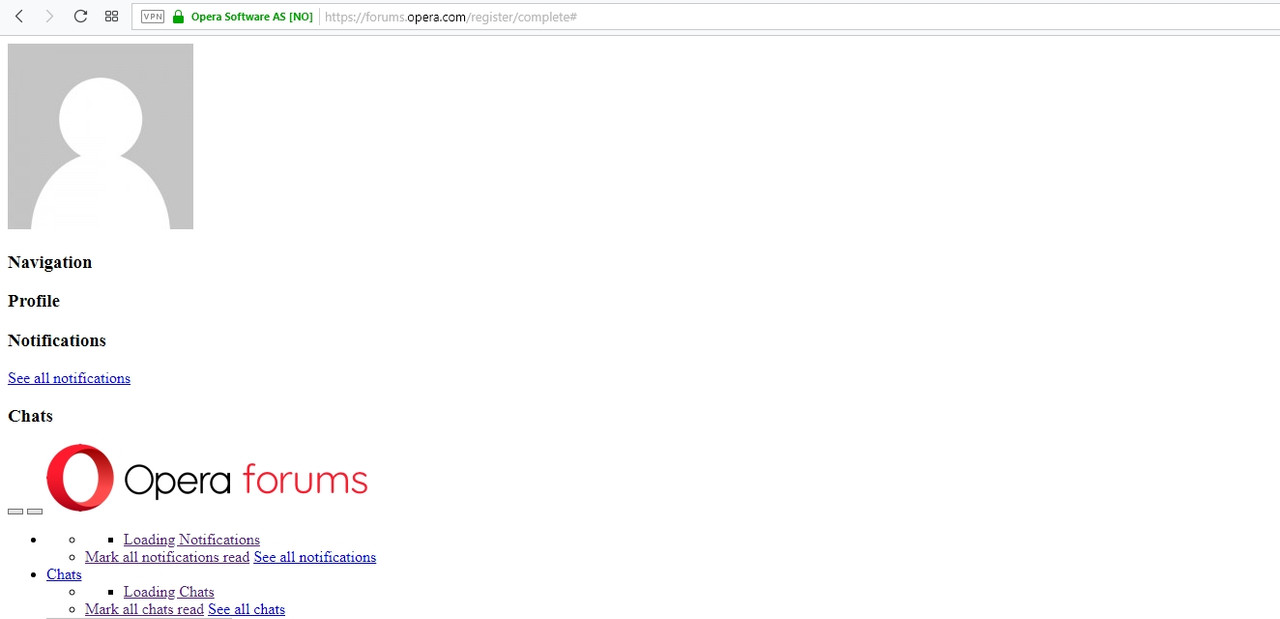
<p dir="auto">for like a month I keep getting an error which makes Websites appear broken. If i reload the page, it's fine, but if I reload again it's broken again. It does happen with almost any site.</p>
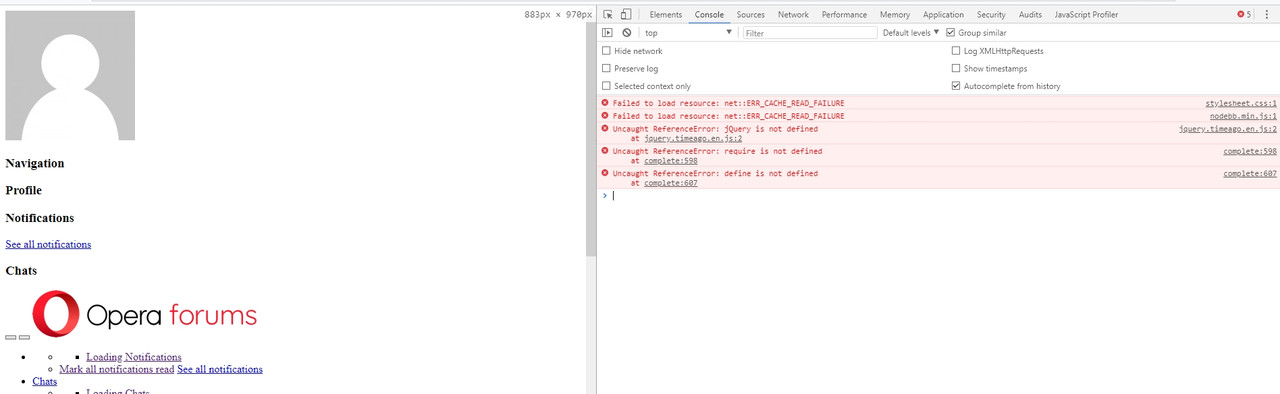
<p dir="auto">I checked the console and it does say: "Failed to load resource: net::ERR_CACHE_READ_FAILURE".</p>
<p dir="auto">The browser is up to date. I'm using Windows 10.</p>
<p dir="auto">For example it even happened when I logged in here:<br />
<img src="https://s33.postimg.cc/w2gb7yba7/Screenshot_1.jpg" alt="alt text" class=" img-responsive img-markdown" /><br />
<img src="https://s33.postimg.cc/6jnyuxzfz/Screenshot_2.jpg" alt="alt text" class=" img-responsive img-markdown" /></p>
<p dir="auto">Does anyone have an idea how I could fix this?</p>
]]></description><link>https://forums.opera.com/topic/26996/failed-to-load-resource-net-err_cache_read_failure</link><guid isPermaLink="true">https://forums.opera.com/topic/26996/failed-to-load-resource-net-err_cache_read_failure</guid><dc:creator><![CDATA[[[global:former_user]]]]></dc:creator><pubDate>Invalid Date</pubDate></item><item><title><![CDATA[Retrieving images from cache?]]></title><description><![CDATA[<p dir="auto">If you root the phone or maybe with ADB Drivers, access the history and extract the images should be possible.</p>
<p dir="auto">Take a look on XDA-Developers or Google.</p>
<p dir="auto">--</p>
<p dir="auto">From Opera itself I don't know if there is an option.</p>

<p dir="auto">Windows 10 (x64) | Anniversary Update<br />
Opera Stable · Beta · Developer</p>
<p dir="auto"><a href="https://www.dropbox.com/sh/smofyf04hpl7xo0/AAD_iH8fe_3g7dnNSd0SH05aa?dl=0" target="_blank" rel="noopener noreferrer nofollow ugc">Test profile</a> | Back up <a href="http://help.opera.com/opera/Linux/2393/en/solutions.html" target="_blank" rel="noopener noreferrer nofollow ugc">Linux</a> · <a href="http://help.opera.com/opera/Mac/2393/en/solutions.html" target="_blank" rel="noopener noreferrer nofollow ugc">Mac</a> ·  <a href="http://help.opera.com/opera/Windows/2393/en/solutions.html" target="_blank" rel="noopener noreferrer nofollow ugc">Win</a></p>
]]></description><link>https://forums.opera.com/topic/23533/retrieving-images-from-cache</link><guid isPermaLink="true">https://forums.opera.com/topic/23533/retrieving-images-from-cache</guid><dc:creator><![CDATA[zalex108]]></dc:creator><pubDate>Invalid Date</pubDate></item><item><title><![CDATA[Opera 48 Browser Cache Adjustment]]></title><description><![CDATA[<p dir="auto">There was a chromium switch back in the days like --disk-cache-size="x bytes" it's what he means I suppose. Don't know if it still exists though or if chromium based browsers do have any limitation on the size.</p>
]]></description><link>https://forums.opera.com/topic/22932/opera-48-browser-cache-adjustment</link><guid isPermaLink="true">https://forums.opera.com/topic/22932/opera-48-browser-cache-adjustment</guid><dc:creator><![CDATA[[[global:former_user]]]]></dc:creator><pubDate>Invalid Date</pubDate></item></channel></rss>