<br />
<b>Deprecated</b>:  The each() function is deprecated. This message will be suppressed on further calls in <b>/home/zhenxiangba/zhenxiangba.com/public_html/phproxy-improved-master/index.php</b> on line <b>456</b><br />
<?xml version="1.0" encoding="UTF-8"?><rss xmlns:dc="http://purl.org/dc/elements/1.1/" xmlns:content="http://purl.org/rss/1.0/modules/content/" xmlns:atom="http://www.w3.org/2005/Atom" version="2.0"><channel><title><![CDATA[Topics tagged with login]]></title><description><![CDATA[A list of topics that have been tagged with login]]></description><link>https://forums.opera.com/tags/login</link><generator>RSS for Node</generator><lastBuildDate>Sat, 06 Jun 2026 10:06:54 GMT</lastBuildDate><atom:link href="https://forums.opera.com/tags/login.rss" rel="self" type="application/rss+xml"/><pubDate>Invalid Date</pubDate><ttl>60</ttl><item><title><![CDATA[[Request] Password Sync]]></title><description><![CDATA[<p dir="auto">I am requesting a password sync feature between Opera GX desktop and Opera GX mobile (iOS for me but Android too)</p>
<p dir="auto">Opera GX desktop has a password suggestion security feature which give you a random string of characters and symbols when you're registering a password for a website and then saves and encrypts that password within the browser. This is a great feature for password security because you can avoid using the same password for everything without having to manage a massive spreadsheet of passwords.</p>
<p dir="auto">However, having no option to view your passwords on mobile render's 90% of this feature's benefits redundant, or worse detrimental. Without a Password Sync feature, you either need to</p>
<p dir="auto">A.) manage a spreadsheet you can access on the go if you want to be able to sign into any accounts that use a suggested password when you're not at your main desktop<br />
B.) download and install Opera GX(if you happen to be at another desktop,) sign in and sync ALL your passwords, sign in and use whichever account you need, and then sign out and uninstall the browser<br />
C.) reset the password to the account you want to use, and either leave it memorable(less secure) or reset it again when you're back to your main desktop(just why?)</p>
<p dir="auto">There are requests for this feature dating back years, and it's pretty much essential if you're going to reasonably utilize the password suggestions feature and expect to log into anything anywhere but home with any browser but Opera GX without downloading Opera GX on a desktop, logging in, and syncing your ALL your passwords.</p>
<p dir="auto">Use cases:<br />
Signing into a streaming service on someone else's TV<br />
Signing into ANYTHING on someone else's desktop running Chrome, Edge, Firefox, etc.<br />
Signing into <strong>ANYTHING on Opera GX</strong> for iOS<br />
Responding on <em><strong>THIS</strong></em> forum anywhere but your own desktop</p>
]]></description><link>https://forums.opera.com/topic/85965/request-password-sync</link><guid isPermaLink="true">https://forums.opera.com/topic/85965/request-password-sync</guid><dc:creator><![CDATA[JaykoBlanco]]></dc:creator><pubDate>Invalid Date</pubDate></item><item><title><![CDATA[Cannot Log into main Opera GX Account]]></title><description><![CDATA[<p dir="auto">Today, I have finally gotten my new PC back after getting new parts installed and doing a full fresh reinstallation of windows, etc.<br />
I installed OperaGx and tried to log in with my original account that I have used for a couple years now and every single time I try to log in, it gives me this error "An error occurred. Please try again."<br />
I get this error no matter how many times I've tried to log in, and properly do the extremely annoying captcha images. I've tried running the browser as Admin as well, and no matter what, I cannot make it past just the very start where it asks for my email to log in. I don't even get to the password part. Can someone please help me? I have hundreds of websites saved and important tabs on my original account.</p>
<p dir="auto"><img src="/assets/uploads/files/1752097730423-f02fc230-5e26-4ef2-b4cd-f19a66dc269b-image-resized.png" alt="f02fc230-5e26-4ef2-b4cd-f19a66dc269b-image.png" class=" img-responsive img-markdown" /> <img src="/assets/uploads/files/1752097700225-015364e1-ba36-47f4-bcd4-c2e6360e6877-image.png" alt="015364e1-ba36-47f4-bcd4-c2e6360e6877-image.png" class=" img-responsive img-markdown" /></p>
]]></description><link>https://forums.opera.com/topic/85544/cannot-log-into-main-opera-gx-account</link><guid isPermaLink="true">https://forums.opera.com/topic/85544/cannot-log-into-main-opera-gx-account</guid><dc:creator><![CDATA[JamesLoginHelp]]></dc:creator><pubDate>Invalid Date</pubDate></item><item><title><![CDATA[Flow is buggy and often won&#x27;t log in]]></title><description><![CDATA[<p dir="auto"><a class="plugin-mentions-user plugin-mentions-a" href="https://forums.opera.com/uid/867863">@TaylorFred</a> Opera One or Opera GX?</p>
]]></description><link>https://forums.opera.com/topic/74509/flow-is-buggy-and-often-won-t-log-in</link><guid isPermaLink="true">https://forums.opera.com/topic/74509/flow-is-buggy-and-often-won-t-log-in</guid><dc:creator><![CDATA[leocg]]></dc:creator><pubDate>Invalid Date</pubDate></item><item><title><![CDATA[Sidebar extensions sing out every time I close Opera]]></title><description><![CDATA[<p dir="auto"><a class="plugin-mentions-user plugin-mentions-a" href="https://forums.opera.com/uid/73">@leocg</a> I'm sorry for that mistake. Right now I'm not at home. I'll answer that in a couple hours!</p>
]]></description><link>https://forums.opera.com/topic/73367/sidebar-extensions-sing-out-every-time-i-close-opera</link><guid isPermaLink="true">https://forums.opera.com/topic/73367/sidebar-extensions-sing-out-every-time-i-close-opera</guid><dc:creator><![CDATA[Mat80]]></dc:creator><pubDate>Invalid Date</pubDate></item><item><title><![CDATA[Unable to log in with Google account]]></title><description><![CDATA[<p dir="auto"><a class="plugin-mentions-user plugin-mentions-a" href="https://forums.opera.com/uid/749826">@el-pollo-loco</a> If you want to access your data in your Google account, you need to go to Google page and login with your Google account.</p>
]]></description><link>https://forums.opera.com/topic/70639/unable-to-log-in-with-google-account</link><guid isPermaLink="true">https://forums.opera.com/topic/70639/unable-to-log-in-with-google-account</guid><dc:creator><![CDATA[leocg]]></dc:creator><pubDate>Invalid Date</pubDate></item><item><title><![CDATA[[Compilation] Can&#x27;t login on Twitch, got a browser not supported message]]></title><description><![CDATA[<p dir="auto">It's happening still it seems. I've lost all connectivity with Twitch. I'm going to have to use another browser because I've tried all the fixes listed here and none of them have worked for me. It's annoying but for now I'm going to have to switch my main browser for Twitch.</p>
]]></description><link>https://forums.opera.com/topic/66523/compilation-can-t-login-on-twitch-got-a-browser-not-supported-message</link><guid isPermaLink="true">https://forums.opera.com/topic/66523/compilation-can-t-login-on-twitch-got-a-browser-not-supported-message</guid><dc:creator><![CDATA[Glarvole]]></dc:creator><pubDate>Invalid Date</pubDate></item><item><title><![CDATA[Flow - cannot login, doesn&#x27;t connect?]]></title><description><![CDATA[<p dir="auto"><a class="plugin-mentions-user plugin-mentions-a" href="https://forums.opera.com/uid/711048">@estanis</a> you cannot set it to be the default, though. Ie. it won't be used when you type in "whatever" on the URL bar, unless you prefix it with the shortcut set there (like "b" for "Bing" or "z" for "Amazon").</p>
<p dir="auto">See the linked forum post for my details.</p>
<p dir="auto">And as Opera isn't customizable enough (in that area), I basically dumped it and switched to Vivaldi. Opera is (for default search) in the same boat as Safari… 😕</p>
]]></description><link>https://forums.opera.com/topic/65550/flow-cannot-login-doesn-t-connect</link><guid isPermaLink="true">https://forums.opera.com/topic/65550/flow-cannot-login-doesn-t-connect</guid><dc:creator><![CDATA[alexs77]]></dc:creator><pubDate>Invalid Date</pubDate></item><item><title><![CDATA[【Feature request】I hope to become to use Aria and Flow by once login.]]></title><description><![CDATA[<p dir="auto">I downloaded Opera for iOS for the first time in a while. This is because I can use the generative AI "Aria" on Opera for iOS.</p>
<p dir="auto">To use Aria, I need to login to my Opera account. So, I loged in it. Aria is nice!</p>
<p dir="auto">But I notice one thing. I was able to login to my Opera account, but "My Flow" feature was not working. The reason is that I need to login by QR code to use My Flow.</p>
<p dir="auto">QR code login is great! Because users don't have to enter a password. It is very easy and safty.</p>
<p dir="auto">But logging in twice is a hassle. I think these should be unified if possible. I would like to be able to use both of these features if I log in with either of them.</p>
]]></description><link>https://forums.opera.com/topic/65404/feature-request-i-hope-to-become-to-use-aria-and-flow-by-once-login</link><guid isPermaLink="true">https://forums.opera.com/topic/65404/feature-request-i-hope-to-become-to-use-aria-and-flow-by-once-login</guid><dc:creator><![CDATA[kyu3]]></dc:creator><pubDate>Invalid Date</pubDate></item><item><title><![CDATA[Fehler bei Anmeldung | Registration error]]></title><description><![CDATA[<p dir="auto"><a class="plugin-mentions-user plugin-mentions-a" href="https://forums.opera.com/uid/1004949">@richartzloosli</a> said in <a href="/post/392040">Fehler bei Anmeldung | Registration error</a>:</p>
<blockquote>
<p dir="auto">Das Opera Forum ist schwer zugänglich auf Windows 11 Home</p>
</blockquote>
<p dir="auto">Das kann schon sein, nach drei Jahren; vielleicht hat er/sie/es keinen PC mehr, oder der Strom wurde abgestellt 😉<br />
Funktioniert hier bestens, auf Windows 10, Windows 11 (Pro und Home) und auch auf Linux ... ..</p>
]]></description><link>https://forums.opera.com/topic/59986/fehler-bei-anmeldung-registration-error</link><guid isPermaLink="true">https://forums.opera.com/topic/59986/fehler-bei-anmeldung-registration-error</guid><dc:creator><![CDATA[[[global:former_user]]]]></dc:creator><pubDate>Invalid Date</pubDate></item><item><title><![CDATA[[Duplicated]Can&#x27;t login on opera account]]></title><description><![CDATA[<p dir="auto">hello,<br />
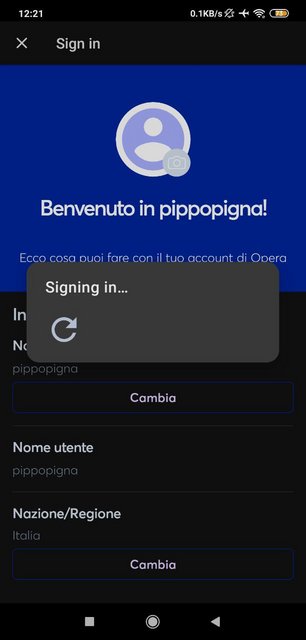
when i try to login on my opera account from opera browser it says always "Signing in..." but nothing happens:<br />
<img src="https://i.postimg.cc/tChfW89M/photo-2022-11-11-12-22-04.jpg" alt="alt text" class=" img-responsive img-markdown" width="306" height="640" /></p>
<p dir="auto">I use last opera version (72.2.3767.68393) on Redmi 9.<br />
On Opera beta login works.</p>
]]></description><link>https://forums.opera.com/topic/58699/duplicated-can-t-login-on-opera-account</link><guid isPermaLink="true">https://forums.opera.com/topic/58699/duplicated-can-t-login-on-opera-account</guid><dc:creator><![CDATA[pippopigna]]></dc:creator><pubDate>Invalid Date</pubDate></item><item><title><![CDATA[Logon stuck for target.com]]></title><description><![CDATA[<p dir="auto">I looked at the settings again and noticed the tracker blocking. I turned it off and <a href="http://target.com" target="_blank" rel="noopener noreferrer nofollow ugc">target.com</a> started to work. I logged in and then reactivated tracker blocking and it seems like it's still working. I don't understand the intricacies enough to speculate beyond thinking the website is refusing to respond when some data is blocked. Regardless, this detail might be useful for someone else.</p>
]]></description><link>https://forums.opera.com/topic/57754/logon-stuck-for-target-com</link><guid isPermaLink="true">https://forums.opera.com/topic/57754/logon-stuck-for-target-com</guid><dc:creator><![CDATA[wendelloni]]></dc:creator><pubDate>Invalid Date</pubDate></item><item><title><![CDATA[Aol login loop]]></title><description><![CDATA[<p dir="auto"><a class="plugin-mentions-user plugin-mentions-a" href="https://forums.opera.com/uid/371377">@frank</a> follow up: enabling VPN solved this problem, so<br />
development team if you could figure this out i would prefer to not have to enable vpn service, respectfully<br />
frank</p>
]]></description><link>https://forums.opera.com/topic/50816/aol-login-loop</link><guid isPermaLink="true">https://forums.opera.com/topic/50816/aol-login-loop</guid><dc:creator><![CDATA[frankmaltese]]></dc:creator><pubDate>Invalid Date</pubDate></item><item><title><![CDATA[The I can&#x27;t login&#x2F;lost my Opera account password&#x2F;Access to 2FA codes Topic]]></title><description><![CDATA[<p dir="auto"><a class="plugin-mentions-user plugin-mentions-a" href="https://forums.opera.com/uid/348319">@ak1rou</a> You can't</p>
]]></description><link>https://forums.opera.com/topic/50068/the-i-can-t-login-lost-my-opera-account-password-access-to-2fa-codes-topic</link><guid isPermaLink="true">https://forums.opera.com/topic/50068/the-i-can-t-login-lost-my-opera-account-password-access-to-2fa-codes-topic</guid><dc:creator><![CDATA[leocg]]></dc:creator><pubDate>Invalid Date</pubDate></item><item><title><![CDATA[Accessing Facebook webpage itself gives error. Works in MS Edge]]></title><description><![CDATA[<p dir="auto">From last week I am getting this error for Facebook landing/login page.</p>
<p dir="auto">Steps I did :<br />
Updated Opera<br />
Cleared all cookies, history, cache</p>
<p dir="auto">Workaround: Works well in other browsers. Also on android devices.<br />
<img src="/assets/uploads/files/1608186726541-image_2020-12-17_120204.png" alt="image_2020-12-17_120204.png" class=" img-responsive img-markdown" /></p>
]]></description><link>https://forums.opera.com/topic/45888/accessing-facebook-webpage-itself-gives-error-works-in-ms-edge</link><guid isPermaLink="true">https://forums.opera.com/topic/45888/accessing-facebook-webpage-itself-gives-error-works-in-ms-edge</guid><dc:creator><![CDATA[wideputin]]></dc:creator><pubDate>Invalid Date</pubDate></item><item><title><![CDATA[[Solved]can not login &gt; passphrase needed &gt; temporary server error, retry later]]></title><description><![CDATA[<p dir="auto">@riemie2 said in <a href="/post/218390">can not login &gt; passphrase needed &gt; temporary server error, retry later</a>:</p>
<blockquote>
<p dir="auto"><a href="https://www.sync.opera.com" target="_blank" rel="noopener noreferrer nofollow ugc">https://www.sync.opera.com</a> offers me:<br />
"Do not remember your key synchronization password (passphrase)? Reset Passphrase."</p>
</blockquote>
<p dir="auto">this helps! was a little afraid. all online-data where deleted, but logout in android and new login works fine.</p>
<p dir="auto">so i can reinstall opera to solve my google login-problem...</p>
<p dir="auto">thank you</p>
]]></description><link>https://forums.opera.com/topic/42257/solved-can-not-login-passphrase-needed-temporary-server-error-retry-later</link><guid isPermaLink="true">https://forums.opera.com/topic/42257/solved-can-not-login-passphrase-needed-temporary-server-error-retry-later</guid><dc:creator><![CDATA[[[global:former_user]]]]></dc:creator><pubDate>Invalid Date</pubDate></item><item><title><![CDATA[Opera can&#x27;t handle Bank of America logins]]></title><description><![CDATA[<p dir="auto"><a class="plugin-mentions-user plugin-mentions-a" href="https://forums.opera.com/uid/73">@leocg</a>: I just disabled all extensions. O worked fine with B of A. I then enabled a few extensions at a time and O worked find. I then enabled all extensions and O worked fine. Strange. Maybe just toggling the extensions fixed the issue!?</p>
<p dir="auto">Thanks for the suggestion.</p>
]]></description><link>https://forums.opera.com/topic/41506/opera-can-t-handle-bank-of-america-logins</link><guid isPermaLink="true">https://forums.opera.com/topic/41506/opera-can-t-handle-bank-of-america-logins</guid><dc:creator><![CDATA[[[global:former_user]]]]></dc:creator><pubDate>Invalid Date</pubDate></item></channel></rss>